

Picture this: a hiring manager has forty resumes open across forty browser tabs, a lukewarm cup of coffee within reach, and roughly seven seconds of patience for each document before deciding whether to keep reading or move on to the next one.
That is the reality most job applications face today. In that tiny window of attention, what is the one thing that can actually make someone pause? Very often, it is not your full work history or your neatly bulleted list of skills — it is the very first line sitting beneath your name: your resume headline.
Key Takeaways
- A resume headline is a single, sharp line beneath your name that spotlights your strongest skills and experience.
- Keep it tight — roughly 8 to 12 words, or 60 to 120 characters — and write it in Title Case so it reads like a heading, not a sentence.
- A strong headline does double duty: it hooks a human reader in seconds and helps you rank higher in ATS keyword searches.
- Always mirror the language used in the job description, and rewrite your headline for every single role you apply to.
- Skip the fluff. Words like “hardworking” and “team player” say nothing on their own — real numbers and specific, concrete skills say everything.
Think of a resume headline as your personal marquee — the lit-up sign above a theatre door that tells everyone walking past exactly what show they are about to see.
It is a short, punchy, one-line statement placed right below your name and contact details, and its entire job is to answer one silent question in the recruiter’s mind almost instantly: “Why should I keep reading this person’s resume?”
If you have ever had to describe your career in a single breath at a networking event, you already understand the spirit of a resume headline — it is simply your elevator pitch, written down.
A software engineer might introduce themselves with something like “Software Engineer with 5+ Years Building Scalable Web Applications,” while a teacher might open with “Certified Math Teacher | 8+ Years of Curriculum Development.” Neither of these lines tries to tell your whole story. They simply open the door and invite the reader to step inside.
Get this one line right, and you will have already done half the work of getting the rest of your resume actually read.
If you are just beginning your career, learning how to write a strong summary for resume for freshers can help you introduce your strengths even when you have limited professional experience.
WHAT IS A RESUME HEADLINE?
Let’s slow down for a moment and define this properly, because the term gets thrown around loosely.
A resume headline — sometimes also called a resume title, though as we’ll see in a moment those are not quite the same thing — is that single, attention-grabbing line sitting at the very top of your resume, directly under your name.
Its job is almost identical to a newspaper headline: in just a handful of words, it has to tell the reader what the story is about, and convince them it is worth their time to keep reading.
The easiest way to understand what a headline is, is to understand what it is not. It is not your resume summary — that slightly longer paragraph a few lines further down that fills in the details of your background and career narrative.
And it is not a resume title either, which functions more like a label or a filename. The headline sits in its own category entirely: shorter and punchier than a summary, but far more descriptive than a title.
A well-built headline typically packs in three ingredients: your job title, how many years of experience you bring to the table, and one standout skill or achievement that makes you memorable. “Project Manager with 8+ Years Leading Tech Teams” is a good example — in just seven words, the reader instantly knows your role, your seniority, and the kind of teams you are used to running. That is really the whole point of a headline. It does not just inform; it creates a small spark of curiosity that pulls the reader further down the page.
Headline vs. Title vs. Summary
These three terms get mixed up all the time, and honestly, that is understandable — they all live near the top of a resume, and they all describe you in some way.
But each one is doing a very different job, and using all three well, together, is what makes the top third of your resume actually work as a unit. Here is the difference laid out side by side:
| Aspect | Resume Headline | Resume Title | Resume Summary |
|---|---|---|---|
| What it is | A punchy one-line hook: role + experience + top skill | A basic job label, much like a filename | A short, 3–4 sentence paragraph providing professional context |
| Length | One line, typically 8–12 words (60–120 characters) | Just a few words | Several full sentences |
| Purpose | Grabs attention instantly and can strengthen keyword alignment for ATS | Labels the resume for easy identification or reference | Adds context and depth to your experience, skills, and career value |
| Example | Project Manager with 8+ Years Leading Tech Teams | Project Manager Resume | Results-driven project manager with 8+ years of experience leading cross-functional technology teams. Skilled in Agile project delivery, stakeholder management, and process improvement. Proven ability to deliver complex projects on time while improving team efficiency. |
The smartest approach is to use all three strategically, each playing to its strength: the headline grabs attention in the first half-second, the summary elaborates once you have earned a few more seconds of the reader’s time, and the title quietly tags the application in the background.
Put together, this structure makes sure that both a busy human recruiter and an automated ATS can immediately spot your top qualifications.
Professionals moving into a new industry can also strengthen the opening section of their application by reviewing examples of a resume summary for career change that emphasizes transferable skills and relevant achievements.
Why Include a Resume Headline?
Including a resume headline is one of the simplest, highest-leverage things you can do to make your application stand out.
Because recruiters so often skim resumes in a matter of seconds, a crisp, well-written headline makes your best assets jump off the page immediately, rather than getting buried in paragraph three of your work history.
It signals your professional identity and your value proposition before the reader has consciously decided to keep reading.
There is also a very practical, behind-the-scenes benefit: headlines quietly boost your performance with Applicant Tracking Systems.
They let you place your highest-priority keywords — like the exact job title from the posting — right there in the very first line of the document, which is prime real estate as far as most ATS algorithms are concerned. An optimized headline can meaningfully improve your resume’s overall match score before a human ever lays eyes on it.
Put simply, a great headline does three things at once: it establishes credibility, it puts your strengths front and centre, and it nudges the reader to keep going. It functions a bit like a movie trailer for the rest of your resume — just exciting enough that the audience wants to see the full feature.
Your headline should work alongside the rest of your application, especially your resume skills section, where you can highlight the technical and interpersonal abilities most relevant to the target role.
Anatomy of a Great Resume Headline
Once you strip away the guesswork, a strong headline almost always follows a simple, repeatable formula: Job Title + Years of Experience + Core Skill or Achievement.
Consider an example like “Content Writer | SEO | Grew Organic Traffic 150% in 12 Months.” In one line, that headline manages to tell a hiring manager exactly who you are, how capable you are, and what kind of results you produce. Let’s break each ingredient down individually.
Job Title (or Target Role)
Use the exact title you are applying for, or a very close synonym if the exact title genuinely does not apply to you. This matters more than people expect — ATS platforms like Taleo or iCIMS often treat “Project Manager” and “PM” as two entirely different things, so it pays to mirror the wording used in the job posting itself rather than relying on a title you personally prefer.
Years / Level
Mention your experience level clearly, something like “5+ Years.” This single detail signals seniority immediately and, conveniently, also helps you land inside the recommended 60–120 character range without much extra effort.
Top Skill or Achievement
Include one standout skill, certification, or measurable result — think “AWS Certified” or “$1M Sales Growth.” This is the piece of the formula where you should replace vague, overused buzzwords with hard evidence. Instead of writing “Results-Driven Salesperson,” for instance, try “Salesperson With 120% Quota Achievement.” Numbers and specifics are simply more persuasive than adjectives — they cannot be faked, and every recruiter knows it.
Formatting Tips
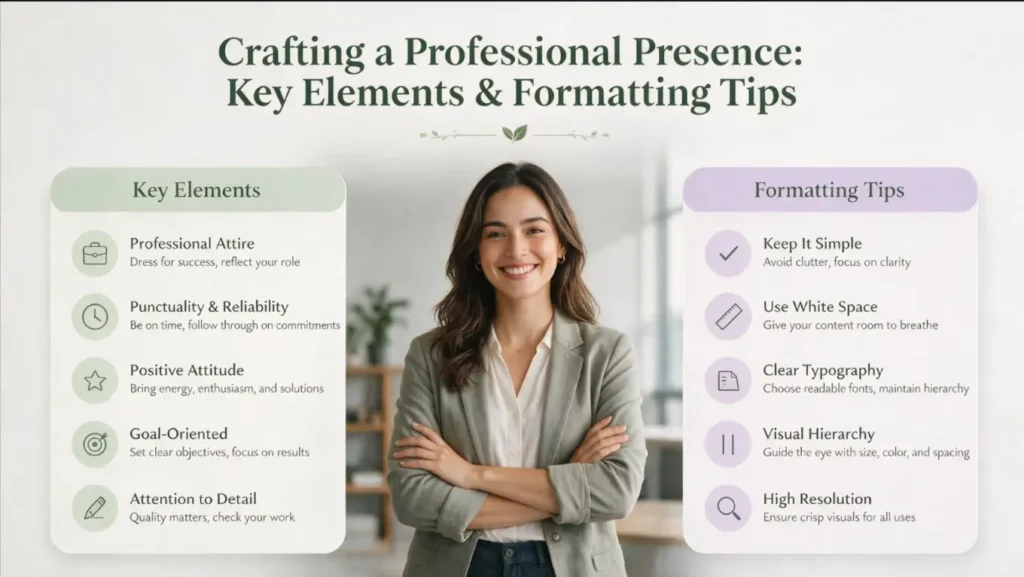
- Punctuation: Use a vertical bar (|) or a semicolon to separate the elements of your headline, rather than writing it as a run-on sentence. Pipes visually break up the information at a glance — for example, “Front-End Developer | React & TypeScript.”
- Capitalization: Write your headline in Title Case, capitalizing the main words, so that it visually signals “this is a heading” rather than just another line of text. Title Case reads as polished and intentional; sentence case only really works if your personal brand is deliberately casual.
- Length: Keep the whole thing to one line — somewhere around 60–120 characters, or roughly 8–12 words. Longer headlines risk wrapping onto a second line, which instantly undercuts their visual impact.
- Clarity: Use clear, specific language, and avoid jargon or acronyms an ATS might not recognize. If you do need to use an acronym, such as “MBA,” spell it out or define it the first time it appears.
Here is a full example broken down: “Senior Marketing Manager | 8+ Years | SEO, Paid Media & Content Strategy.” Notice how this single headline uses pipes to separate its parts, sticks to Title Case throughout, and manages to include the role, the years of experience, and the key skills — all without ever feeling cluttered.
Presentation matters as much as wording, so choose one of the best fonts for resume to keep your headline and other sections professional, readable, and visually consistent.
ATS and Resume Headlines
Your headline plays a genuinely strategic role when it comes to Applicant Tracking Systems.
Most modern ATS platforms rank resumes largely through keyword matching — in fact, keyword match is often the single dominant factor across major systems.
In practical terms, that means using the exact job title and key terms straight from the job description in your headline can noticeably boost where you land in the rankings.
Inserting the target title — even just once, in a summary or headline — is one of the most heavily weighted signals on many ATS platforms.
For example, on systems like iCIMS or Workday, a candidate whose current title matches the posting word-for-word can rank meaningfully higher than an equally qualified candidate whose title only roughly matches.
Keyword Tips
Mirror the employer’s own language as precisely as you can. If a posting says “Data Analyst,” use that exact phrase rather than substituting something like “Program Analyst,” even if the roles are practically identical in your mind. Systems like Taleo or iCIMS often fail to recognize synonyms, no matter how obvious the connection seems to a human reader.
On platforms built around semantic matching, such as Greenhouse or Lever, more natural phrasing tends to work just fine — but using the exact phrase never hurts, so it is the safer default either way.
It is also worth knowing that ATS platforms frequently consider keyword frequency, not just presence. Mentioning an important term two or three times — once in the headline, and again later in your bullet points — can genuinely improve your ranking.
That said, there is a clear ceiling here: avoid keyword stuffing. Two or three natural, well-placed mentions is plenty; beyond that, you start to sound robotic rather than qualified.
Finally, remember that parsing accuracy matters just as much as keyword choice. Simple formatting — no tables, columns, or images anywhere near your headline itself — combined with standard section headers, ensures the ATS actually reads your information correctly instead of garbling it.
Always keep your name and headline in the main body of the document, never inside a header or footer, since many parsers skip those areas entirely. Put your headline on its own line directly below your name; this tells both the ATS and any human reader exactly where to look first.
Once your headline is ready, following a clear resume outline can help you organize your summary, experience, skills, education, and additional qualifications in a logical order.
Formatting and Placement
How you style your headline has a real effect on readability, both for a human skimming quickly and for a machine parsing methodically.
Stick to a clean, ATS-friendly format: a single-column layout, standard fonts, nothing fancy.
Avoid decorative elements like tables, icons, or graphics anywhere near your headline — ATS software very often skips over this kind of content entirely, which means any keywords hidden inside it simply vanish from the system’s view. Use simple bullet points below the headline instead to fill in supporting detail.
Placement
Put your headline immediately beneath your name and contact information, right at the very top of the resume. This is genuinely prime real estate — the first thing anyone, human or algorithm, will see.
Make sure your name, your headline, and your location or title are clearly separated by line breaks or punctuation so that everything is read correctly and in the right order. For example:
| John Doe Dynamic Marketing Manager with 7+ Years Driving Growth (123) 456-7890 | johndoe@email.com |
Keep the overall look high-contrast — dark text on a plain white background — and feel free to bold the headline slightly if you like, but do so sparingly.
The goal is clarity above all else: your headline needs to stand out visually without ever confusing the ATS about what it is looking at. Title Case, paired with an optionally slightly larger or bold font, is usually enough on its own to signal “this is a header,” not just another bullet point lost in the crowd.
The amount of information you include also depends on your professional background, so experienced candidates should understand when a 2 page resume is appropriate instead of forcing extensive experience onto a single page.
Resume Headline Examples by Profession
Theory is useful, but nothing beats seeing the formula in action across a wide range of real careers. Headlines should always be tailored to the specific job and industry you are targeting — what works beautifully for a software developer will look out of place on a nurse’s resume, and vice versa.
Below you will find sample headlines spanning twenty-six different fields and experience levels, each one illustrating the same underlying structure: Job Title + Experience + Skill or Achievement.
| Industry / Level | Sample Headline |
|---|---|
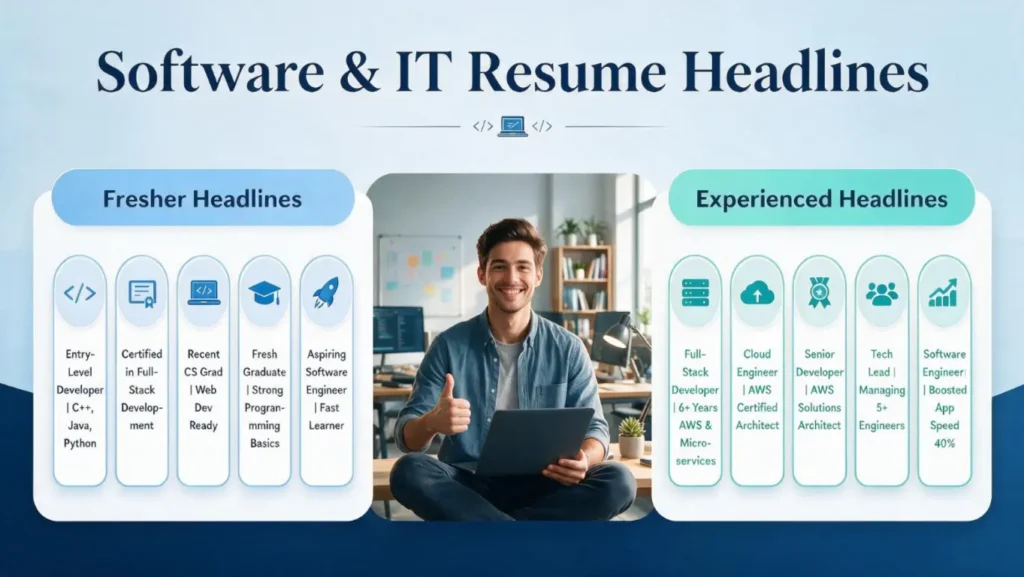
| Software / IT (Fresher) | Entry-Level Software Developer | Skilled in C++, Java, and Python |
| Software / IT (Experienced) | Full-Stack Developer | 6+ Years in AWS & Microservices |
| Marketing | Digital Marketing Manager with 8+ Years Driving Lead Generation for B2B SaaS |
| Sales | Sales Executive | 5 Years | 120% Quota Achievement Each Year |
| Healthcare / Nursing | Registered Nurse | 10+ Years ICU & Patient Education |
| Education / Teaching | Certified Math Teacher | 8+ Years of Curriculum Development & Student Success |
| Finance / Accounting | Financial Analyst with 6 Years of Budgeting and Forecasting |
| Engineering | Civil Engineer | PE Certified | 10+ Years Infrastructure Projects |
| Creative / Design | Graphic Designer | 5+ Years Adobe Suite & Brand Strategy |
| Administrative | Executive Assistant with 10+ Years Supporting C-Level Leadership |
| Operations / Logistics | Logistics Coordinator | Streamlined Shipments 20% Faster |
| Customer Service | Customer Support Specialist | 95%+ Issue Resolution Rate |
| Hospitality | Hotel Manager | Oversaw 200+ Room Boutique Hotel |
| Blue-Collar / Skilled Trades | Forklift Operator & Inventory Specialist with 7 Years in Warehouse Management |
| Human Resources | HR Manager | 7+ Years Talent Acquisition & Employee Engagement |
| Legal | Corporate Attorney | 6+ Years Contract Negotiation & Compliance |
| Retail | Retail Store Manager | 5+ Years Driving 20% Sales Growth |
| Data Science / Analytics | Data Scientist | Python & Machine Learning | Improved Model Accuracy 30% |
| Product Management | Product Manager | 5+ Years Launching B2B SaaS Products |
| Consulting | Management Consultant | 4+ Years Driving Cost Savings for Fortune 500 Clients |
| Real Estate | Real Estate Agent | 8+ Years | $15M in Closed Sales |
| Media / Journalism | Content Journalist | 5+ Years Investigative Reporting & SEO Writing |
| Non-Profit / NGO | Program Director | 6+ Years Scaling Community Outreach Programs |
| Government / Public Sector | Policy Analyst | 5+ Years Public Sector Program Evaluation |
| Manufacturing | Production Supervisor | 8+ Years Lean Manufacturing & Quality Control |
| Construction | Construction Project Manager | 12+ Years | $20M Commercial Buildings |
Every single example above highlights the role, an experience metric, and one key skill or result — that consistency is not an accident.
Feel free to adjust these templates to fit your own background; the possibilities are genuinely endless, but the underlying structure should stay the same no matter your field. Lean on bold, active words — developer, managed, delivered, launched — and quantifiable results wherever you possibly can.
Along with a compelling headline, your resume education section should clearly present relevant degrees, institutions, graduation details, and qualifications that support your candidacy.
Advanced Tips & Best Practices
- Use a Clear Formula: Many strong headlines follow the pattern Job Title + Years + Top Skill/Result — for example, “Accountant | CPA Track | Month-End Close in Under 3 Days.” Even if you are a fresher with no professional experience yet, you can still use this formula: swap in “Recent Grad” or “Entry-Level” and pair it with one or two of your strongest skills.
- Title Case & Punctuation: Always capitalize the major words in your headline so it visually mimics a title. Separate the different phrases with a pipe or a dash instead of commas — it reads far more cleanly and avoids any ambiguity about where one idea ends and the next begins.
- Include Keywords: Scan every job posting for the important terms it uses — specific software, certifications, tools — and work them into your headline wherever they genuinely apply. This single habit does more to align your resume with ATS criteria than almost anything else you could do.
- Customize Each Application: Rewrite your headline for each individual job application. If a posting places heavy emphasis on a particular skill — SEO, Python, client relations, whatever it may be — feature that skill front and centre in your headline. It is a small tweak, but it can meaningfully improve both your ATS ranking and how relevant you appear to a human reader.
- Placement Check: Never place two headline-style lines back to back. Your headline is meant to stand alone, immediately followed by your summary or a skills section — always have normal paragraph or bullet content following it, so the headline has room to do its job before the reader moves on.
Recruiters will also look closely at your professional history, so learn how to mention experience in resume sections using clear responsibilities, measurable accomplishments, and relevant keywords.
Do’s and Don’ts
| Do | Don’t |
|---|---|
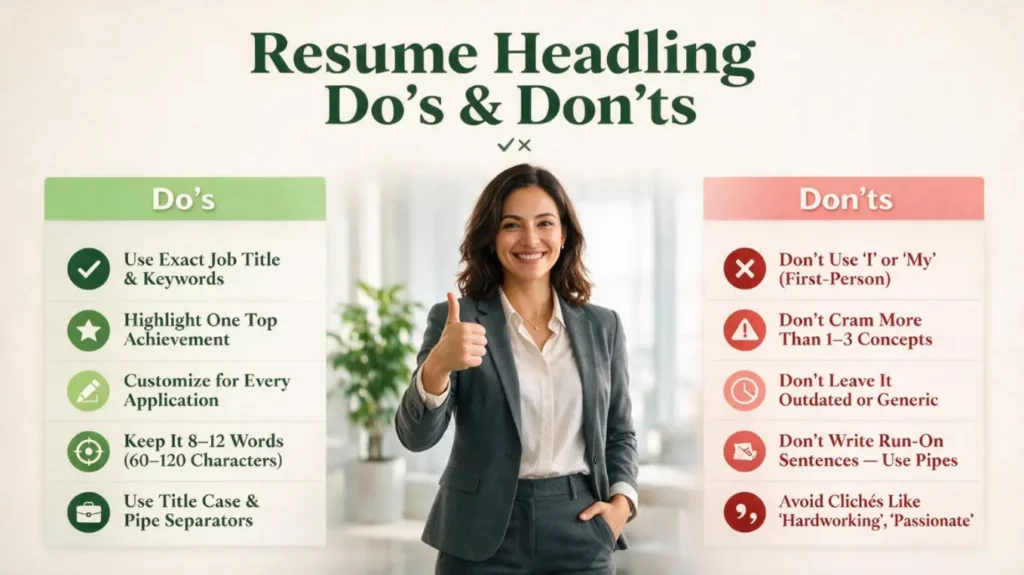
| Use the exact job title and relevant keywords from the posting | Use first-person language like “I” or “My” |
| Highlight one genuinely strong, top achievement | Cram in more than one to three concepts at once |
| Customize the headline for every single application | Leave it outdated, generic, or copy-pasted from a template |
| Keep it to 8–12 words, or 60–120 characters | Write it as a run-on sentence — use pipes instead |
| Use Title Case and pipe separators for a clean look | Lean on clichés like “hardworking” or “passionate” |
By following these practices, and using the examples in this guide as your starting templates, you can build powerful, effective headlines across virtually any domain — from white-collar corporate roles to blue-collar skilled trades.
Final Thoughts
At the end of the day, a resume headline is a small piece of real estate that punches well above its weight. It costs you nothing but a little thought and a bit of editing, yet it can be the single difference between a resume that gets a genuine read and one that gets scrolled past in a matter of seconds.
Treat it the way a good editor treats a headline for a news story: write it, then rewrite it, then cut every word that is not pulling its weight.
Use the formula, borrow from the examples that match your field, tailor it to every job you apply for, and let it do exactly what it was designed to do — open the door and invite the reader in.
If you are targeting advancement within your current organization, a well-written cover letter for promotion can reinforce your achievements, readiness for greater responsibility, and commitment to the company.
Glossary
A handful of terms come up again and again throughout this guide. Here is a quick reference for each one.
| Term | Definition |
|---|---|
| ATS (Applicant Tracking System) | Software used by companies to collect, sort, and filter resumes. Roughly 95% of Fortune 500 companies use one. It scans for keywords from the job description and ranks candidates before a human ever opens a file. |
| Resume Headline | A single line of text below your name that summarizes your professional identity—your role, experience level, and top qualifier. Typically 8–12 words. |
| Resume Summary | A 2–4 sentence paragraph below the headline that provides broader context about your background and career narrative. Expands on what the headline declares. |
| Resume Title | Sometimes used interchangeably with “headline,” but technically refers to the contact information block at the very top of the resume (name, phone, email, LinkedIn). |
| Pipe Separator | The vertical bar character (|) used to separate distinct pieces of information in a headline. Preferred over commas because it creates a clean visual break. |
| Title Case | A capitalization style where the first letter of every major word is uppercase. Standard for resume headlines because it signals “heading” rather than “sentence.” |
| Keyword Match | The degree to which words in your resume match the job description. ATS uses this to rank candidates. The headline is an efficient place to incorporate relevant keywords. |
| Quantification | Expressing an achievement as a number—percentage, dollar amount, headcount, or time saved. Numbers make claims more specific and credible. “Drove growth” is a claim; “35% growth” provides measurable context. |
Conclusion
Your resume headline is one line with one job: make the recruiter keep reading. Match the job title exactly, add a number that proves you’re real, and finish with a result that makes you memorable. That’s it. Write it in 15 minutes, and every application you send gets measurably stronger.
After finalizing your headline and content, you can place everything into professionally structured MS Word resume templates that are easy to edit and customize for different applications.
Frequently Asked Questions
Q1: What exactly should I include in a resume headline?
Include your target job title, your years of experience if you have any, and one or two of your top qualifications or achievements. Keep the whole thing brief — something like “Graphic Designer | 5+ Years Branding & UX Design” does the job nicely. As a rule of thumb, stick to the formula Job Title + Years + Skill or Achievement, and you will rarely go wrong.
Q2: How long should a resume headline be?
Aim for a single line, roughly 60 to 120 characters, which in practice works out to about 8 to 12 words. It needs to be concise enough to read at a glance, yet long enough to actually convey your main value — that balance is really the whole challenge of writing a good one.
Q3: Where should I place my resume headline?
Directly below your name and contact information, right at the very top of the resume. This prime position ensures that both recruiters and ATS software see it immediately, before anything else. Never hide it inside a header or footer — keep it in the main body of the document so it reads correctly every time.
Q4: Can I use keywords in my headline to help with ATS?
Yes, absolutely — in fact, you should. Using exact keywords, especially the job title itself, is critical, since many ATS platforms rank resumes primarily by keyword match. If the job posting says “Data Analyst,” put “Data Analyst” in your headline rather than a close synonym. Avoid substituting similar-sounding terms where you can help it, since systems like Taleo or iCIMS often fail to recognize them as equivalent.
Q5: Should a new graduate or someone with little experience use a headline?
Yes, without question — a headline is still genuinely valuable even without years of experience behind you. Lean instead on your education, certifications, or relevant skills, and use phrases like “Entry-Level” or “Recent Graduate” in place of a years-of-experience figure. For instance, “Recent Engineering Graduate | SolidWorks & CAD Expertise” works well. If you have relevant internships or volunteer work behind you, feel free to highlight those accomplishments instead.