


Resume keywords are the specific skills, tools, qualifications and job-related terms an employer looks for. Examples include SQL, inventory control, customer support and a required nursing license. The right words depend on the job you want.
Start with the job description. Choose terms that match your background, then show where you used them. A keyword list helps you name your abilities; a clear example helps the reader understand them.
Below, you can browse keywords by industry, work through a job-description example and see how to use relevant terms throughout your resume.
Resume Keywords by Industry
Find your field below, then choose the terms that fit the job description and your experience. These lists are examples, not a checklist to copy into every resume.
Each group includes job-specific terms and two sample bullets. Use a sample only as a model: change the task, tool and setting to match your own work.
Software Development
- Software developer: Python, Java, Git, unit testing, REST APIs
- Web developer: HTML, CSS, JavaScript, React, responsive design
Software project
Built a Python expense tracker with input validation and unit tests for calculating monthly totals.
Web project
Created a responsive React website for a student club, using Git to track changes and reviewing keyboard navigation before launch.
IT Support and Cybersecurity
- IT support: Windows, Microsoft 365, troubleshooting, ticket management, user accounts
- Cybersecurity analyst: SIEM, log analysis, incident response, vulnerability assessment
IT support
Resolved Microsoft 365 sign-in issues, documented troubleshooting steps and updated support tickets before closing them.
Cybersecurity lab
Used a SIEM in a training lab to review authentication logs and document a simulated incident investigation.
Data and Analytics
- Data analyst: SQL, Microsoft Excel, Power BI, data cleaning, reporting
- Data engineer: ETL, data pipelines, Python, data warehousing
- Data scientist: statistical modeling, machine learning, model evaluation
Data analysis project
Cleaned a public transport dataset with SQL and built a Power BI dashboard showing passenger trends by route.
Data engineering project
Built a Python ETL pipeline to load public weather data into PostgreSQL, with checks for missing values and duplicate records.
Marketing
- Digital marketing: SEO, Google Analytics 4, email marketing, campaign reporting
- Social media: content calendars, community management, social media analytics
- Marketing manager: campaign planning, budget management, market research
Digital marketing
Used Google Analytics 4 to review landing-page traffic and prepared campaign reports for the marketing team.
Student activity
Maintained a content calendar for a campus festival and reviewed social media analytics to plan follow-up posts.
For management roles, use our marketing manager resume keywords guide to narrow the list to your specialty.
Sales
- Sales representative: prospecting, lead qualification, CRM, product demonstrations
- Account executive: pipeline management, proposals, negotiation, contract renewals
Sales representative
Recorded prospecting calls and lead qualification notes in Salesforce so account executives could review each opportunity.
Account executive
Prepared sales proposals and tracked contract renewal dates in the CRM, coordinating pricing questions with the sales manager.
Finance and Accounting
- Accountant or bookkeeper: bank reconciliation, accounts payable, accounts receivable, QuickBooks
- Financial analyst: financial modeling, budgeting, forecasting, variance analysis
- India-based accounting roles: TallyPrime, GST, TDS, Ind AS — where requested
Bookkeeping
Completed bank reconciliations in QuickBooks and investigated differences between statement balances and ledger entries.
Finance coursework
Built an Excel forecasting model for a coursework case study and used variance analysis to explain differences between planned and actual costs.
Healthcare
- Registered nurse: patient assessment, care planning, medication administration, EHR documentation
- Medical assistant: vital signs, patient intake, exam-room preparation
- Healthcare administration: appointment scheduling, insurance verification, medical records
Nursing clinical placement
Completed patient assessments and EHR documentation during supervised clinical placements, following the unit’s care-planning procedures.
Medical office
Handled appointment scheduling and insurance verification, updating patient records before scheduled visits.
For more role-specific terms, see our healthcare resume keywords guide. Include licenses and certifications only if you hold them.
Office Administration
- Administrative assistant: calendar management, Microsoft Outlook, document preparation, meeting coordination
- Receptionist: visitor check-in, call handling, appointment scheduling
Administrative assistant
Coordinated meetings in Microsoft Outlook, prepared agendas and recorded follow-up tasks for the office team.
Volunteer reception
Handled visitor check-in and appointment scheduling at a community advice center, referring questions to the appropriate volunteer.
Human Resources
- Recruiter: candidate sourcing, applicant tracking system, interview scheduling, screening
- HR assistant: onboarding, employee records, HRIS, benefits administration
Recruiting
Updated candidate records in the applicant tracking system and coordinated interview scheduling with hiring managers.
HR assistant
Prepared onboarding documents and checked employee records in the HRIS for missing information.
Customer Service
- Customer service representative: customer inquiries, order tracking, complaint resolution, CRM
- Technical support: troubleshooting, ticket management, knowledge base, escalation
Customer service
Handled customer inquiries about deliveries, used order tracking to check shipment status and recorded follow-up notes in the CRM.
Technical support
Troubleshot account-access problems, recorded steps in support tickets and escalated unresolved cases with relevant error details.
Warehouse and Logistics
- Warehouse associate: order picking, packing, barcode scanners, shipping and receiving
- Inventory or logistics roles: cycle counts, inventory control, WMS, shipment tracking
Warehouse associate
Used barcode scanners for order picking and checked packed items against shipment records before dispatch.
Inventory clerk
Completed cycle counts and updated stock records in the warehouse management system (WMS), reporting discrepancies to the supervisor.
Operations and Project Management
- Project coordinator: project scheduling, status reporting, risk tracking, stakeholder communication
- Operations manager: process improvement, resource planning, SOPs, vendor coordination
Project coordinator
Updated project schedules in Asana and prepared status reports showing overdue tasks and decisions needed from stakeholders.
Operations
Documented standard operating procedures (SOPs) for equipment requests and coordinated vendor deliveries with the facilities team.
Education
- Teacher: lesson planning, assessment, classroom management, differentiated instruction
- Teaching assistant: small-group support, learning materials, progress records
- School administration: student records, enrollment, parent communication
Teacher
Adapted lesson planning for mixed-ability classes and used formative assessment to identify topics that needed further explanation.
Teaching assistant
Prepared learning materials for small-group sessions and updated progress records for the classroom teacher.
Engineering and Skilled Trades
- Mechanical engineer: CAD, SolidWorks, engineering drawings, design review
- Electrician: electrical installation, wiring diagrams, fault finding
- HVAC technician: preventive maintenance, HVAC troubleshooting, refrigerant handling
- Welder: MIG welding, TIG welding, blueprint reading — match your process
Engineering project
Created SolidWorks models and engineering drawings for a coursework fixture, documenting design changes after a team review.
HVAC technician
Performed preventive maintenance on HVAC equipment and recorded troubleshooting findings for faults requiring further repair.
Design and Creative Work
- Graphic designer: Adobe Illustrator, Photoshop, typography, brand guidelines
- UX designer: Figma, wireframes, prototyping, usability testing
- Video editor or animator: Premiere Pro, After Effects, storyboarding, motion graphics
UX portfolio project
Built a Figma prototype for a library booking app and revised the navigation after usability testing with classmates.
Video editing
Edited interview footage in Premiere Pro, balanced dialogue levels and added captions for a community event video.
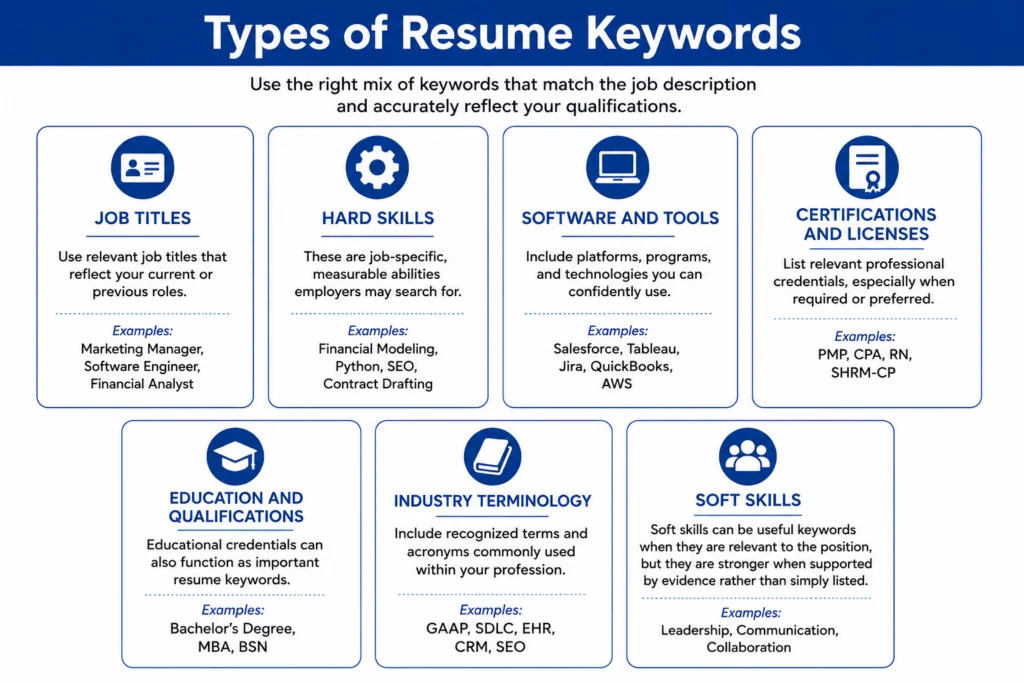
How to Find Resume Keywords
The job description is your main source. An industry list can give you ideas, but the posting tells you what this employer needs.
- Read the duties. Note specific tasks, such as bank reconciliation, lesson planning or inventory tracking.
- Check the requirements. Look for named tools, qualifications, licenses and methods. Keep “required” and “preferred” items separate in your notes.
- Make a short working list. Group the terms by task, tool and qualification. Repeated terms may deserve attention, but a requirement mentioned once can still matter.
Example: an office assistant job
Sample job description — written for this example
We need an office assistant to handle appointment scheduling, maintain customer records and prepare weekly reports. Applicants should be comfortable using Microsoft Excel and Microsoft Outlook. Previous reception experience is preferred.
- Tasks: appointment scheduling, customer records, weekly reports.
- Tools: Microsoft Excel, Microsoft Outlook.
- Preferred experience: reception experience.
Next, match those terms to things you have actually done. Someone who handled bookings while volunteering might write:
Resume bullet — volunteer experience
Handled appointment scheduling for a community center and updated booking records in Microsoft Excel.
The example uses two relevant terms with a clear task and setting. It does not claim Outlook knowledge or reception experience the applicant may not have.
How to Choose the Right Keywords
For each term on your shortlist, ask: Does this matter for the job, and can I explain where I used it? Give space first to requirements you meet and tasks central to the role.
Check what you can support
Using the office assistant posting above, here is how an applicant could review three terms:
- Use it
Microsoft Excel: You used it to maintain booking records. Name the tool and describe that task.
- Be more precise
Weekly reports: You prepared one report for a class project. Describe that project report; do not suggest you produced reports every week.
- Leave it out
Microsoft Outlook: You have used Gmail, but never Outlook. List your relevant experience accurately instead of claiming the requested tool.
Use clear names
Use the employer’s wording when it accurately describes your experience. “Appointment scheduling” is clearer than “helped with office things.” Keep official software, license and certification names accurate.
For a relevant industry abbreviation, you can give both forms once: warehouse management system (WMS). You do not need to expand familiar product names such as Microsoft Excel.
If you need help naming tools and methods, see our guide to technical skills for a resume.
A missing requirement is still a gap. Adding its name cannot replace a license, certification or skill you do not have. If you are currently training, state the course and your actual progress clearly.
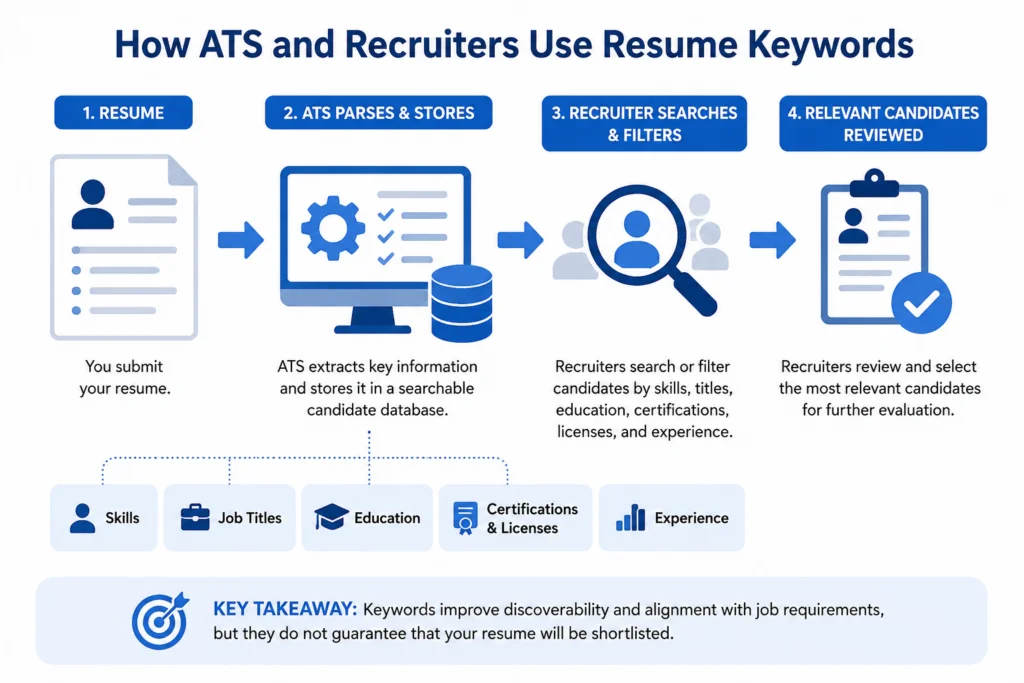
Where to Put Resume Keywords
Put each keyword where it tells the reader something useful. A skills list names your abilities; experience and project bullets show how you used them.
Skills
List relevant tools and abilities you can use. Choose specific names rather than a broad phrase such as “good with computers.”
Sample skills line — administrative role
Microsoft Excel, appointment scheduling, customer records, document preparation
For help organizing the list, see what skills to put on your resume.
Experience
Connect the keyword to a task you performed. Add the tool, purpose or result when it helps explain your contribution.
Sample experience bullet — administrative role
Maintained customer records in Microsoft Excel and checked contact details before preparing appointment lists for reception staff.
Our work experience guide explains how to arrange these bullets under each role.
Projects
A project can demonstrate a tool or method you have not used in paid work. State the project’s setting clearly.
Sample project bullet — coursework
Used SQL to check duplicate entries in a public library dataset and documented the data-cleaning steps in a coursework report.
See how to list projects on a resume for project titles and descriptions.
Education and certifications
Use the correct name of your degree, license or certification. Include the issuer and relevant dates. Describe unfinished training as in progress, rather than as an earned qualification.
Use our guide to listing certifications if you need help formatting the details.
Summary, if you use one
Mention a few strengths central to the role and support them elsewhere on the resume. A summary is optional; do not add one just to fit more keywords.
Repeat with a purpose. Listing Excel in Skills and showing an Excel task in Experience can be useful. Repeating the same phrase in every bullet adds little. Adapt these examples to your actual background.
Resume Keywords With No Experience
You do not need a paid job to show a relevant skill. Coursework, volunteering and school activities can give you evidence. Choose a term from the posting, then describe a task where you used it.
Label the setting honestly: a class project belongs under Projects or Education, and volunteering belongs under Volunteer Experience. These sample bullets show how to make the connection.
Office work: volunteering
Keywords: document preparation, Microsoft Word.
Volunteer experience — neighborhood association
Handled document preparation for a neighborhood association, using Microsoft Word to format meeting agendas and minutes.
Data work: coursework
Keywords: data cleaning, Microsoft Excel, PivotTables.
Coursework project — housing data
Completed data cleaning in Microsoft Excel for a public housing dataset and used PivotTables to compare rental prices by neighborhood.
Marketing: school activities
Keywords: content creation, Canva.
School activity — book drive
Supported content creation for a school book drive, designing Canva posters and writing announcements with donation dates and drop-off locations.
Keep the claim as specific as the experience. Making posters does not establish paid advertising experience. Completing an Excel project does not establish advanced knowledge of every Excel feature. Adapt each example only to work you actually did.
If you are still identifying what you can offer, our guide to skills for a resume with no experience can help you build a relevant shortlist.
Common Resume Keyword Mistakes
Before sending your resume, check that the keywords describe your background clearly. Watch for these five mistakes.
Copying the job description
Problem: Copied duties describe what the employer wants, without showing what you have done.
Fix: Keep relevant terms, then explain your own task, tool and setting.
Claiming skills you do not have
Problem: Adding requested software or credentials makes your resume inaccurate if you do not have them.
Fix: State your actual skill or training. Mark unfinished courses as in progress.
Hiding keywords
Problem: White text, tiny text or concealed lists add words the reader cannot assess.
Fix: Keep every keyword visible, readable and connected to a relevant section.
Changing past job titles
Problem: Replacing your previous title with the advertised title can misrepresent your work history.
Fix: Keep the accurate title. Explain relevant duties in the bullets beneath it.
Using verbs without job details
Problem: Words such as “managed” and “developed” do not name the skill, tool or task on their own.
Fix: Say what you managed or developed. Include specific terms such as payroll processing or SQL when they fit your experience.
For help choosing the opening word of a bullet, use our separate action verbs for a resume guide.
Resume Keywords FAQs
Open a question for a short answer.
How many keywords should I put on my resume?
There is no single number that fits every job. Cover the relevant requirements you can support, then remove unrelated terms and unnecessary repetition. Do not add words just to reach a target count.
Should I use the exact words from the job description?
Use the same skill, tool or qualification name when it accurately describes your background. Some recruiter searches require exact matches. You can still write the surrounding sentence in your own words; you do not need to copy whole duties.
Should I use abbreviations or full names?
For a relevant industry term, include the full name and abbreviation together once, such as customer relationship management (CRM). Use the correct product name for software. Do not add unfamiliar abbreviations simply to make your resume look technical.
Can I repeat a keyword in different sections?
Yes, when each mention has a purpose. You might list Power BI in Skills and describe a Power BI project under Projects. Avoid repeating the term in unrelated bullets or adding a second list of the same keywords.
What if I do not have a skill listed in the job posting?
Do not claim it. Describe relevant skills you do have, and identify current training accurately. A preferred skill you lack is different from a required license or qualification. Read the posting carefully before deciding whether to apply.
Are resume keywords the same as action verbs?
They serve different purposes. Job-specific keywords name relevant skills, tools, qualifications or tasks, such as SQL or inventory control. Action verbs describe what you did, such as checked or organized. A clear bullet can use both.
Does a high resume scanner score guarantee an interview?
No. A third-party scanner score is feedback from that tool, not a confirmed result from the employer’s hiring system. Use its suggestions to review relevant omissions, but do not invent experience or add unrelated terms to raise the score.
Source for the exact-match example: Greenhouse’s keyword filtering documentation. This describes one feature, not every employer’s screening process.

Latest Posts
- 10 Project Manager Interview Questions on Deadlines, Budgets, and Teams

- Top 10 Common Job Interview Questions and How to Answer Them

- How to Answer “Where Do You See Yourself in Five Years?”

- How to List a Company That Closed or Changed Its Name on Your Resume

- Headline For Resume: A Complete Guide

- Medical Assistant Cover Letter Examples and Writing Guide for 2026



Empowering Your Career with Tailored Resumes & Cover Letters
© 2026 Career Star LLC. All Rights Reserved.