


THE FORMAT AT A GLANCE
A traditional resume format uses a simple, professional layout with clear headings and little decoration. It usually places your most recent work experience first, making your career history easy to follow.
- Simple layout
- Clear section headings
- Minimal decoration
Start with the template below, then explore three examples to see how the format works for different jobs. You’ll also learn how to arrange your sections, choose readable formatting and adapt the layout to your experience.
Are “traditional” and “chronological” the same?
Traditional describes the design: restrained styling, readable text and familiar headings.
Reverse chronological describes the order: your current or most recent job appears first, followed by earlier positions.
A resume can use both. You can also keep a traditional design while adjusting section placement—for example, putting relevant education before work experience when you are a recent graduate.
Traditional Resume Template
This traditional resume template shows how to organize your qualifications in a simple, professional layout. Use it as a guide for arranging your information, then adapt the sections to your experience and the job you want.
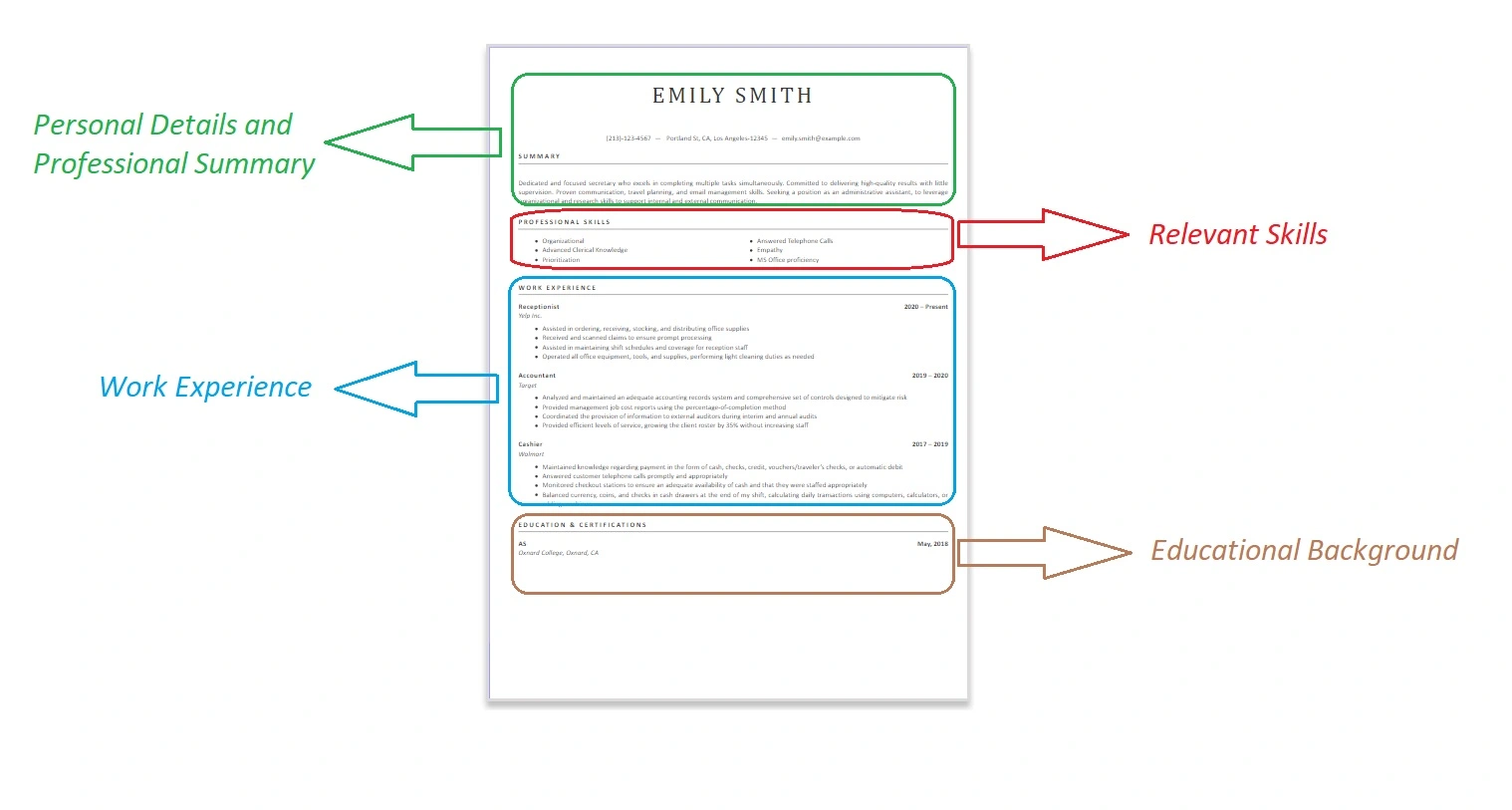
Want a template you can edit? Explore our Word resume templates and choose a simple design that fits your content.
Traditional Resume Examples
These examples use clear section headings and list the newest job first. Notice how the supporting sections change: a nurse needs a visible licence section, while a financial analyst may give more space to software and analytical skills.
Illustrative examples: Names, employers and results below are fictional. Use the structure as a guide. Replace the content with your own experience, qualifications and verified achievements.
Financial Analyst Traditional Resume Example
Layout focus: Work experience comes before education to emphasize recent financial analysis work.
Jordan Ellis
Chicago, IL | jordan.ellis@example.com | 312-555-0142
Professional Summary
Financial analyst with four years of experience in budgeting, forecasting and variance analysis. Uses Excel and Power BI to explain performance trends and support financial planning.
Work Experience
Financial Analyst | Example Manufacturing Co. | July 2024–Present
- Prepare monthly budget reports for six departments and explain major differences between planned and actual spending.
- Automated recurring Excel reports, reducing preparation time from five hours to two hours.
Junior Financial Analyst | Sample Retail Group | July 2022–June 2024
- Consolidated monthly sales and expense records for management reporting.
- Checked forecast inputs against source records and investigated discrepancies.
Education
Bachelor of Science in Finance | Example University | 2022
Skills
Financial forecasting, budgeting, variance analysis, Excel PivotTables, Power Query, Power BI
Registered Nurse Traditional Resume Example
Layout focus: A separate licence and certification section makes required credentials easy to locate.
Morgan Lee
Sacramento, CA | morgan.lee@example.com | 916-555-0138
Professional Summary
Registered nurse with six years of medical-surgical and telemetry experience. Skilled in patient assessment, care coordination, discharge education and electronic health record documentation.
Licensure and Certifications
California Registered Nurse licence — active
Basic Life Support (BLS) — current
Advanced Cardiovascular Life Support (ACLS) — current
Work Experience
Registered Nurse, Telemetry | Example Medical Center | August 2023–Present
- Assess patients, monitor changes in condition and coordinate care with the clinical team.
- Precepted four newly hired nurses on unit procedures and documentation practices.
Registered Nurse, Medical-Surgical | Sample Community Hospital | August 2020–July 2023
- Delivered bedside care and maintained accurate patient records.
- Explained discharge instructions to patients and caregivers, checking their understanding.
Education
Bachelor of Science in Nursing | Example University | 2020
Skills
Patient assessment, telemetry monitoring, medication administration, patient education, Epic EHR
Warehouse Team Lead Traditional Resume Example
Layout focus: Two roles show progression from warehouse associate to team lead. Relevant operational skills follow the work history.
Alex Carter
Columbus, OH | alex.carter@example.com | 614-555-0165
Professional Summary
Warehouse team lead with seven years of fulfillment experience, including three years supervising picking and packing teams. Experienced in shift coordination, stock checks and warehouse management systems.
Work Experience
Warehouse Team Lead | Example Distribution Co. | September 2023–Present
- Coordinate daily picking and packing assignments for 12 associates.
- Introduced a shift-handover log to track incomplete orders, stock discrepancies and equipment issues.
- Trained six new associates in scanning procedures and order accuracy checks.
Warehouse Associate | Sample Logistics Group | September 2019–August 2023
- Picked and packed customer orders using RF scanners and checked items against shipment records.
- Completed cycle counts and reported differences between physical stock and system records.
Education
High School Diploma | Example High School | 2019
Skills
Shift coordination, order fulfillment, RF scanners, cycle counting, inventory records, warehouse management systems
How to Format a Traditional Resume
Keep the layout simple and consistent. Readers should be able to find your job titles, dates and qualifications without searching through decorative elements. Use the settings below as a starting point, then follow any instructions in the job posting.
| Element | Recommended approach |
|---|---|
| Layout | Use a single column with a clear reading order from top to bottom. |
| Font | Choose a readable font such as Arial, Calibri, Georgia or Times New Roman. Use it consistently. |
| Font size | Start with 10–12 pt for body text and 12–14 pt for section headings. Check readability in the exported file, since fonts vary in size. |
| Margins | Start with 1-inch margins. If necessary, reduce them evenly to about 0.5 inch while keeping enough white space. |
| Spacing | Use consistent line spacing and leave visible gaps between sections. Avoid squeezing lines together to fit more text. |
| Headings | Use familiar labels such as Work Experience, Education and Skills. Make headings distinct with bold text and consistent sizing. |
| Dates | Use one style throughout, such as “July 2024–Present.” List jobs from most recent to oldest. |
| Bullet points | Use standard bullets for achievements and responsibilities. Keep each point focused on one contribution. |
| Color and graphics | Use dark text on a light background. Keep decoration minimal and avoid skill-rating bars or icons that replace important words. |
| Length | One page is often enough for early-career applicants. Use two when relevant experience needs the space. Edit repetition before shrinking the text. |
| File format | Submit the file type the employer requests. If both are accepted, use a clean DOCX or text-based PDF and check the final layout before sending. |
Check the exported file: Open the version you will submit. Look for misplaced dates, split headings and missing text. For a PDF, check that you can select and copy the text in a sensible order. This is a useful basic check, not a guarantee that every applicant tracking system will parse it correctly.
For more help balancing white space and content, see our guide to resume margins .
What to Include in a Traditional Resume
Build your resume around the information an employer needs: how to contact you, what you can do and where you gained your experience. Keep section names familiar so readers can find those details quickly.
A common section order: Contact Information → Professional Summary → Work Experience → Education → Skills. Add relevant certifications or other supporting sections where they are easiest to notice.
Contact Information
Include your name, phone number, professional email and city or region. Add a LinkedIn profile or portfolio when it supports your application. A full street address is usually unnecessary unless requested.
Placement: At the top of the document, in the main body rather than only in a page header.
Professional Summary
If a summary adds useful context, use two or three short sentences to highlight your relevant experience, strengths and qualifications. Our resume summary examples show how to connect those details to different jobs. Avoid opening with unsupported praise or repeating a list of duties.
Placement: Below your contact information. You can omit it when it adds little beyond the rest of the resume.
Work Experience
For each role, include your job title, employer and employment dates. Use concise bullets to describe relevant contributions and achievements. Our guide to writing your work experience section explains how to turn your responsibilities into clear descriptions of your work.
List your newest role first. For help arranging jobs, promotions and dates, see the reverse-chronological resume format .
Placement: Usually before education when your work experience is your strongest qualification.
Education
List your relevant degree or qualification, institution and graduation year or expected completion date. Include relevant coursework or academic achievements when they strengthen your application. See how to list education on a resume for examples suited to different educational backgrounds.
Placement: Usually after experience. Recent graduates can move education higher when it provides stronger evidence of their suitability.
Skills
Select skills you can demonstrate and that match the position. Name relevant software, tools, methods or languages clearly. If you need help deciding what skills to put on your resume , start with the job requirements and compare them with your actual abilities.
Support broader strengths, such as leadership, with examples in your experience.
Placement: A short skills section can follow education or sit above experience when specific technical abilities are central to the job.
Certifications and Other Relevant Sections
Add licences, certifications, projects, volunteer work or languages when they help establish your qualifications. Use a clear heading for each section you need rather than grouping unrelated details under “Other.”
For credentials, include the qualification name, issuing organization and relevant dates. Our guide to listing certifications on a resume explains the details to include.
Placement: Put required licences or credentials near the top when they determine eligibility. Other supporting information can follow the main sections.
When Should You Use a Traditional Resume?
A traditional resume is a practical choice when you want your experience and qualifications to take priority over decorative design. You can adapt its section order to your background while keeping the appearance simple.
Employer instructions come first. If an application requires a prescribed template, particular file type or specific information, follow those requirements even when they differ from this guide.
Traditional vs. Modern Resume: Key Differences
The main difference is presentation. Both styles should explain your qualifications clearly, and either can use reverse-chronological work experience. A modern resume does not need graphics or a complicated layout.
Traditional Resume
- Usually uses a single column and a familiar top-to-bottom layout.
- Relies on bold headings, spacing and simple lines to separate sections.
- Typically uses dark text with little or no decorative color.
Modern Resume
- May use contemporary typography and more varied spacing or section placement.
- May add restrained color accents or other visual details.
- Can still use a simple, single-column structure with standard headings.
Choose readability over the label. Neither style guarantees ATS compatibility. Clear text, sensible reading order and a supported file type matter more than whether a template is called traditional or modern.
For a fuller comparison and guidance on choosing a design, see modern vs. traditional resumes .
Frequently Asked Questions
Is a traditional resume the same as a chronological resume?
Not exactly. Traditional describes a simple, restrained design, while chronological describes how experience is organized. Most traditional resumes list jobs in reverse-chronological order, starting with the most recent position. You can keep a traditional design while adjusting section placement to suit your background.
Can a traditional resume be two pages?
Yes. A traditional resume does not have to fit on one page. One page is often sufficient for early-career applicants, while two pages can suit candidates with substantial relevant experience. Remove repetition before reducing font sizes or crowding the layout, and follow any employer instructions about length.
Are traditional resumes ATS-friendly?
A traditional resume can be suitable for applicant tracking systems when it uses readable text, standard headings and a clear reading order. The design label alone does not guarantee compatibility. Avoid submitting an image-only resume, follow the requested file format and check any fields the application system fills from your uploaded document.
Can students use a traditional resume?
Yes. Students can use a traditional design and place relevant education, projects or internships before work experience. Include part-time jobs, volunteering and student activities when they demonstrate useful abilities. Make the setting and your contribution clear rather than presenting academic projects as professional employment.
Should I submit a traditional resume as Word or PDF?
Use the file type requested in the job posting or application portal. If both are accepted, submit a clean DOCX or text-based PDF. A PDF generally preserves appearance, while a Word document is easier to edit. Open the final file and check its text, spacing and page breaks before submitting it.