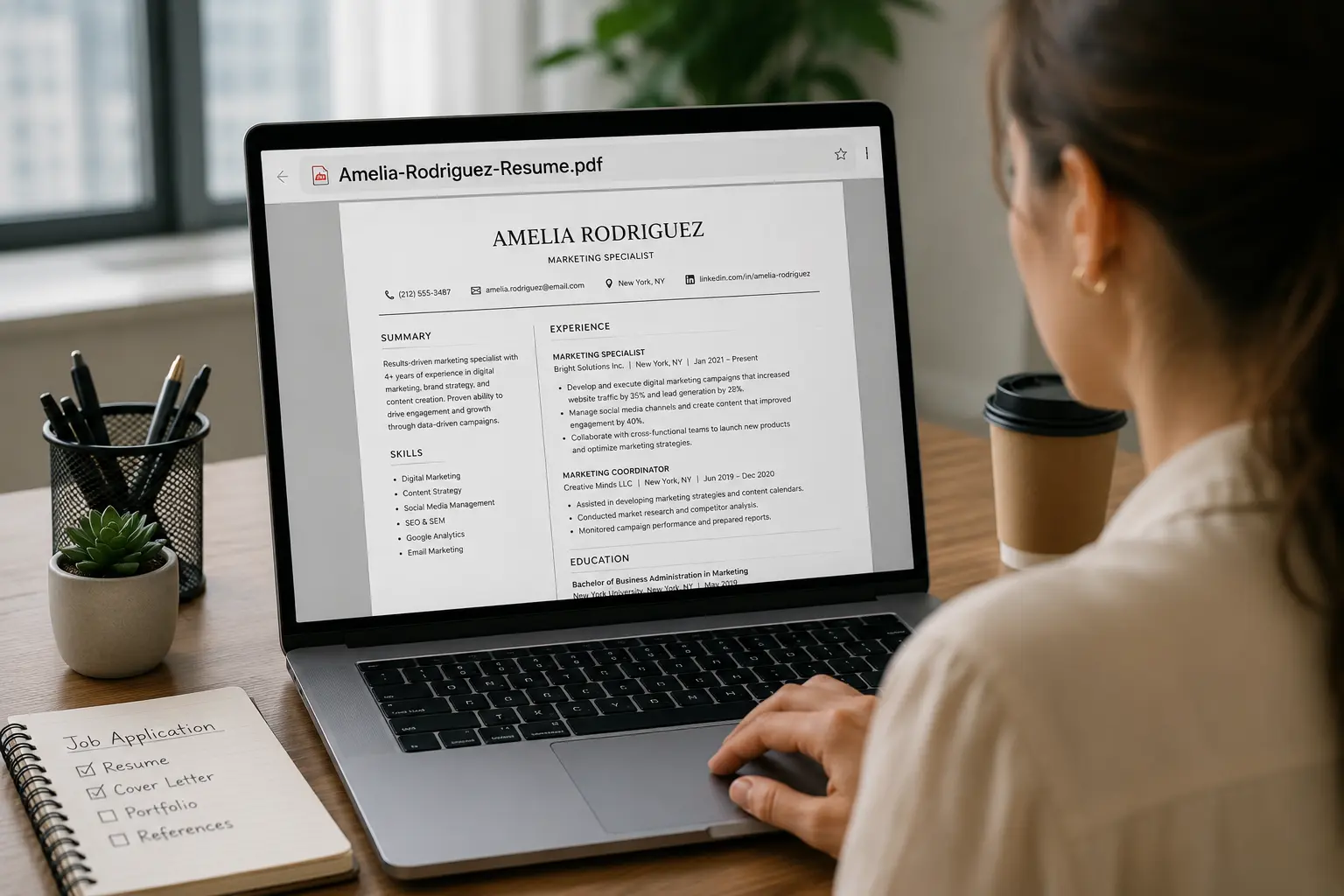

You can spend hours putting together the right resume where you think about your previous roles, what you can offer as well as how you’re going to structure and phrase your resume
However, when it is finally time to submit it for consideration you might forget one tiny detail: the name of your resume file.
Having a file called Resume.doc or Document1.doc might not say anything to the recruiter about you as a person
A professional and informative name like John Smith Resume will make it easy for the recruiter to identify your resume.
Although the resume file name might not be what you consider very important when submitting your application, it might actually surprise you how simple it is to get it right.
This article will teach you how to name your resume, what a good name should be, what not to write in the name of your resume, and will provide you with some examples of a professional resume file name that you will be able to use when applying for a job.
“Details create the big picture.”
— Sanford I. Weill
Key Takeaways
- A professional resume file name should clearly identify you and the document.
- Including your full name and the word “Resume” is a simple and reliable naming format.
- Adding the job title can make a tailored resume easier to identify.
- Always follow the employer’s specific file-naming instructions when provided.
- Avoid vague names, unnecessary version numbers, special characters, and overly long file names.
- Use a consistent naming style across different versions of your resume.
- PDF is generally a safe default unless the employer specifically requests another format.
What to Name Resume File: The Basics
A resume file name refers to the name of your resume file. File name might seem too small but it’s the detail that your potential employer will see first even before opening your resume.
The file name appears outside the resume itself, such as in an email attachment, downloads folder, shared drive, or applicant tracking system.
A clear file name will ensure that the hiring person will understand who you are and which file belongs to you.
There is a simple, reliable formula for getting this right. It is covered in detail below, but the short version is to keep it simple and meaningful.
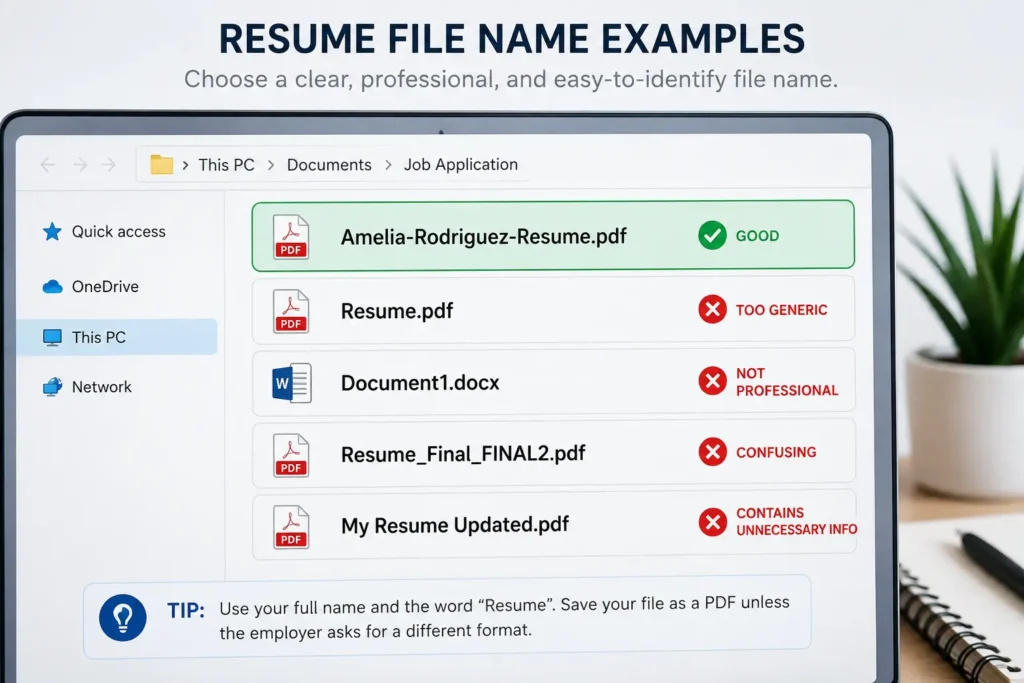
The main aim is to get a file name that is simple and meaningful. Do not use vague names like resume.pdf or Document1.docx, as they do not reveal anything about the applicant.
Good to Know
Your resume file name, resume title, and resume summary are three different things. The file name identifies the saved document, while the title and summary appear inside the resume and serve different purposes.
Why Your Resume File Name Matters for Job Applications
Even though it might seem insignificant, the name of your resume file plays a role in the identification and organization of your application during the recruitment process. The recruiters go through different resumes every day, and a descriptive file name helps them in locating candidates.
Here are some of the reasons why it is important:
1. It Makes a Professional First Impression.
A recruiter may see the name of the file before opening the resume. A proper filename shows that you have paid attention to detail, while a vague filename such as resume_final2.pdf gives the impression of being sloppy.
2. It Helps Recruiters Search for Your Resume easily
During the application process, recruiters save resumes on their computers. When resumes contain the candidates’ names, recruiters can locate applicants easily later.
3. It Helps to Avoid Confusion When Hiring
When several people are involved in recruitment, compelling file names helps prevent the confusion of applicants’ resumes. It becomes even more important when there are candidates who submit documents with some common or similar names.
4. It Aids in Document Organizing
The hiring team can organize the documents of candidates with the help of applicant tracking systems or other software. A proper filename can facilitate to associate the document with the right candidate or position.
Quick Tip
Remember that the resume file name itself will not land you a job in an organization. Its primary function is to help in the identification, organization, and processing of your job application. In fact, the content of the resume is determining in the “success” of your application.
Resume File Name vs. Resume Title vs. Resume Summary
The terms in question, though somewhat similar, refer to different components of a job application. Distinguishing between them can help one to use the correct pieces of information when naming the resume.
| Term | What It Actually Is |
|---|---|
| Resume File Name | The name of the saved resume document, such as Sarah_Klein_Resume.pdf. It appears outside the resume itself. |
| Resume Title (Headline) | A short professional headline inside the resume, usually placed below your name, such as Senior Product Marketing Manager. |
| Resume Summary | A brief paragraph inside the resume that highlights your experience, skills, and value as a candidate. |
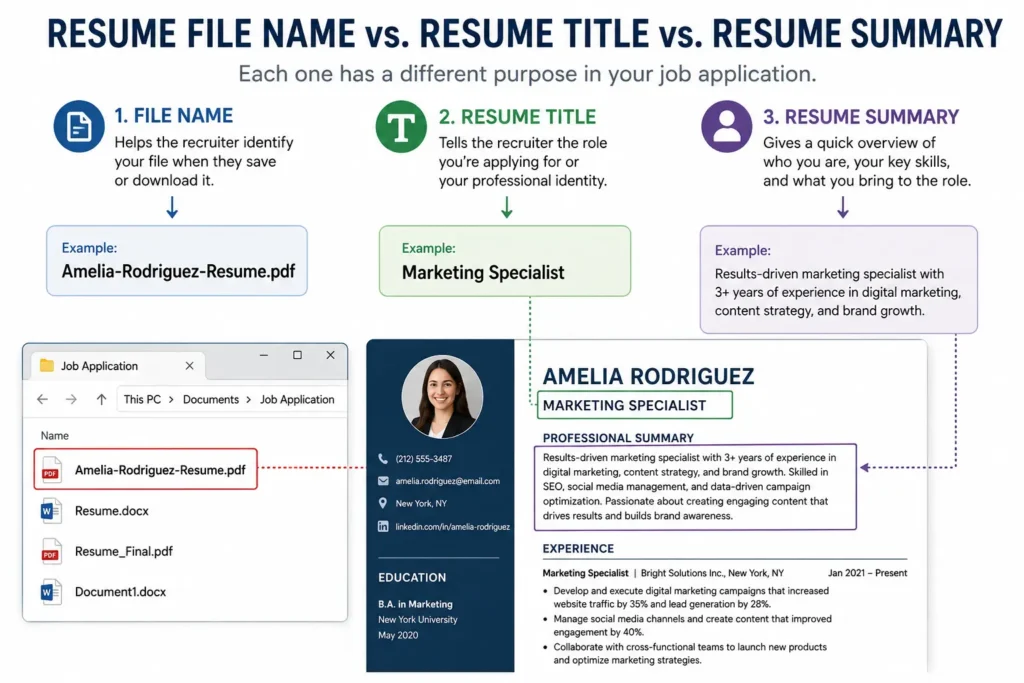
A good method for differentiating between the three is remembering that the file name describes the document, the title describes your professional profile, and the summary explains what you can offer.
What Should You Name Your Resume File? (The Formula)
There’s no need to make your resume title uneven and complicated. A simple and standard title lets the reader know whose document is given and where the resume is intended to be used.
The best ATS-friendly formats are:
FirstName_LastName_Resume.pdf
or
FirstName_LastName_JobTitle_Resume.pdf
| Part | Purpose | Example |
|---|---|---|
| First and Last Name | Clearly identifies the candidate. | Sarah_Klein |
| Resume | Makes the purpose of the file obvious. | Sarah_Klein_Resume |
| Job Title | Identifies the position when the resume is tailored to a specific role. | Sarah_Klein_Marketing_Manager_Resume |
| File Format | Shows the document type. |
Quick Tip
If you are unsure which format to use, FirstName_LastName_Resume.pdf is a simple choice that works for most applications.
When applying for a specific position, you can use: FirstName_LastName_JobTitle_Resume.pdf
Naming Resume File: Examples
The correct file name for the resume may change based on the method and location of the application. The given examples indicate how to modify the basic naming formula without unnecessarily complicating the file name.
| Situation | Example File Name |
|---|---|
| General job application | Amelia_Rodriguez_Resume.pdf |
| Applying for a specific role | Amelia_Rodriguez_Marketing_Manager_Resume.pdf |
| Employer provides a job ID | Amelia_Rodriguez_Resume_JobID4521.pdf |
| Resume tailored to a specific field | Amelia_Rodriguez_UX_Resume.pdf |
| Using hyphens instead of underscores | Amelia-Rodriguez-Resume.pdf |
The most important thing is to make the file name specific to the application without using excessive length. If your employer proposes some specific naming scheme or job ID, utilize that first. Otherwise, simply using the name-resume formula is probably sufficient.
Should You Include the Job Title in Your Resume File Name?
It is not compulsory to name the file of your resume after the job title, nonetheless, it could come in handy when applying for particular jobs.
For instance,
Amelia-Rodriguez-Marketing-Manager-Resume.pdf
This proves to be useful when developing various resumes for multiple positions since the name makes it obvious which job the resume is originally for. That said, there is no need to always put the job title in the name.
Quick Tip
Utilize the job title if it brings added value to your application.
File Name for Resume: Mistakes to Avoid
The filename of your resume can create a bad impression in the mind of recruiters even before they open your file. Here are a few guidelines for creating a proper filename for your file.
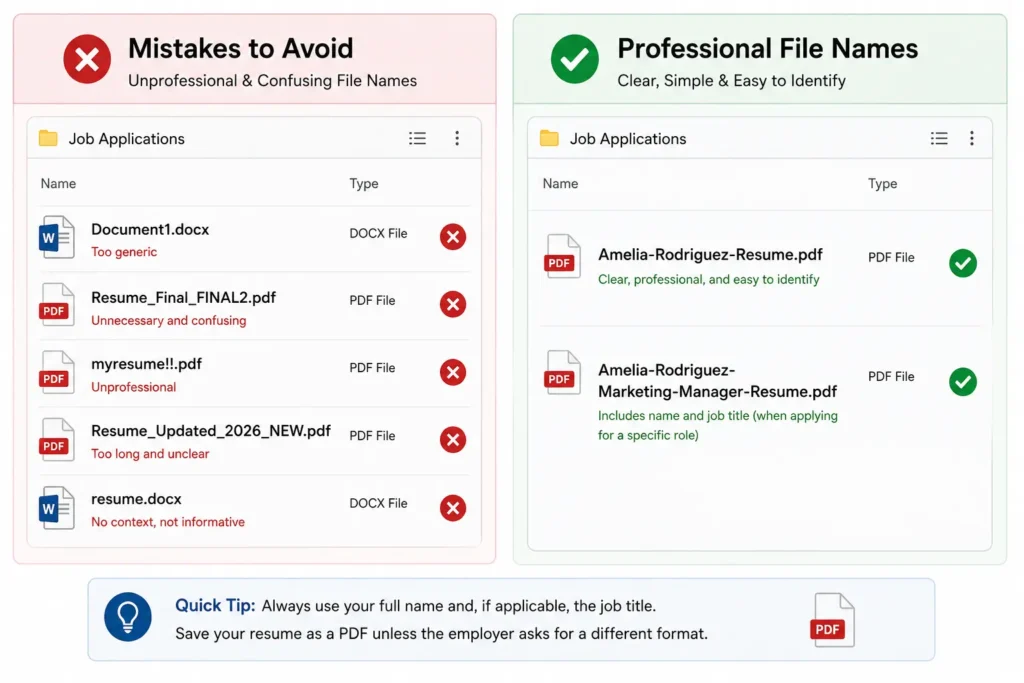
1. Using a generic filename
Do not use filenames such as Document1.docx or Resume.pdf as those fail to identify you with clarity.
2. Adding version numbers to the filenames
Using a name such as Resume_Final_FINAL2.pdf would appear messy. Use versions of the file only for your personal use.
3. Using weird characters in the filenames
It is advisable not to use certain special characters like %, #, &, etc. as these may create issues in the application systems.
4. Keeping the filename too long
The filename should be appropriate for reading. Please avoid putting excessive information that makes the filenames unreadable.
5. Using a nickname that is different than the actual name mentioned in the resume
If your name is Amelia Rodriguez, do not submit the file with the name Amy-Resume.pdf.
6. Using unnecessary capitalizations
Filenames like AMELIA_RODRIGUEZ_RESUME!!.pdf may not appear very professional as compared to simple formats
Tools That Make Naming and Saving Easier
There is no need for fancy new programs just to rename your resume, since most of the programs you know well can solve this task well.
1. Word or Google Docs
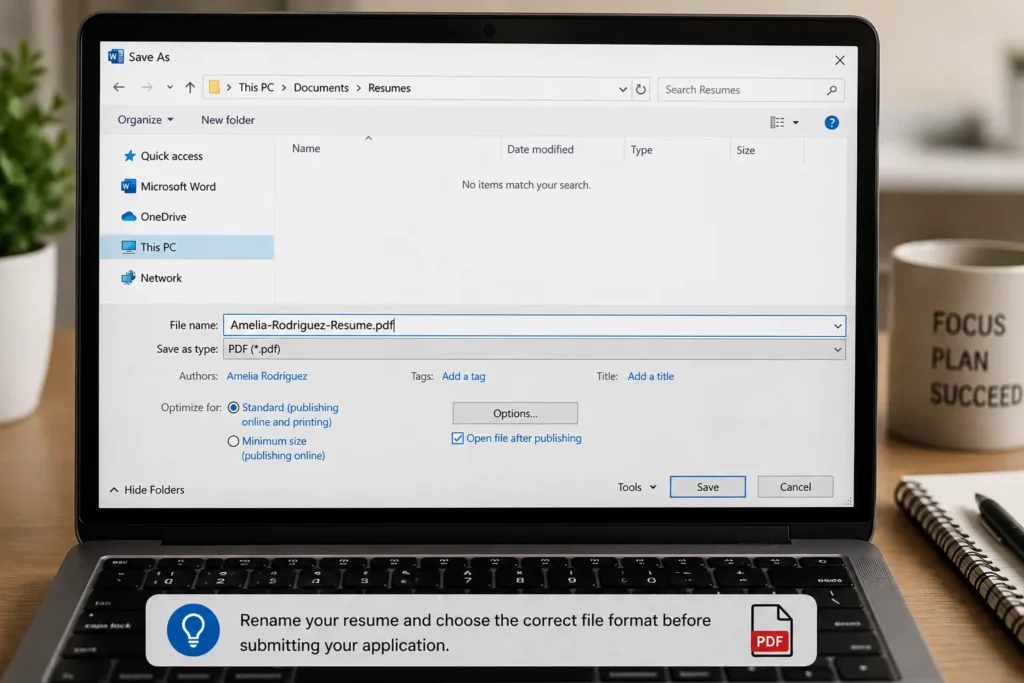
Simply use the saving settings to save your resume under the needed name in the preferred format.
2. Resume Builders
With the help of tools like Zety, Novoresume, Enhancv, and Teal, creating and downloading your resume with a meaningful name will not be a problem, especially when your doc contains several versions.
3. PDF Converters
Services like Smallpdf and iLovePDF will help you change your Word file into PDF format and rename it at the same time.
4. Bulk Rename Tools
In case you have got many resume versions, apps like Windows PowerRename, Mac Automator will come in handy when you need to change the names of numerous files in a uniform way.
5. ATS Checkers
Programs like Jobscan do not rename your document but they can analyze your resume to check whether the formatting is clear for applicant tracking systems.
For the majority of candidates, Word or Google Docs is enough. The key point is rather checking the final name and format of your file before submitting your application.
A Final Check Before You Upload Your Resume
- Verify Your Name Double-check that both your first and last names have been typed properly as they appear on your resume.
- Verify the Name of the Document If the document has unnecessary words such as Final. Updated, New, or V2, remove them.
- Verify Your Job Title If you mentioned the title, make sure it corresponds to the position you are applying for.
- Verify the Employer’s Guidelines If the job advertisement indicates a specific naming pattern or job code, follow it.
- Verify the Type of Document Make sure that the document is in the format required by the employer. If it is not mentioned, PDF is advisable.
- Open the Final Document Before sending it, make sure that the resume displays properly.
“The details are not the details. They make the design.”
— Charles Eames
Conclusion
Although it may seem minor, naming the resume file is another aspect of the job application process, where minor details help to improve the ease of managing and identifying job applications. A professional-sounding name tells recruiters about the document’s owner and helps to differentiate their resume from other similar applications.
Note that the best way of naming the file is to keep it brief and clear, so the name includes the candidate’s name and the word “resume,” and the position if applying for a particular job. You should not use complex names and version numbers. In the case you receive specific instructions from the employer about how to name the application, please follow them first.
Note that an appropriate resume file name will not compensate for relevant skills or appropriate experience, and it takes just a few seconds to create a correct filename. So, it is better to stick with the principles described above and keep track of the file you are submitting.
Frequently Asked Questions (FAQs)
You may want to stick to a simple naming convention which is First Name Last Name Resume.pdf. The addition of the job title of the vacancy applied for is optional.
Yes, name makes it easier for recruiters to find and organize your resume.
Although it is up to you, it is advisable to do so in case you prepared a resume for a specific job.
You should opt for either hyphens or underscores. For example, Amelia-Rodriguez-Resume.pdf or Amelia_Rodriguez_Resume.pdf.
PDF is usually a good format because it maintains your special formatting but you should abide by the wishes of the employer provided the hiring ad says so.