

Office skills for a resume include administrative tasks, software abilities, and workplace communication. To decide what belongs on yours, start with the position you want: a receptionist may need strong call handling, while an office manager may need experience overseeing budgets and vendors.
The challenge is turning everyday work into useful resume information. “Helped around the office” hides your contribution. A description of the documents, people, or processes you supported gives an employer something concrete to assess. This guide takes you from choosing relevant skills to placing them on your resume and writing clear examples.
Find office skills for your role
Open a role to see its usual focus. The posting remains your guide.
Office assistant
Handles day-to-day support across the workplace.
Document preparation · Supply tracking · Data entry · Calendar coordination
Use only the skills you can demonstrate.
Receptionist
Manages first contact with callers and visitors.
Telephone communication · Visitor check-in · Appointment booking · Message routing
Use only the skills you can demonstrate.
Office clerk
Maintains routine transactions and organized paperwork.
Records management · Order entry · Invoice processing · Spreadsheet updates
Use only the skills you can demonstrate.
Administrative assistant
Coordinates logistics for a person, team, or department.
Travel arrangements · Meeting support · Business writing · Microsoft Outlook
Use only the skills you can demonstrate.
Office manager
Oversees resources, services, and support staff.
Budget monitoring · Vendor oversight · Facilities coordination · Staff supervision
Use only the skills you can demonstrate.
Job titles provide a starting point, but responsibilities vary between employers. Look beyond the title when evaluating your fit.
Show which digital tools you can confidently use with our guide to computer skills for a resume.
What are office skills for a resume?
Office skills describe how you handle the people, information, and systems involved in daily operations. Some are learned through formal training; others develop through practice.
Three categories help organize them:
- Technical: operating a tool or system, such as using spreadsheet formulas.
- Administrative: managing a process, such as assembling documents for an approval meeting.
- Interpersonal: working effectively with others, such as explaining a procedure to a new colleague.
A single assignment may use all three. Taking meeting minutes involves software, organization, and listening. You can identify the main ability by asking what the task required you to do well.
Describe your abilities in Word, Excel, and PowerPoint more precisely with these Microsoft Office skills for your resume.
Best office skills to put on a resume
The table below is the article’s main skills reference. Select from it according to your target vacancy rather than trying to include every item.
| Category | Skill | What it means | Example of use |
|---|---|---|---|
| Administrative | Calendar coordination | Arranging appointments around availability | Booking a meeting across three schedules |
| Administrative | Document preparation | Producing clear, consistent paperwork | Formatting an agenda and attachments |
| Administrative | Data entry | Transferring information into a system | Adding registration details to a database |
| Administrative | Records management | Keeping files organized and retrievable | Applying a shared folder naming convention |
| Administrative | Invoice processing | Checking and routing billing documents | Matching an invoice to a purchase order |
| Administrative | Supply tracking | Monitoring stock and replenishment | Recording stationery use before reordering |
| Office software | Microsoft Word | Creating and editing text documents | Applying styles to a procedure manual |
| Office software | Microsoft Excel | Working with spreadsheet data | Using formulas to total monthly expenses |
| Office software | Microsoft Outlook | Using email and calendar functions | Creating an invitation with attachments |
| Office software | Google Workspace | Collaborating in cloud documents | Collecting edits through Google Docs |
| Office software | CRM software | Maintaining customer information | Logging a follow-up in Salesforce |
| Communication or judgment | Business writing | Expressing information clearly in writing | Drafting a concise supplier inquiry |
| Communication or judgment | Telephone communication | Handling calls professionally | Routing a caller to the right department |
| Communication or judgment | Prioritization | Deciding what needs attention first | Completing a deadline-sensitive request |
| Communication or judgment | Confidentiality | Handling sensitive information appropriately | Restricting access to personnel documents |
For digital tools, think about the functions you use. Saving a spreadsheet and building a pivot table represent different levels of experience. If the posting asks for a particular function, that distinction matters.
Modern office work can also involve shared-file permissions, online meetings, or approved AI tools. Mention these when they relate to the vacancy and your actual work. For an AI-assisted task, describe your role in checking the output; simply entering prompts gives little information about the quality of the finished work.
Identify the job-specific tools and practical abilities worth highlighting with our guide to technical skills for a resume.
How to choose office skills from a job description
Read the responsibilities and qualifications together. Employers may describe an ability as a task rather than list it under “skills.”
Consider this fictional advertisement:
Office clerk: Enter incoming orders, check customer details, and prepare weekly reports. Required: spreadsheet experience, accurate typing, and professional email communication. Preferred: familiarity with inventory software.
First, separate the essentials from the preferences:
- Required: spreadsheet work, accurate information entry, and written communication.
- Optional: experience with inventory software.
Next, identify the expected level. Preparing a weekly report might involve updating an existing template; another vacancy might require creating reports from raw data. Use the surrounding responsibilities to understand the difference.
Present your scheduling, recordkeeping, and daily support experience with our office assistant resume guide and examples.
Finally, match the requirements to your background. Keep the employer’s terminology when it accurately describes your abilities. If you know a comparable system, name it rather than substituting the requested product’s name.
The following worksheet helps you make those connections before you edit the resume itself.
Match a requirement to your evidence
The examples are fictional. Add your own situation in the last row. Entries stay on this page and disappear when it is reloaded; copy your work before leaving.
| Job requirement | Where I used it | Wording for my resume |
|---|---|---|
| Spreadsheet reporting | Class fundraising project | Built an Excel expense tracker and prepared a final spending report for a student fundraiser. |
| Professional email communication | Community volunteer group | Sent confirmation emails to workshop participants, including arrival instructions and contact information. |
You now have material to work with. Its placement determines how easily a hiring manager can find it.
Build an application that highlights your coordination and organizational abilities with these administrative assistant resume examples and writing tips.
Where should office skills go on a resume?
Use each section for a different purpose: name an ability, establish your professional focus, or demonstrate a contribution. CareerOneStop recommends using the opening summary to highlight relevant qualifications and the work history to describe accomplishments.
Skills section
Use short, recognizable phrases. Add a function when the software name alone would be too broad.
Example: Adobe Acrobat: combining files, assembling PDF packets, and adding document comments.
Group tools separately from administrative processes if the section becomes difficult to scan.
Summary or objective
A summary connects an experienced candidate’s background to the position. An objective can help a new applicant explain the direction of their application. Either should add context beyond the list below it.
Example: Administrative professional with three years of experience preparing leadership briefings and coordinating travel across multiple time zones.
Build an application that highlights your coordination and organizational abilities with these administrative assistant resume examples and writing tips.
Work experience
Describe an activity within a specific role so readers can understand your contribution.
Example: Reconciled monthly purchasing receipts against departmental logs and flagged missing documentation before finance review.
A skill name may appear in both the skills section and an experience bullet when the bullet adds proof. Avoid copying the same description into both places.
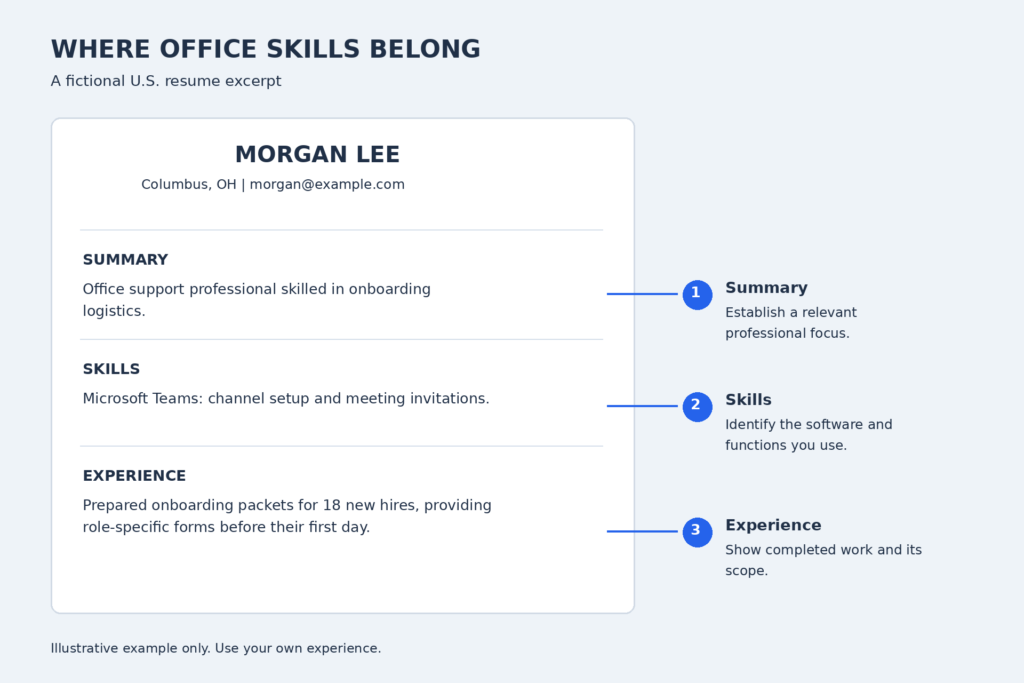
Summary: Office support professional skilled in onboarding logistics.
Skills: Microsoft Teams: channel setup and meeting invitations.
Experience: Prepared onboarding packets for 18 new hires, providing role-specific forms before their first day.
Notice how the summary establishes a focus, the skills line identifies a tool, and the bullet describes completed work. Career level affects the kind of evidence you can provide.
Showcase your team supervision, budgeting, and workplace operations experience with these office manager resume examples.
Office skills resume examples for different experience levels
These fictional excerpts demonstrate three levels of responsibility. They are short samples, not complete resumes; use them as models for structure.
Entry-level candidate: campus volunteer
Focus: event registration, shared-file collaboration, and written instructions.
- Collected registration forms for a 75-person campus workshop and organized attendee names by session.
- Created a Google Docs arrival guide covering room locations, accessibility entrances, and check-in procedures.
Place this under Volunteer Experience or Campus Involvement, with the organization and dates. The label makes the source of the experience clear.
Experienced office assistant
Focus: travel arrangements, reimbursement review, and follow-up correspondence.
- Arranged airfare, hotel bookings, and itinerary packets for 12 employees attending an annual conference.
- Reviewed 40 reimbursement submissions per month and emailed itemized correction requests for incomplete forms.
The first bullet shows a coordinated assignment; the second demonstrates a recurring workload. Together, they provide more context than a list of routine duties.
Office manager
Focus: contract evaluation, facilities coordination, and team supervision.
- Compared proposals from four cleaning contractors and negotiated a service agreement that lowered annual costs by $3,200.
- Supervised a three-person support team and introduced a facilities issue log that assigned ownership of maintenance requests.
This excerpt moves toward decisions about resources and responsibility for other employees. The change in scope communicates seniority without relying on adjectives such as “dynamic” or “exceptional.”
When adapting any example, preserve your own role in the work. A team achievement needs wording that explains the part you handled.
How to turn office skills into strong resume bullets
Use action + task or tool + scope + result as a writing guide. Begin with a verb, identify the work, and add enough detail to show its scale or effect.
Scheduling
Weak: Responsible for scheduling.
Stronger: Coordinated weekly appointments for six consultants, resolving booking conflicts before calendars were finalized.
Records accuracy
Weak: Updated files.
Stronger: Audited 180 supplier records against signed agreements and corrected 24 outdated contact entries.
Customer communication
Weak: Answered customer questions.
Stronger: Explained application requirements to visitors and provided a written next-step checklist for incomplete submissions.
The first rewrite clarifies who received support. The second measures the work completed. The third identifies a useful deliverable without attaching a percentage.
Use only figures you can explain and support. If no measurable result is available, finish with a clear scope or output:
Sorted incoming mail for two departments.
That sentence describes a real task without inventing an efficiency improvement. Depending on the vacancy, a simple, relevant contribution can be more useful than an impressive but unsupported claim.
Draft your office skills bullet
Enter short phrases. Result is optional. The tool arranges your wording; edit the sentence before using it.
The generated sentence is a starting point. Read it aloud and remove any words that make the meaning harder to understand.
Mistakes to avoid when listing office skills
Check these four issues before submitting your application:
- Broad software claims: Replace “computer literate” with the program and functions you use.
- Unrelated items: Remove abilities that take space away from the vacancy’s priorities.
- Unexplained soft skills: Support “teamwork” or “adaptability” with a situation showing what you did.
- Unclear proficiency labels: Replace “expert” or “advanced” with a precise description of your capability unless the label is justified.
Also check spelling in product names and consistency in job titles. Small editing errors can undermine an application for work involving careful document handling.
FAQ
These answers address the remaining decisions about the size and content of your skills section.
1. How many office skills should I put on a resume?
There is no fixed number. Six to ten relevant items can be an editorial starting point, not a hiring rule. Adjust for the vacancy and available space.
2. What office skills can I list without office experience?
Include abilities developed through coursework, volunteering, clubs, or personal projects. A completed project is useful evidence; attending a course alone may not demonstrate practical proficiency.
3. Should I write “Microsoft Office” or name individual programs?
Name individual programs when their differences matter to the role. If the posting uses “Microsoft Office,” you can write “Microsoft Office: Word, Excel, and Outlook,” including only those you know.
Use one target posting to make your final selection. Keep the abilities that fit, place them where readers can find them, and give your strongest contributions room to speak