

Your first interview can feel unfamiliar, especially when your resume contains more coursework than employment. What will you talk about? How formal should you sound? And what happens if the screen freezes halfway through an answer?
You do not need an impressive job title to contribute something worthwhile. You need relevant evidence, thoughtful preparation, and a clear explanation of what you can offer. These virtual interview tips for students will help you turn everyday experience into convincing answers and approach an internship, campus position, or first-job interview with a practical plan.
Know your virtual interview format before you prepare
In a live interview, you speak with someone in real time. In a one-way interview, you record responses to prompts without an interviewer present. The invitation should explain which format applies.
Treat that message as your starting document. Confirm the date, time zone, platform, expected duration, and any access instructions. For a recorded assessment, identify the submission deadline, preparation time, response length, and retake policy.
If something is unclear, send a focused question: “Could you confirm whether this assessment is recorded or a live conversation?”
Once the arrangements are clear, move on to the substance: understanding the opportunity and selecting evidence that supports your application.
Prepare for a virtual interview using your student experience
Begin with the job description. Pick three responsibilities that seem central to the position, then investigate what the organization actually does. Its product pages, recent announcements, and team information can help you understand the work beyond the vacancy title.
Next, look through your own experience. A laboratory assignment may demonstrate accuracy; volunteering could reveal patience; a campus event might show how you organize competing priorities.
Use this worksheet to build the connection:
| Job requirement | My student experience | Action and result |
|---|---|---|
| Accurate recordkeeping | Treasurer for a student society | Reconciled receipts against the event budget and identified a duplicate reimbursement before payment. |
| [Requirement from the posting] | [Relevant activity] | [Your contribution and its outcome] |
Choose an example where you can explain your own contribution without relying on what the group accomplished collectively.
Build a small bank of three stories: a challenge you resolved, a responsibility you managed, and a situation that taught you something. Each should have enough detail to withstand a follow-up question.
Practice explaining them aloud in different ways. Ask a friend to interrupt with “Why did you choose that approach?” or “What would you change?” This helps you become comfortable discussing your experience rather than reciting a polished paragraph.
Set up your space, camera, and audio
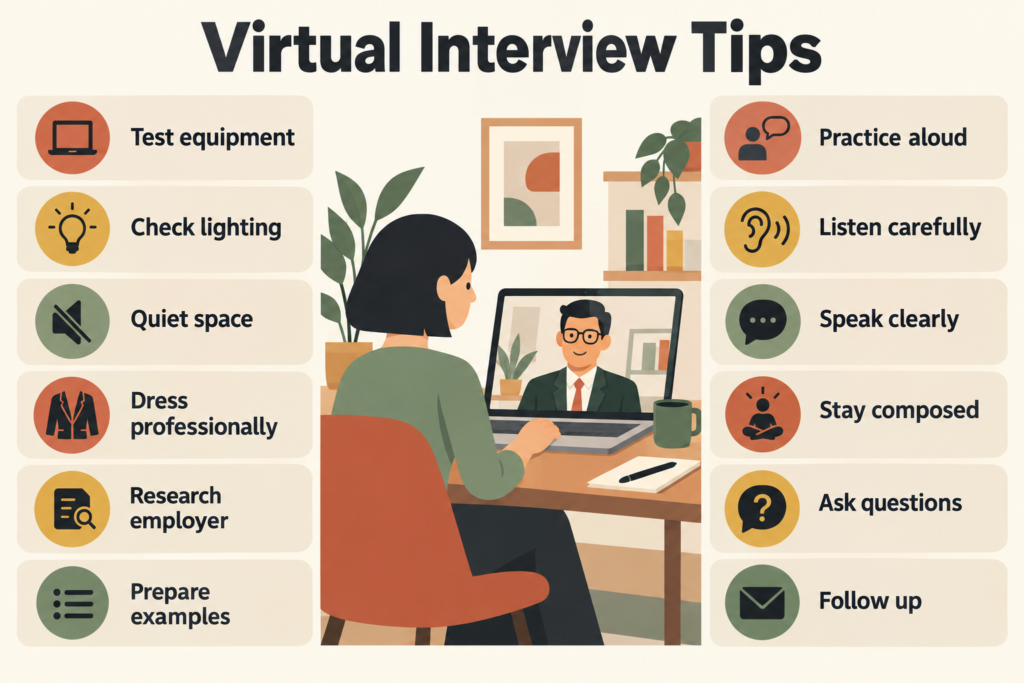
Use the device and location you intend to use on interview day for a short test call. Open the actual platform, confirm its permissions, and listen to a sample recording. A working camera does not guarantee that the correct microphone is selected.
Charge your device and check the connection where you will sit. Place the camera near eye level and put your main light in front of you. A bright window behind your chair can make your face difficult to see.
Choose an uncluttered background, reduce nearby noise, and close applications that might send alerts. Let anyone sharing the space know when you need quiet.
Ask your campus career center whether interview rooms are available if your accommodation is unsuitable. USC, for example, offers students a room reservation option.
The goal is a setup you can operate comfortably, without adjusting it throughout the conversation.
Choose what to wear and what to keep nearby
Choose clothing that fits the role and the employer’s level of formality. When uncertain, a neat shirt with simple trousers is a practical starting point. Dress fully so standing up unexpectedly will not become a distraction.
Keep your resume, the job description, water, and a small prompt sheet within reach. A useful sheet might contain three story labels and the questions you want to ask.
Use keywords rather than complete answers. Searching through paragraphs can pull your attention away from the interviewer. For a test or assessment, check whether reference material is permitted before keeping it open.
Answer virtual interview questions when you have little work experience
Give the interviewer a clear starting point instead of opening with an apology about your background. For “Tell me about yourself,” connect your current studies, a relevant interest, and the opportunity ahead.
Sample introduction
“I’m a second-year economics student, and I’ve become interested in how people use data to make everyday business decisions. In a recent independent assignment, I compared local grocery prices and explained the patterns in a short report. I’m looking for an analyst internship where I can develop that interest through practical work and feedback.”
For a behavioral question, briefly describe the situation and your responsibility, spend most of the answer on your actions, then explain the outcome. This structure gives an unfamiliar listener enough context to follow your reasoning.
Consider this internship question: “Tell me about a time you took initiative.”
Weak answer
“I’m proactive and always willing to help. I usually do more than people expect.”
Stronger answer
- Context: “At our volunteer book drive, donations arrived without age-group labels.”
- Action: “I suggested sorting categories and made signs so volunteers could place books consistently.”
- Result: “We completed the sorting before collection, and the coordinator kept the signs for the next drive.”
The stronger version lets the listener assess a specific decision rather than accept a personality claim.
When asked why you want the role, name a genuine connection:
“Your outreach internship includes helping first-year students find support services. I remember finding those services confusing when I arrived, so I’m interested in making the information easier to navigate.”
These examples are fictional models. Replace their details with your own experiences, and use numbers only when you can explain how you know them.
Communicate clearly during the virtual call
A video conversation has a slightly different rhythm from an in-person meeting. Let the interviewer finish, then take a brief pause before responding. This is particularly helpful when the connection introduces a delay.
Speak in manageable sentences and allow your voice to vary naturally. You can sound interested without rushing or filling every silence. If you need a moment, say, “Let me think of the most relevant example.”
Look toward the camera at natural points, especially when introducing yourself or making an important statement. Return to the screen to read the interviewer’s reactions; continuous staring into the lens is unnecessary.
If the question has several parts, answer them in order. You can signpost the transition with “On the second part of your question…”
In a panel interview, begin your response by acknowledging the person who asked the question. If other participants introduce themselves, note their names so you can address them accurately later.
Finish when your point is complete. Let the interviewer decide whether to explore it further instead of adding another example just to fill the pause.
Handle interruptions and technical problems calmly
An unexpected problem does not require a long explanation. Identify what happened, take the next useful action, and return to the interview.
Use these three scenarios to rehearse a simple recovery:
| Situation | Immediate action | What you could say |
|---|---|---|
| The connection drops | Try to rejoin. If that fails, contact the recruiter using the details in your invitation. | “The call disconnected, and I’m trying to rejoin. Please let me know if you’d prefer another way to continue.” |
| Someone enters the room | Ask for a moment and address the interruption. | “Excuse me for a moment while I handle an interruption.” |
| Part of a question is inaudible | Request the missing wording before answering. | “The audio cut out after you mentioned the deadline. Could you repeat that part?” |
For a recorded assessment, use the platform’s support instructions if a failure prevents completion. Keep a record of any error message and the time it occurred so support staff have something specific to investigate.
Once the issue is resolved, pick up from the last clear point. A brief recovery usually communicates more composure than repeated apologies.
Ask useful questions before the interview ends
Your questions can help you decide whether the opportunity offers suitable work and support. Choose something the conversation has not already covered.
These prompts explore three different areas:
The work: “What is one project the person in this position could contribute to during the first month?”
Training: “How do new interns receive guidance when they encounter an unfamiliar task?”
Success: “By the end of the placement, what would make you say someone had done well?”
Before signing off, clarify the next step and expected decision timeline. That gives you a basis for judging when a later status inquiry would be appropriate.
Follow up after the virtual interview
For a live interview, send a concise thank-you email within 24 hours. Mention one conversation detail and confirm your interest without reproducing your entire application.
Subject: Thank you — [Role] interview
Hi [Name],
Thank you for speaking with me today. Your explanation of [specific project] helped me understand how interns contribute to the team.
I remain interested in the position. Please let me know if you need anything further from me.
Best,
[Your name]
After sending it, make a private note of one answer you would improve next time. Write the missing detail while you still remember it. For a recorded submission, keep the confirmation message and follow the employer’s contact instructions.
FAQ
1. What should I say if I have never used a required tool?
Be direct about your current knowledge. You might say, “I haven’t used that software yet, but I understand what it is used for and would need training to work with it.” If you have used a related tool, explain the connection without presenting the two as interchangeable.
2. Can I interview on my phone?
Yes, if the platform supports it and the employer allows it. Secure the phone on a stable stand rather than holding it. Check whether the interview requires screen sharing, document viewing, or another task that would be awkward on a small display.
3. How early should I join?
A practical target is about five minutes before a live interview, unless the invitation says otherwise. You may enter a waiting room before the host admits you. If you arrive early and find another conversation underway, leave and return at the scheduled time.
4. What if I need an interview accommodation?
Contact the recruiter before the interview and describe the adjustment you need, such as captions, an accessible platform, or additional processing time. Ask how to arrange it and obtain confirmation. For a timed assessment, do not assume the timer can be paused without an agreed adjustment.