

To create a ChatGPT resume, provide your actual experience and a target job description, then ask for a draft that uses only those facts. Review every statement, remove unsupported additions and check the finished document before applying.
Start with an existing resume or rough notes about your work, education and projects. ChatGPT can help you organize that information, revise unclear wording and identify experience relevant to a particular opening. You still need to confirm that the result accurately represents you.
A useful prompt starts with four things
Your task + your experience + the target job + clear instructions. Tell ChatGPT what you want to change, provide the relevant facts and specify what it must preserve.
Before accepting a suggestion, check whether it adds a skill, changes your responsibility or claims a result you cannot support. Clearer wording should still describe the work you actually did.
ChatGPT Resume Prompts You Can Copy
Choose the task you need help with, then copy the prompt into ChatGPT. Replace the instructions in square brackets with your own information before sending it.
Share only the information needed for the task. Remove private contact details and confidential work information from anything you paste or upload.
Write a resume from scratch
Use this when you have notes about your background but have not written a resume yet.
Check the result: confirm the dates, titles and qualifications before reviewing the wording.
Improve an existing resume
Use this to identify useful changes before asking for a rewrite.
Check the result: decide whether each change makes your experience clearer. You do not need to accept every suggestion.
Rewrite work experience
Use this for a few experience statements or notes about one job.
Check the result: watch for changes such as “helped” becoming “led,” or a task becoming a claimed improvement without supporting information.
Write a resume summary
Use this after you have written your experience, skills and education sections.
Check the result: every qualification in the summary should match something you have actually done or learned.
Tailor a resume to a job description
Use this to decide which parts of your experience to emphasize.
Check the result: a requirement in the posting is not proof that you have that qualification.
Review a resume
Use this for a final content review before checking the finished document yourself.
Check the result: compare factual concerns with your own records. Check page breaks, links and spacing in the final file separately.
Write a resume with no paid experience
Use this if your experience comes from education, projects, volunteering or school activities.
Check the result: keep the setting clear. A class project should still be described as a class project.
Explain skills for a career change
Use this to connect tasks from your previous work with the responsibilities of a different role.
Check the result: the suggested wording should explain the connection without making your previous job sound like a different job.
Review before using: these prompts ask ChatGPT to preserve your information, but you still need to check the response. Remove anything you cannot explain or support.
How to Use ChatGPT to Write a Resume
Start with your own information and work through one section at a time. Check each revision before asking ChatGPT to continue. This makes changes to your experience easier to notice.
Gather your experience and the job description
Write down your job titles, dates, tasks, tools and relevant qualifications. Add results or work volumes when you know them. Keep estimates clearly marked as estimates.
Save the job description too. It will help you choose which parts of your experience matter most for this application. If you need help identifying relevant abilities, see what skills to put on a resume.
What to record: the task, the tool you used, your part in the work and any result you can support. A result is useful, but you do not need to invent one when it is unknown.
Remove private or confidential information
For drafting, you can replace your name, phone number and email address with placeholders. Add the final contact details in your document editor afterward.
Do not share customer details, private information about colleagues, internal documents or figures your employer does not allow you to disclose. Replacing a company name does not make confidential material safe to share.
Explain the task and set clear limits
Tell ChatGPT which role you are applying for and whether you want a first draft, a revision or feedback. Provide the information needed for that task.
Ask it to preserve your facts and question missing details. Make clear that it must not add qualifications, tools, numbers or results. The copyable prompts above include these instructions.
Draft and review one section at a time
Begin with work experience or projects. Compare the draft with your notes and correct any changes in meaning before moving to the next section.
Write the summary after the supporting sections. Check that it describes experience and skills already shown elsewhere in your resume.
Watch the level of responsibility: if you helped prepare a report, a revision should not say you led the reporting team.
Choose the experience that matches the opening
Compare your draft with the job description. Give more space to relevant work and shorten details that add little to this application.
Use the employer’s terms when they accurately describe your experience. If the posting asks for a tool you have never used, leave it out rather than adding it to improve the apparent match.
Verify the content and check the final file
Check names, dates, titles, qualifications and numbers against your records. Read each experience statement aloud and confirm that you could explain it in an interview.
Then check the formatted document. Remove placeholders and editing notes, inspect page breaks and open the exported file. Follow the employer’s instructions for the file type and application details.
Keep your original notes. Use them to check revisions, and save the resume you submit alongside the job description so you can refer to both before an interview.
ChatGPT Resume Example: From Notes to Finished Draft
This example shows how the same information can become a clear resume draft. You can compare the starting notes, the writing prompt and the proposed resume.
Illustrative example: Taylor Morgan and the background below were created for this explanation. The draft shows acceptable wording based on those notes; it is not a recorded ChatGPT response or a hiring result.
The information used
These notes set the limits for the draft. They include what the applicant did and what they cannot claim.
A prompt for these notes
The prompt asks for a short draft and makes the limits clear. Replace the example background with your own before using it.
A resume draft based on the notes
This is a compact example of the resume content. It does not add qualifications or results that are missing from the notes.
Check whether a revision changes the facts
A sentence can sound professional and still misrepresent the applicant. Compare each claim with the original notes.
| Proposed wording | Decision | Reason |
|---|---|---|
| Handled approximately 40 customer emails per working day. | Keep | Matches the notes and preserves the estimate. |
| Reduced response times by 40%. | Remove | No response-time result was supplied. |
| Led the implementation of a new support system. | Remove | Suggesting a checklist does not establish leadership of a software implementation. |
| Used SQL to analyze customer issues. | Remove | The notes say the applicant has not used SQL. |
| Suggested a request-tagging checklist that the team adopted. | Keep | Describes the contribution without inventing a result. |
How to Tailor Your Resume to a Job Description
Give ChatGPT your resume and the job description, then ask it to compare the requirements with your experience. Use that comparison to decide what to emphasize, what needs more detail and which qualifications you have not shown.
Copy the full job description rather than providing only the job title. Two jobs with the same title can involve different tools, responsibilities and qualifications.
Example: comparing Taylor’s resume with a posting
This illustrative posting asks for customer email support, Zendesk experience, weekly issue reports and SQL. Taylor’s notes from the previous section support some of these requirements, but not all of them.
| Job requirement | What Taylor’s notes show | What to change or check |
|---|---|---|
| Customer email support | Answered approximately 40 customer emails per working day. | Keep this experience near the top of the work section. Preserve “approximately” when describing the volume. |
| Zendesk experience | Used Zendesk to tag requests and escalate billing questions. | Name Zendesk and describe those tasks. Do not add system administration or other functions Taylor has not used. |
| Weekly issue reports | Maintained a weekly issue log in Excel. | Ask whether Taylor also prepared or shared reports. Maintaining a log does not establish that responsibility. |
| SQL | The notes say Taylor has not used SQL. | Leave SQL out of the skills section. Check whether the posting lists it as required or preferred before deciding how to proceed with the application. |
Use the comparison to make specific changes
- Put relevant experience first. Within each job, lead with the tasks most relevant to the opening. Keep employment dates and job titles accurate.
- Use clear, accurate terms. If you have used the software named in the posting, name it directly. Do not replace your actual tool with a different product just because the employer requests it.
- Answer questions before accepting additions. If ChatGPT suggests a responsibility that is missing from your resume, confirm whether you actually performed it. Add the detail only when it is true.
- Keep relevant supporting experience. Do not remove every task that the posting does not mention. Keep details that help explain your work or demonstrate useful abilities.
Our guide to resume keywords explains how to choose relevant terms and use them in context. A keyword should describe something you can do, not simply something the employer wants.
Missing from the resume does not always mean missing from your experience. Check your own records and notes before deciding. If you do not have the qualification, keep that gap clear rather than asking ChatGPT to write around it.
How to Review Your Resume With ChatGPT
Already have a draft? Ask ChatGPT to point out problems before you ask it to rewrite anything. That way, you can see what it wants to change and decide whether the suggestion makes sense.
Use the resume review prompt above. Include the job description so the feedback relates to the job you want.
What should you ask it to check?
| Check | What ChatGPT can look for | What you need to confirm |
|---|---|---|
| Clear wording | Long sentences, repeated phrases or descriptions that do not explain what you did. | Does the new wording still describe your work correctly? |
| Job match | Relevant experience that is hard to find or needs more detail. | Have you done the work it suggests adding? |
| Dates and titles | Different date styles, overlapping dates or job titles that change between sections. | Are the details correct? Two jobs can overlap, so an overlap alone does not prove there is a mistake. |
| Spelling and grammar | Typos, missing words and inconsistent punctuation. | Has it kept names, software names and other important terms correct? |
Read the feedback before accepting it
Look for comments that explain a specific problem. “This sentence repeats the previous one” gives you something to check. “Your resume needs more impact” does not explain what to change.
If a suggestion is unclear, ask which sentence it refers to and what information is missing. Do not add a number or a result just because the feedback asks for one.
What about an ATS score?
An applicant tracking system, or ATS, is software employers use to manage applications. ChatGPT does not know how a particular employer has set up its screening process.
If it gives your resume a score such as “85% match,” do not treat that as the employer’s score or your chance of getting an interview. Ask it to show which job requirements your resume supports and which ones need checking.
Check the finished file yourself
A review of the text does not replace a check of the document you will submit. Open that file and make sure:
- Your name and contact details are correct.
- The section headings are easy to find.
- No text is cut off or pushed onto an unwanted extra page.
- Links open the right pages.
- No placeholders, comments or editing notes remain.
- The file type matches the employer’s instructions.
One last check: read your resume aloud. If you cannot explain a sentence comfortably in an interview, check the wording and the facts before keeping it.
Format Your Resume and Choose a Template
Once you are happy with the wording, put it into a resume template. Choose a layout that gives your experience enough room and keeps the text easy to read.
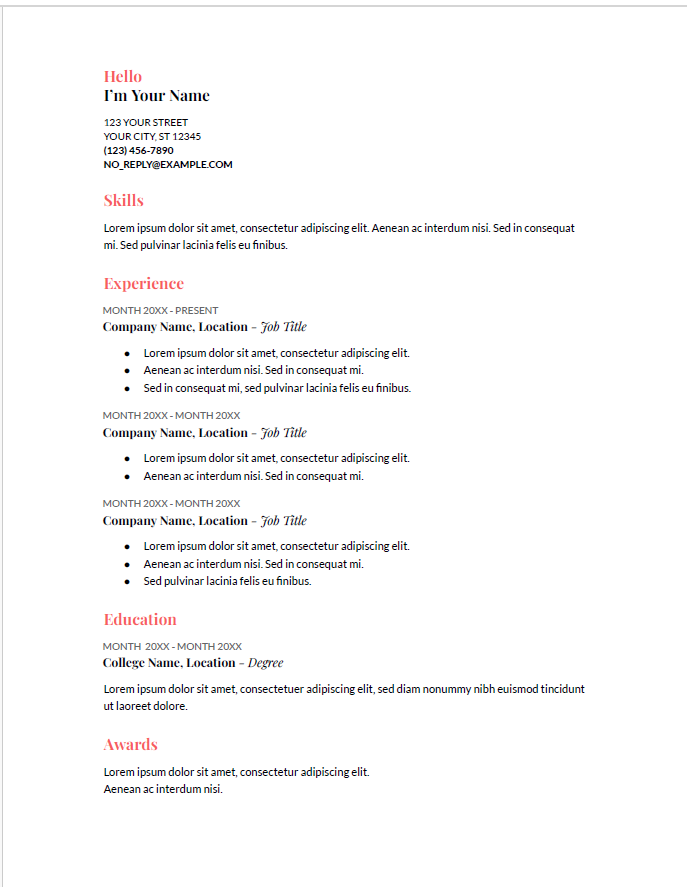
Here are three Google Docs templates you can use. Select an image for a larger preview, or open the template to make your own copy. The links open in a new tab.
 View larger preview
Coral
One main column with colored headings for skills, experience and education.
Open in Google Docs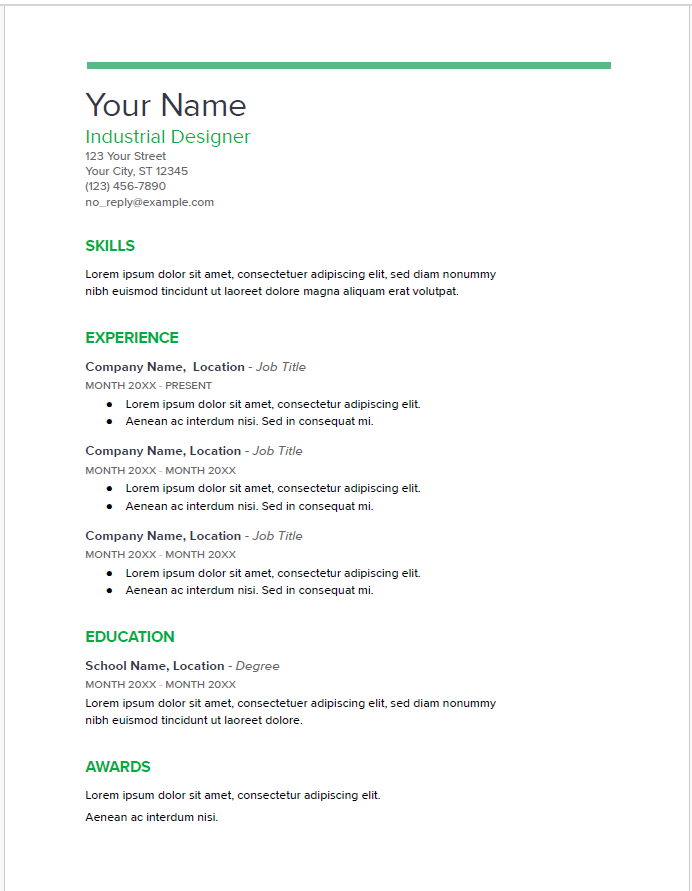 View larger preview
Spearmint
A single-column layout with green headings and a clear space between sections.
Open in Google Docs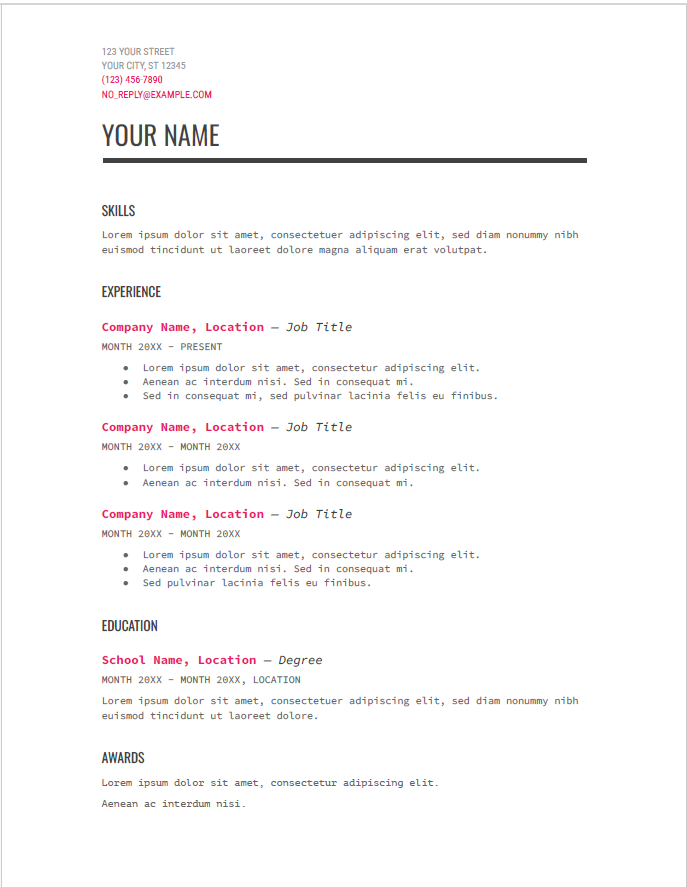 View larger preview
Modern Writer
A single-column design with typewriter-style text and pink accents.
Open in Google DocsThese images show the layout. They are not resume examples to copy word for word. Replace all sample text with your own details, including names, job titles, dates and contact information.
How to add your ChatGPT draft
- Open a template and make your own copy. Sign in to your Google account if asked.
- Replace the sample text section by section. Add your contact details, experience, skills and education. Remove sections you do not need.
- Check the formatting after pasting. If the pasted text changes the font or spacing, use your editor’s option to paste without formatting.
- Read the whole document. Check for leftover sample text, awkward page breaks and headings separated from the text below them.
Want more choices? Browse our Google Docs resume templates. If you prefer Word, use one of our Word resume templates.
Keep the layout easy to read
- Use clear headings such as Experience, Education and Skills.
- Keep body text consistent in size and style.
- Leave enough space between sections.
- Keep important details as text rather than adding them inside an image.
- Shorten repeated wording before making the text smaller to fit the page.
Should you send a PDF or Word file?
Start with the employer’s instructions. If the application asks for a Word file, send a DOCX file. If it asks for a PDF, send a PDF.
Keep an editable copy for future changes. Open the file you plan to submit and check that the text, dates and page breaks still look right.
If either format is accepted, our guide to PDF vs. Word for your resume explains the differences.
ChatGPT Resume Mistakes and Privacy Checks
Before you use the draft, compare it with your own notes. Even a small change can make a sentence say more than you meant. These are the main problems to watch for.
1. Keeping numbers you did not provide
Do not keep a percentage, sales figure or time-saving claim unless you know where it came from.
Your note: you answered customer emails.
An unsupported addition: the draft says you improved customer satisfaction by 30%.
Remove the added result. If you have a real figure, provide it with enough context to explain what it measures.
2. Making your role sound bigger than it was
Check words such as “led,” “managed” and “created.” They should describe what you actually did.
Your note: you helped your manager prepare a monthly report.
An unsupported addition: the draft says you managed monthly reporting.
Keep your part clear. Helping with important work is still useful experience; you do not need to claim ownership of it.
3. Adding skills just because the job asks for them
A job description tells you what the employer wants. It does not tell ChatGPT what you can do.
If the draft adds unfamiliar software, a qualification you do not hold or a task you have never done, remove it. If you are still learning a skill, describe that honestly when it is relevant.
4. Using impressive words that say very little
Phrases such as “results-driven professional” do not explain your experience on their own. Look for the task behind the claim.
What did you handle? Which tool did you use? Who did you help? Add the answers you know, and remove wording that does not help the reader understand your work.
5. Sending the same draft to every employer
You can reuse your work history, but check the job description before each application. Bring the most relevant experience into view.
Also check for company names, job titles and instructions left over from an earlier draft.
Check what you are about to share
Before pasting text or uploading a file, remove information that is private, confidential or unnecessary for the task:
- Government identification numbers.
- Bank details, passwords or account information.
- Private contact details for references or colleagues.
- Customer, client or patient information.
- Internal documents you do not have permission to share.
- Nonpublic figures or details about your employer’s work.
Use placeholders for contact details while editing. Replacing a company or customer name does not remove every privacy concern from the rest of the text.
Harvard’s guidance on AI for resumes and cover letters also advises against sharing personal or proprietary information.
Keep this simple: if a sentence includes something you did not tell ChatGPT, check it. If you cannot support it, change it or remove it.
Do Employers Care If You Use ChatGPT?
There is no single answer for every employer. Read the application instructions and follow any rules about AI use. Whatever help you use, the resume must describe your own experience accurately.
Is it wrong to use ChatGPT for a resume?
Using it to suggest clearer wording is different from asking it to invent qualifications. You can use the draft to improve how you explain your work, while checking that every claim is true.
If an employer says not to use AI for the application, follow that instruction. Do not assume that advice for one employer applies to every other application.
Do you need to tell the employer?
Check whether the application asks about AI assistance or requires you to disclose it. Follow those instructions and answer honestly if asked.
Explain what you actually used it for, such as checking grammar, suggesting edits or comparing your resume with the job description. Do not describe a full AI-written draft as a spelling check.
What if your resume sounds too polished?
Read it aloud. Keep words you understand and sentences you would feel comfortable explaining. Replace broad praise with details about your work.
Before keeping a sentence, ask:
- Did I do this work?
- Does this describe my part correctly?
- Can I explain the number or result?
- Could I give an example if an interviewer asked?
Check each stage separately. Instructions for a resume may differ from the rules for a writing test, interview or work sample. Read the rules for that task before using AI.
ChatGPT Resume FAQs
Here are answers to a few common questions about writing and editing a resume with ChatGPT.
Can ChatGPT write my entire resume?
Yes, it can help draft the sections from information you provide. Start with your work history, education, skills and the job you want.
Check the draft before using it. ChatGPT cannot confirm your work history for you, and it may add details you did not provide.
Can I upload my resume instead of pasting it?
Yes, if file uploads are available in your account. Remove private or confidential information first, then explain what you want ChatGPT to check.
For a small change, you can paste just the section you need help with. You do not have to share the whole file.
Can I use ChatGPT for resume writing for free?
You can use a free ChatGPT account to ask for help with resume wording. Usage limits apply, and access to tools such as file uploads can vary.
Start by pasting a short section and asking for one clear change. Check the current options in your account before deciding whether you need a paid plan.
Can ChatGPT create a Word or PDF resume?
When file-creation tools are available, you can ask it to prepare a downloadable resume in the format you need. Check the actual file type and open the result before submitting it.
You can also copy the reviewed text into Word or Google Docs, choose a layout and save the finished resume in the format the employer requests.
Can ChatGPT help if I have no work experience?
Yes. Give it details about projects, coursework, volunteering or activities you have taken part in. Explain what you personally did and which tools or skills you used.
Keep those activities clearly labeled. A school project should not appear as a paid job, and a planned activity should not appear as completed work.
How do I make the wording sound more like me?
Ask for short sentences and familiar words. Read the draft aloud and change anything you would struggle to explain in an interview.
Keep details about your own work. The tools you used, tasks you handled and problems you solved tell the reader more than broad claims about being an excellent candidate.
For current product features, see OpenAI’s guide to using ChatGPT.