Want to create a UX designer resume that lands you a job? This guide will teach you how to showcase your skills effectively, format your work experience, and avoid common pitfalls. Read on to learn the key elements of a winning resume.
Key Takeaways
A strong UX designer resume should effectively showcase skills, experiences, and achievements in a clear, structured, and relevant manner to catch the attention of hiring managers.
Key components of a UX designer’s resume include contact information, work experience, education, skills, and optionally, a short bio, all laid out in an intuitive, visually appealing format.
Tailoring your resume to specific job descriptions, highlighting quantifiable results, and avoiding common formatting mistakes are essential strategies for enhancing the effectiveness and readability of your resume.
UX Designer with 6+ years of experience designing web and mobile products for SaaS and
e-commerce companies. Skilled in user research, information architecture, wireframing,
prototyping, usability testing, and interaction design. Improved task completion, checkout
conversion, and product adoption by translating research findings into practical interface changes.
Core Skills
UX Design: User Flows | Wireframing | Prototyping | Interaction Design |
Information Architecture | Responsive Design Research: User Interviews | Usability Testing | Surveys | Competitive Analysis |
Journey Mapping Tools: Figma | FigJam | Adobe Creative Suite | Miro | Maze | Jira Additional: Design Systems | Accessibility | A/B Testing |
Developer Handoff | Agile Product Development
Professional Experience
Senior UX Designer Northstar Commerce | Seattle, WA March 2023 – Present
Redesigned the mobile checkout experience using usability-test findings and behavioral data, increasing completed purchases by 18%.
Conducted40+ user interviews and usability sessions to identify navigation, search, and account-management issues across the company’s e-commerce platform.
Created user flows, wireframes, interactive prototypes, and detailed design specifications for 12+ product releases across web and mobile.
Expanded the company’s Figma design system with 35+ reusable components, reducing inconsistencies across customer-facing interfaces.
Partnered with product managers, engineers, analysts, and content designers to define requirements and resolve usability issues before development.
Reviewed post-launch analytics and customer feedback to identify improvements for subsequent product releases.
UX Designer BrightPath Software | Portland, OR June 2020 – February 2023
Designed workflows for a B2B project-management platform used by more than 25,000 monthly active users.
Simplified the new-user onboarding flow from eight steps to five, contributing to a 22% increase in onboarding completion.
Planned and moderated usability tests for new dashboard, reporting, and collaboration features before engineering handoff.
Developed wireframes and high-fidelity prototypes in Figma to communicate interaction behavior and responsive layouts.
Collaborated with engineers during implementation to address design questions and verify interfaces against approved specifications.
Documented research findings and presented recommendations to product teams to guide quarterly design priorities.
UX Designer Harbor Digital Studio | Portland, OR July 2018 – May 2020
Designed responsive website and mobile experiences for clients in retail, financial services, healthcare, and professional services.
Created site maps, task flows, wireframes, and prototypes based on project requirements and user research.
Conducted stakeholder interviews and competitive reviews to identify customer needs and define project requirements.
Tested prototypes with target users and revised layouts based on observed navigation and comprehension problems.
Worked with visual designers and front-end developers to prepare design specifications and resolve implementation issues.
Presented design concepts and research findings to clients, explaining decisions with user evidence and project requirements.
Selected UX Project
E-Commerce Checkout Redesign Northstar Commerce
Analyzed analytics, support requests, and usability-test results to identify friction in the existing checkout process.
Redesigned shipping, payment, and order-review screens to reduce unnecessary decisions and form fields.
Built and tested interactive Figma prototypes with 12 participants before development.
Contributed to an 18% increase in completed purchases following the redesigned experience.
Education
Bachelor of Fine Arts in Interaction Design University of Washington | Seattle, WA May 2018
Certifications
Google UX Design Professional Certificate — Coursera Certified Usability Analyst (CUA) — Human Factors International
Entry-level UX Designer with hands-on experience creating user-centered web and mobile
experiences through internships and portfolio projects. Skilled in user research, wireframing,
prototyping, usability testing, and responsive design. Experienced in using Figma and research
findings to identify usability problems and improve digital interfaces.
Core Skills
UX Design: Wireframing | Prototyping | User Flows | Information Architecture |
Interaction Design | Responsive Design UX Research: User Interviews | Usability Testing | Surveys |
Competitive Analysis | Persona Development Tools: Figma | FigJam | Miro | Maze | Adobe Illustrator | Jira Additional: Accessibility | Design Systems | Developer Handoff |
Agile Collaboration
Professional Experience
UX Design Intern Clearview Digital | Austin, TX January 2026 – June 2026
Created wireframes and interactive Figma prototypes for 6 web and mobile product features based on product requirements and user feedback.
Conducted15 user interviews and usability sessions to identify navigation problems and document recurring user concerns.
Revised onboarding screens based on usability findings, helping reduce the average number of steps required to complete account setup.
Collaborated with UX designers, product managers, and developers to prepare user flows and interface specifications for development.
Updated reusable Figma components and documented usage guidelines to maintain consistency across product screens.
UX Design Intern PixelBridge Studio | Austin, TX May 2025 – August 2025
Designed responsive wireframes for client websites across education, retail, and professional service projects.
Reviewed competitor websites and existing customer journeys to identify opportunities for clearer navigation and content organization.
Built clickable prototypes in Figma and incorporated feedback from designers and client review sessions.
Assisted with usability tests by preparing tasks, recording observations, and organizing findings for the design team.
Worked with developers to review implemented pages and document differences between approved designs and final interfaces.
UX Projects
Mobile Budgeting App — UX Case Study Independent Project | 2025
Interviewed8 potential users to understand common challenges with tracking everyday spending and monthly budgets.
Created personas, user flows, and low-fidelity wireframes based on recurring needs identified during research.
Designed a high-fidelity Figma prototype covering account setup, expense tracking, budget creation, and monthly spending summaries.
Conducted usability tests with 5 participants and revised navigation labels and transaction-entry screens based on observed difficulties.
Local Restaurant Discovery Website — Academic Project University of Texas at Austin | 2024
Surveyed30 students about how they search for restaurants, compare options, and select dining locations.
Organized research findings into user needs and developed a site map for the proposed website.
Created responsive wireframes and interactive prototypes for search, filtering, restaurant details, and saved locations.
Tested the prototype with 6 users and revised the filtering system to make cuisine, price, and distance options easier to locate.
Education
Bachelor of Fine Arts in Design University of Texas at Austin | Austin, TX May 2025
Relevant Coursework:Interaction Design | User Experience Design | Visual Communication |
Design Research | Web Design
Certification
Google UX Design Professional Certificate Coursera | 2025
Recent design graduate pursuing an entry-level UX Designer role with project-based experience
in interface evaluation, content organization, accessibility, and digital product design.
Comfortable translating user needs into structured screen layouts and testing design decisions
through coursework and independent projects. Portfolio includes mobile and web case studies
developed from research through final interface concepts.
Public Transit Mobile App Redesign Independent UX Project | 2026
Evaluated an existing transit app using usability heuristics and documented 14 interface and navigation issues affecting trip planning.
Conducted contextual inquiries with 7 public transit users to understand how riders locate routes, check arrival times, and respond to service changes.
Organized observations through affinity mapping and identified recurring needs related to route visibility, alerts, and trip information.
Designed mobile screens for route planning, saved trips, service alerts, and arrival information using Sketch.
Reviewed redesigned screens against WCAG accessibility principles and adjusted text hierarchy, touch targets, and interface labels.
Community Food Bank Website Redesign Academic Project | 2025
Audited a nonprofit website to identify problems with content hierarchy, donation information, volunteer instructions, and mobile navigation.
Completed a content inventory covering 40+ existing pages and reorganized information into a simplified site structure.
Developed screen maps and page layouts for donation, volunteering, food assistance, and contact sections.
Applied mobile-first design principles to improve access to frequently requested information on smaller screens.
Presented the final redesign and supporting rationale to faculty and classmates and incorporated critique into the final project.
Reviewed key shopping pages against WCAG guidelines to identify accessibility barriers affecting navigation and content comprehension.
Documented issues involving heading structure, form labels, keyboard navigation, link descriptions, and image alternatives.
Prioritized findings according to their potential effect on completing common shopping tasks.
Proposed revised interface elements and content treatments for product search, product details, shopping cart, and checkout screens.
Compiled findings into a portfolio case study explaining each identified issue and corresponding design recommendation.
Education
Bachelor of Arts in Digital Design Columbia College Chicago | Chicago, IL May 2026
Relevant Coursework:Human-Computer Interaction | Digital Interface Design | Information Design |
Web Accessibility | Content Strategy | Design Psychology
Certification
UX Design Fundamentals Certificate Interaction Design Foundation | 2026
Academic Activities
Student Design Association Member | 2024 – 2026
Participated in student design critiques focused on digital interfaces, accessibility, typography, and information organization.
Presented academic design projects and incorporated structured peer feedback into subsequent revisions.
Attended portfolio reviews and design workshops led by practicing designers.
Collaborated with students from design and technology programs during campus design challenges.
Additional Knowledge
HTML & CSS Fundamentals | Accessibility Standards | Content Auditing |
Typography | Grid Systems | Design Critique | Digital Content Organization |
Basic Front-End Concepts
Portfolio
jordanmitchelldesign.com Includes case studies covering a public transit app redesign, nonprofit website restructuring,
and e-commerce accessibility review, with project rationale, design decisions, and final interface concepts.
DANIEL BROOKS
Senior UX Designer
San Francisco, CA | (415) 555-0163 | daniel.brooks@example.com Portfolio: danielbrooksux.com | LinkedIn: linkedin.com/in/danielbrooksux
Professional Summary
Senior UX Designer with 9+ years of experience designing complex SaaS, fintech, and enterprise
products. Experienced in product discovery, workflow optimization, design systems, accessibility,
and data-informed design decisions. Led UX initiatives across multi-product platforms, mentored
designers, and partnered with product and engineering teams to improve customer workflows
and product adoption.
Senior UX Designer Vertex Financial Technologies | San Francisco, CA April 2022 – Present
Led UX design for a financial management platform serving more than 85,000 business users, covering reporting, payments, account administration, and financial dashboards.
Restructured a multi-step account setup workflow based on behavioral data and customer feedback, reducing setup abandonment by 24%.
Established interaction patterns and documentation for 50+ shared interface components, improving consistency across three product teams.
Facilitated product discovery workshops with engineering, product, analytics, and customer success teams to define user problems before feature development.
Mentored4 UX designers through design critiques, project reviews, portfolio discussions, and individual development plans.
Used Amplitude and Hotjar data to evaluate released features and identify workflow changes for subsequent design iterations.
Lead UX Designer Meridian Cloud Systems | Oakland, CA February 2019 – March 2022
Directed UX work for enterprise workflow software used by more than 40,000 employees across client organizations.
Simplified a complex reporting workflow, reducing the average time required to generate recurring reports by 31%.
Created service blueprints to document interactions between customers, support teams, administrative users, and platform processes.
Facilitated design workshops with stakeholders to define requirements, prioritize workflow problems, and evaluate proposed solutions.
Introduced structured design critiques for a team of 6 designers, creating a consistent process for reviewing product decisions before development.
Partnered with engineering leads to evaluate technical constraints and adjust interaction designs without removing critical user requirements.
UX Designer Northline Software | San Jose, CA June 2017 – January 2019
Designed account-management and reporting features for a B2B software platform serving small and midsize businesses.
Mapped complex administrative workflows and redesigned screen sequences to reduce unnecessary steps in recurring tasks.
Created interactive prototypes for new product concepts and presented design rationale to product and engineering teams.
Analyzed customer support tickets and product usage patterns to identify recurring interface problems.
Coordinated accessibility reviews and documented interface changes needed to improve keyboard navigation and screen-reader compatibility.
Prepared detailed interaction specifications and reviewed implemented features before production releases.
Selected Leadership Project
Enterprise Design System Expansion Vertex Financial Technologies
Audited interface patterns across 4 product areas to identify duplicated components and inconsistent interaction behavior.
Defined component requirements, usage rules, states, and accessibility considerations with design and engineering teams.
Coordinated adoption of more than 50 standardized components across multiple product workflows.
Created documentation that helped designers and developers determine when and how shared components should be used.
Education
Bachelor of Science in Human-Computer Interaction University of California, Irvine | Irvine, CA June 2017
Professional Development
Design Leadership and Management Certificate — Cooper Professional Education Advanced Accessibility for Digital Products — Deque University
danielbrooksux.com Selected case studies covering enterprise UX, financial technology, workflow optimization,
design systems, accessibility, and UX leadership.
SOPHIA BENNETT
UX/UI Designer
New York, NY | (646) 555-0192 | sophia.bennett@example.com Portfolio: sophiabennettdesign.com | LinkedIn: linkedin.com/in/sophiabennettdesign
Professional Summary
UX/UI Designer with 5+ years of experience creating interfaces for consumer apps,
subscription platforms, and responsive websites. Experienced in translating product
requirements into polished screen designs, interactive experiences, and reusable visual
patterns. Focuses on interface clarity, responsive behavior, typography, motion, and
consistent visual presentation across devices.
UX Researcher with 5+ years of experience studying user behavior for healthcare,
education, and consumer technology products. Plans and conducts qualitative and
quantitative research, synthesizes evidence, and communicates findings to product teams.
Experienced in developing research studies that answer product questions, uncover
behavioral patterns, and support decisions throughout the product lifecycle.
Research Skills
Qualitative Research: Ethnographic Research | Diary Studies |
Field Studies | Focus Groups | Concept Testing | Moderated Research Quantitative Research: Questionnaire Design | Statistical Analysis |
Behavioral Segmentation | Benchmark Studies | Descriptive Statistics Research Operations: Participant Recruitment | Research Protocol Development |
Consent Procedures | Research Repository Management | Study Scheduling Analysis & Synthesis: Thematic Analysis | Coding Frameworks |
Research Triangulation | Insight Synthesis | Research Reporting Research Tools: UserTesting | Lookback | Optimal Workshop |
Qualtrics | SPSS | Airtable | EnjoyHQ
Professional Experience
UX Researcher Medora Health Technologies | Boston, MA September 2022 – Present
Planned and conducted 35+ research studies examining how patients and healthcare professionals use appointment, messaging, and care-management features.
Led diary studies with 40 participants to document patient behaviors and challenges across multi-week healthcare journeys.
Developed questionnaires and analyzed quantitative responses from more than 1,200 users to identify behavioral patterns across customer groups.
Conducted field research with healthcare staff to understand how digital tools fit into existing clinical and administrative processes.
Synthesized qualitative and quantitative evidence into research reports used by product teams to prioritize feature changes.
Established a searchable research repository that organized study plans, recordings, findings, and reports across 50+ completed studies.
User Research Specialist LearnSpring Technologies | Cambridge, MA June 2020 – August 2022
Conducted research with students, instructors, and school administrators to evaluate digital learning products used across 75+ educational institutions.
Designed and moderated focus groups to examine how instructors incorporated digital assignments and assessments into classroom routines.
Ran concept-testing studies to compare early product ideas before teams committed development resources.
Created behavioral segments from research findings to help product teams distinguish the needs of students, instructors, and administrators.
Analyzed open-ended survey responses using structured coding frameworks and summarized recurring themes for product leadership.
Presented research findings to product, engineering, marketing, and customer-support teams through reports and research readouts.
Research Assistant – Human Factors Lab Boston University | Boston, MA August 2018 – May 2020
Supported academic studies examining human behavior and decision-making in digital environments.
Recruited and scheduled more than 150 study participants according to defined research criteria.
Prepared research protocols, participant materials, consent documentation, and study records for faculty-led projects.
Coded qualitative research data using predefined frameworks and reviewed datasets for missing or inconsistent entries.
Assisted with statistical analysis and preparation of research findings for faculty presentations.
Maintained participant records and research documentation in accordance with university research procedures.
Selected Research Study
Patient Communication Behavior Study Medora Health Technologies
Developed a mixed-method research plan to examine how patients selected and used different communication channels when contacting healthcare providers.
Recruited28 participants across multiple age groups and levels of digital familiarity.
Combined diary entries, follow-up discussions, and questionnaire data to identify recurring communication behaviors.
Identifiedsix behavioral patterns affecting how users selected messaging, phone, and appointment-support options.
Presented findings to product leadership and documented research questions requiring further investigation.
Education
Master of Science in Human Factors in Information Design Bentley University | Waltham, MA May 2020
Bachelor of Arts in Psychology Boston University | Boston, MA May 2018
Research Training
Human Subjects Research Certification — CITI Program Applied Quantitative Research Methods — American Statistical Association
Research Platforms & Methods
UserTesting | Lookback | Optimal Workshop | Qualtrics | SPSS |
Airtable | EnjoyHQ | Diary Studies | Ethnographic Studies |
Focus Groups | Field Research | Concept Testing
Portfolio
nataliemorganresearch.com Research case studies covering study planning, field research, diary studies,
quantitative analysis, behavioral segmentation, synthesis, and communication of research findings.
Product Designer with 6+ years of experience designing digital products for SaaS,
marketplace, and consumer technology companies. Experienced in defining product problems,
developing feature concepts, evaluating product performance, and carrying designs from
early exploration through launch. Uses customer needs, product metrics, and business
requirements to make practical design decisions.
Product Designer SummitWorks Technologies | Denver, CO July 2022 – Present
Designed core features for a SaaS operations platform serving more than 60,000 monthly users across small and midsize businesses.
Reworked the trial-to-paid upgrade experience after reviewing customer behavior and product metrics, contributing to a 19% increase in trial conversions.
Defined feature requirements with product managers and engineers before developing concepts for billing, reporting, permissions, and account-management tools.
Evaluated product usage through Mixpanel and FullStory to identify points where customers abandoned or struggled with key workflows.
Ran rapid design experiments to compare potential solutions before committing engineering resources to full feature development.
Reviewed released features against defined product goals and proposed subsequent improvements based on usage patterns and customer feedback.
Product Designer MarketLoop | Boulder, CO March 2020 – June 2022
Designed buyer and seller features for an online marketplace processing more than $25 million in annual transactions.
Developed feature concepts for seller listings, order management, customer messaging, and purchase tracking.
Worked with product managers to define MVP requirements and separate essential functionality from features planned for later releases.
Examined funnel data to identify where customers exited the purchase process and redesigned key decision points within the buying journey.
Participated in design sprints with product, engineering, and business teams to explore and evaluate new marketplace capabilities.
Monitored product adoption after launches and documented opportunities for subsequent feature iterations.
Associate Product Designer Trailhead Digital | Denver, CO August 2018 – February 2020
Developed product concepts for web-based applications used by clients in travel, retail, and business services.
Translated business requirements into feature maps and screen-level product concepts for client review.
Built interactive product demonstrations to communicate feature behavior before engineering development began.
Worked with developers to evaluate technical constraints and modify proposed product behavior when implementation requirements changed.
Supported release reviews by comparing completed features against approved product requirements.
Documented design decisions and product changes throughout development to maintain clear records for project teams.
Sketch | InVision | Mixpanel | FullStory | Linear |
Notion | Productboard | Google Analytics
Portfolio
ethanparkerproduct.com Selected product case studies covering feature definition, product discovery,
experimentation, MVP development, product metrics, marketplace design,
and post-launch iteration.
What Makes a Strong UX Designer Resume?
Creating a standout UX designer resume is about more than just listing your previous jobs. It’s about presenting your skills, experiences, and achievements in a way that tells a coherent story. Clarity, relevance, and demonstration of skills are crucial elements that can make your resume shine. A well-structured resume should clearly present sections like experience, skills, and education to enhance readability and ensure that hiring managers can quickly find the information they need.
Employers appreciate concise resumes that effectively summarize your experiences and skills. To increase your chances of getting noticed, consider the following tips:
Tailor your killer resume according to the specific job description to highlight the most relevant parts of your background.
Use relevant keywords and skills to help your resume pass initial screenings.
Ensure your resume stands out among other applicants by focusing on these key elements.
Remember, proper formatting and a clean design can make a significant difference in how your resume is perceived. A relevant and easy-to-read hierarchy aids in the quick assessment of your resume by hiring managers. Keeping the length of your UX designer resume to one page is often recommended to maintain clarity and avoid overwhelming the reader with too much information.
Focusing on these key aspects will help you create a resume that highlights your qualifications and demonstrates your understanding of design thinking principles and user-centered design principles.
Ready to Land Your Next Job?
Don’t let your resume get lost in the stack. Build a professional, ATS-friendly resume that highlights your leadership, achievements, and industry expertise.
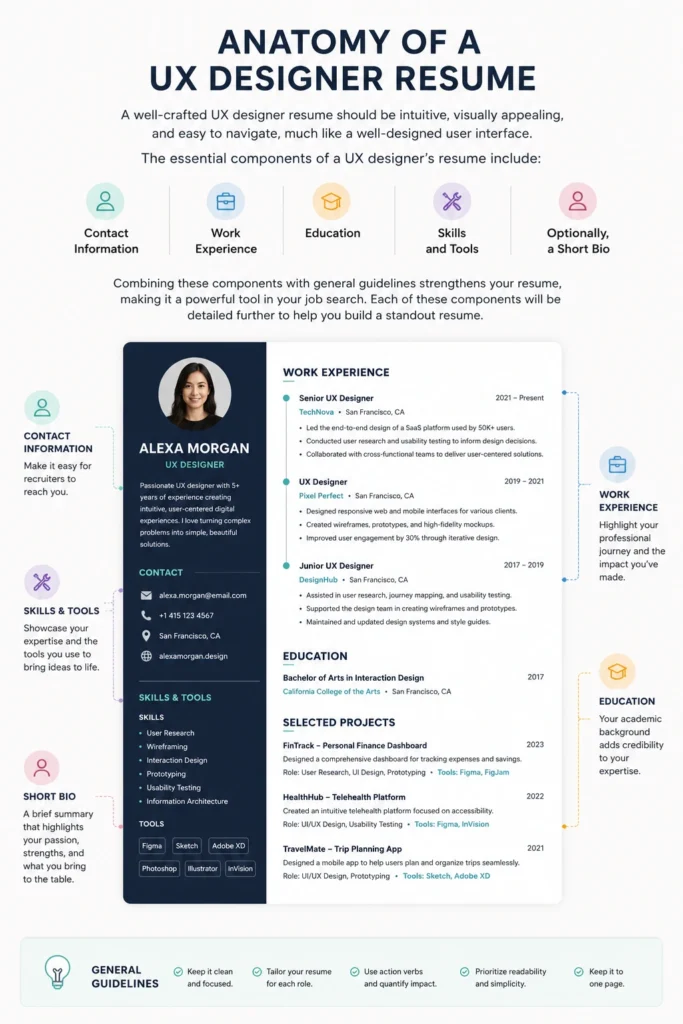
A well-crafted UX designer resume should be intuitive, visually appealing, and easy to navigate, much like a well-designed user interface. The essential components of a UX designer’s resume include:
Contact information
Work experience
Education
Skills and tools
Optionally, a short bio Each of these elements plays a crucial role in painting a comprehensive picture of your professional journey.
Combining these components with general guidelines strengthens your resume, making it a powerful tool in your job search. Each of these components will be detailed further to help you build a standout resume.
Contact Information
Your contact information is the first thing hiring managers will look at, so it needs to be clear and easy to find. Include essential details such as:
Your full name
Phone number
Email
LinkedIn profile
A link to your portfolio.
To make your contact details easily visible and showcase your UX work effectively:
Format your contact details for easy visibility.
Ensure that your name and links stand out.
Present your portfolio link prominently to showcase your UX work from the start.
“Design is not just what it looks like and feels like. Design is how it works.”— Steve Jobs
Work Experience
The work experience section is where you highlight your professional journey. Here are some tips for listing your work experience:
List your work experience in reverse chronological order to help employers quickly identify your most recent qualifications.
Focus on relevant work experience that showcases your skills and contributions in UX design.
Omit unrelated positions, as including them can distract from your qualifications.
Showcase your career progression and relevant experiences to highlight your job title, growth, and leadership abilities.
Maintain clarity and consistent formatting to enhance readability in the same company.
Entry-Level
UX Intern Creative Solutions, Boston, MA | June 2022 – August 2022
Conducted user research and usability testing for a new mobile application, documenting user feedback and identifying usability issues.
Created and refined wireframes and interactive prototypes in Figma to support early-stage design concepts.
Collaborated with UX and UI designers to improve navigation, screen layouts, and interface consistency based on research findings.
Presented design observations and recommendations during team reviews to support revisions before development.
Mid-Level
UX Designer Innovate Tech, San Francisco, CA | January 2018 – Present
Led UX design for multiple digital product initiatives, contributing to a 25% increase in user engagement through improved workflows and interface experiences.
Conducted A/B tests and analyzed user behavior to optimize key user pathways and improve conversion rates.
Developed user flows, wireframes, and interactive prototypes to translate research findings and product requirements into practical design solutions.
Collaborated with product managers, developers, and researchers to refine features from early concepts through implementation.
Mentored junior designers on user-centered design practices, design critiques, and effective documentation.
Education
Your educational background is a vital part of your resume. When listing it, consider the following:
Start with the most recent program.
Include details about your university studies.
Mention relevant courses.
Highlight any notable certificates.
Include UX bootcamps and online courses, as they demonstrate your proficiency in design principles through the projects undertaken during these programs.
[Degree] in [Major] [School Name], [City, State] | [Graduation Year]
Example
Bachelor of Fine Arts in Interaction Design California College of the Arts, San Francisco, CA | 2022
Certifications
Google UX Design Professional Certificate — Coursera | 2021
UX Certification — Nielsen Norman Group (NN/g) | 2022
Ready to Land Your Next Job?
Don’t let your resume get lost in the stack. Build a professional, ATS-friendly resume that highlights your leadership, achievements, and industry expertise.
The skills and tools section is where you list the key skills that make you a great UX designer. Important skills include prototyping, research, user testing, coding, and visual design. Categorize your skills if needed and avoid flashy indicators; instead, use clear terms like intermediate or advanced to indicate tool proficiency levels. Listing tools and skills in a logical order significantly enhances the readability of your resume.
Successful UX designer resumes should emphasize:
Core technical skills, such as user research and wireframing
Essential soft skills like empathy and problem-solving
Familiarity with design skills and design tools like Adobe XD and Sketch
UX design skills in user testing and UX methodologies
Top ATS Keywords for UX Designer
Skill
Frequency
User Research
184
Wireframing
161
Prototyping
138
Usability Testing
115
Interaction Design
115
Visual Design
92
Information Architecture
92
Design Thinking
69
Figma
69
Adobe XD
69
By prioritizing the most relevant skills, you can present a strong case for your capabilities.
Short Bio (Optional)
A short bio is optional but can significantly enhance your resume by highlighting your unique qualities as a UX designer. The bio should showcase your attitude towards UX design, expertise, and key skills relevant to the job.
To write an effective resume bio, review UX designer job postings and draw inspiration from the language used.
Examples of Winning UX Designer Resumes
Sometimes, the best way to learn is by example. Reviewing winning UX designer resumes can provide inspiration and a clear idea of what a successful resume looks like. These examples can help you understand how to present your own experiences and skills in a way that stands out to hiring managers.
In the following subsections, we will explore examples of entry-level, junior, and senior UX designer resumes, including resume examples. By studying these examples, you can enhance your resume and improve your chances of landing your dream job.
Entry-Level UX Designer Resume
For entry-level UX designers, it’s essential to emphasize:
Relevant internships and projects to demonstrate relevant experience.
Educational achievements, methodology, and skills to make a strong impression.
If you lack work experience, consider including the following in your online portfolio:
Free-time design works or pro bono projects to demonstrate your motivation for professional improvement through self-training.
Relevant internships.
Freelance projects and personal projects to showcase practical experience.
Why This Resume Works
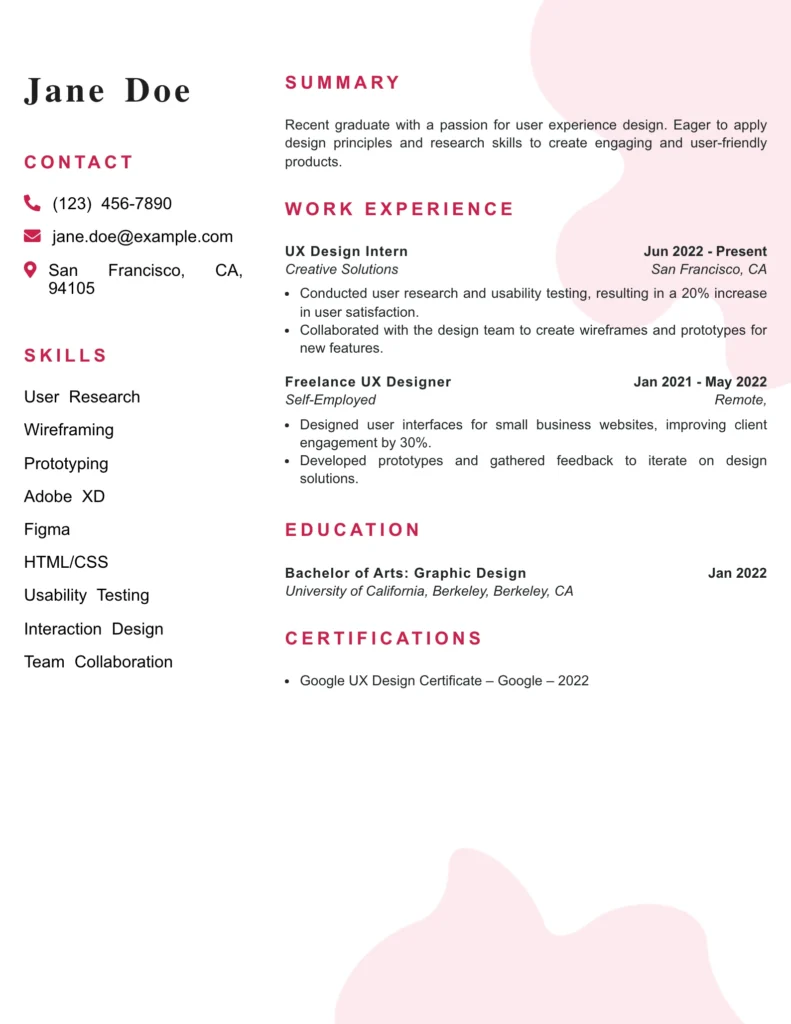
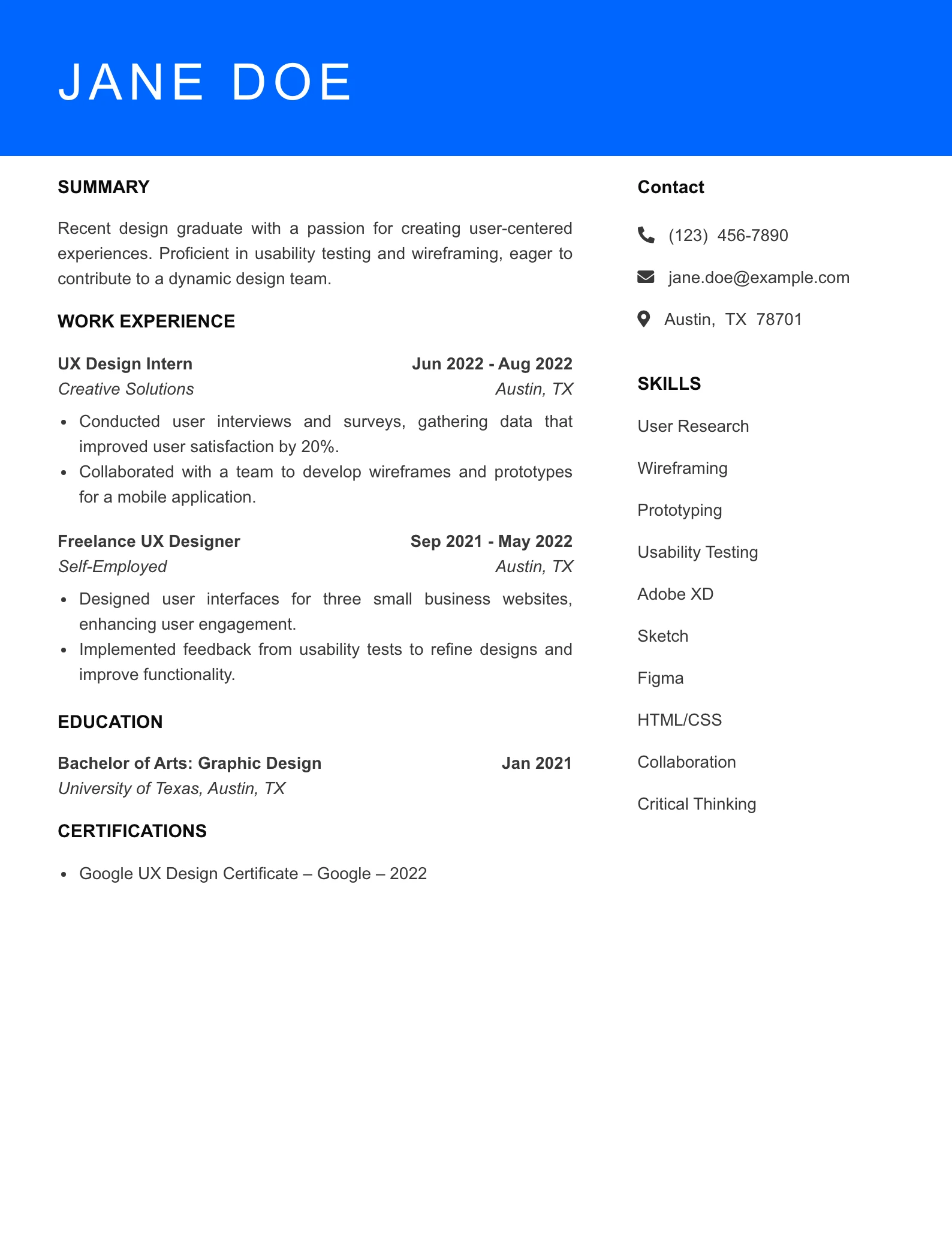
The summary clearly articulates Jane’s recent graduation and passion for user experience design, effectively setting the stage for her qualifications and career aspirations.
Relevant skills are explicitly listed, showcasing a strong foundation in UX design tools and methodologies that align well with industry expectations.
The work history highlights impactful contributions, such as measurable increases in user satisfaction and client engagement, demonstrating Jane’s ability to deliver results.
The resume is suitable for an entry-level position, as it emphasizes relevant internships and freelance work, illustrating practical experience in the field.
Overall clarity and a professional tone enhance the resume, making it easy for hiring managers to quickly assess her qualifications and fit for a UX design role.
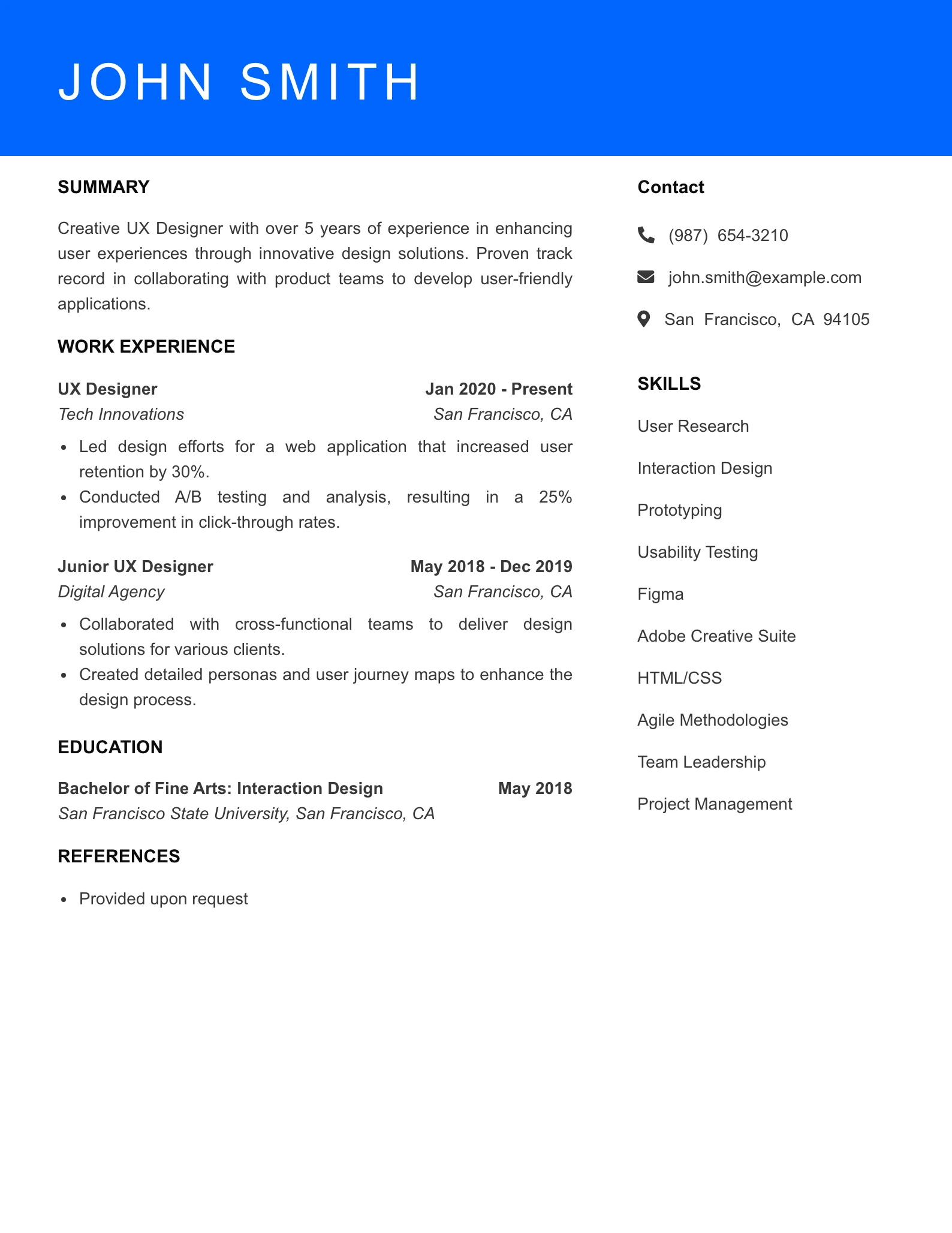
Junior UX Designer Resume
Quantifiable results such as task success rates, error rates, and user satisfaction scores should be highlighted to demonstrate your impact as a junior UX designer. A colorful design can make your resume stand out among others and attract the attention of hiring managers.
A personal bio in your resume conveys your unique UX design attitude, expertise, and skills. Measurable accomplishments like improved user retention and successful product launches are vital in a junior UX designer’s work history.
Why This Resume Works
The summary is clear and directly highlights John’s experience in user-centered design, establishing his qualifications for the role effectively.
The skills section is relevant and comprehensive, showcasing a mix of technical and soft skills that align with the demands of a UX Designer position.
The work history demonstrates impactful contributions, such as a significant increase in user retention and successful product launches, reflecting John’s ability to drive measurable results.
The resume is well-suited for a mid-level position, showcasing over 5 years of experience and a progression from Junior UX Designer to a leadership role, indicating readiness for increased responsibility.
The clarity and professional tone throughout the resume enhance its overall effectiveness, making it easy for hiring managers to assess John’s qualifications and fit for the role.
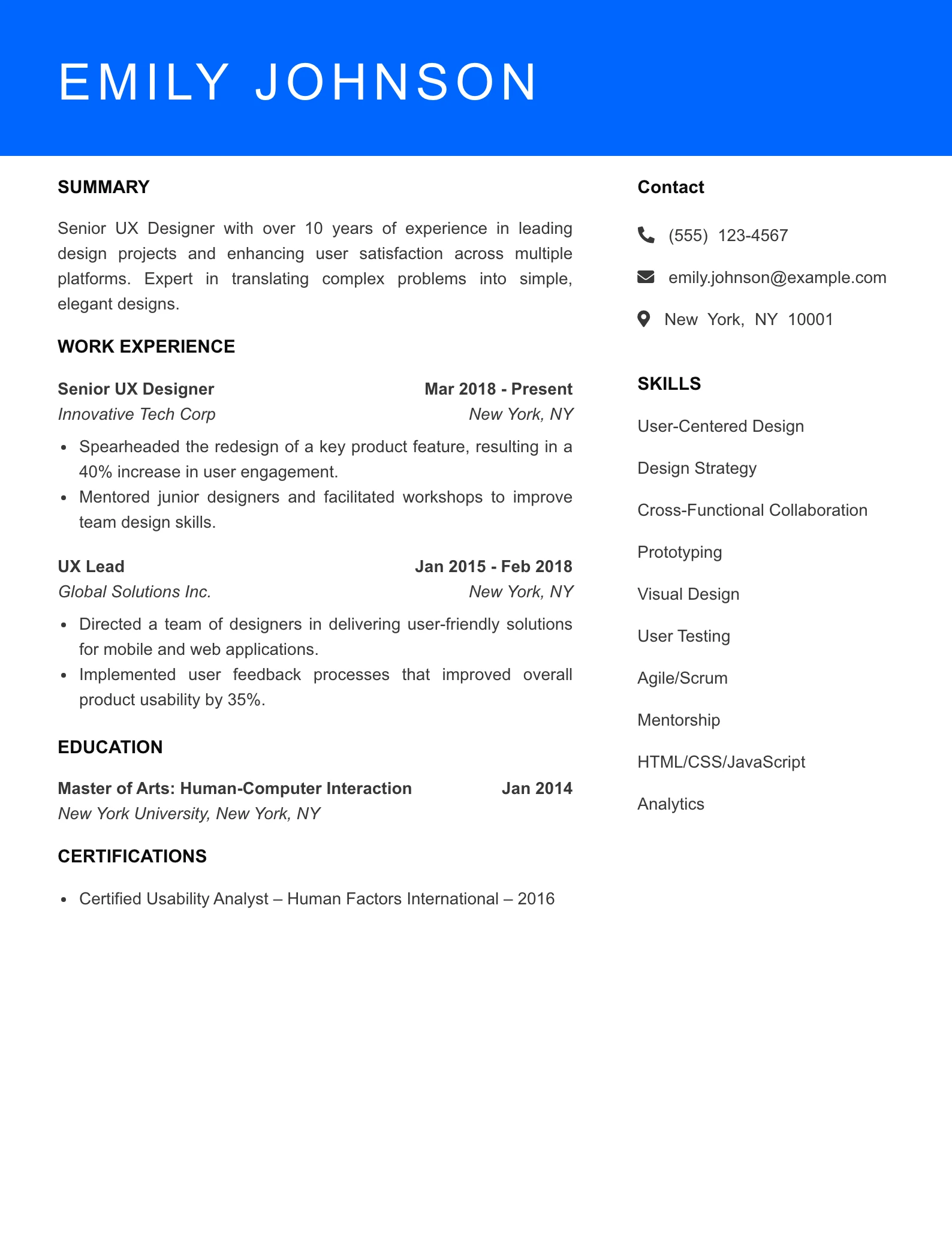
Senior UX Designer Resume
A senior UX designer resume should:
Be easily readable and organized for clarity.
Utilize segmented resumes with line breaks to create visual blocks of related data, enhancing readability.
Emphasize extensive experience and expertise.
Showcase yourself as a results-driven senior product designer professional.
The summary clearly articulates Emily’s extensive experience and expertise in UX design, positioning her as a results-driven professional suited for senior roles.
A comprehensive list of relevant skills aligns closely with industry standards, showcasing her capabilities in both design and leadership, essential for a senior marketing role.
The work history highlights quantifiable achievements that demonstrate her impact on user engagement and conversion rates, underscoring her effectiveness and success in previous positions.
The progression of her roles from UX Designer to Senior UX Designer indicates a strong career trajectory, affirming her suitability for senior-level positions in marketing or UX design.
The clarity and tone of the resume are professional and confident, effectively communicating her qualifications and making a strong impression on potential employers.
Ready to Land Your Next Job?
Don’t let your resume get lost in the stack. Build a professional, ATS-friendly resume that highlights your leadership, achievements, and industry expertise.
Writing Tips for Crafting Your Own UX Designer Resume
Crafting your own UX designer resume involves:
Summarizing your experiences, education, skills, and accomplishments effectively.
Highlighting relevant experiences and skills prominently to direct the reader’s attention.
Using professional templates to streamline the resume creation process by providing structured layouts and design elements.
Many professional templates are tailored specifically for UX roles, including sections that highlight relevant skills and experiences for ux professionals. Maintain a single-page format for your ux designer resume template to keep it concise and relevant.
Tailoring Your Resume to Job Descriptions
Tailoring your resume to the job description is crucial for UX designers. To ensure your resume stands out, consider the following:
Strategically include relevant information within a limited space.
Include specific keywords and information relevant to the job posting.
Enhance your chances of passing initial screenings by aligning your resume with the job requirements.
Referencing job descriptions can guide the creation of a compelling resume header that aligns with employer expectations. Utilize descriptive keywords from the job posting to make your resume stand out. Employers often appreciate resumes that reflect a candidate’s familiarity with their unique design vision.
Highlighting Quantifiable Results
Employers prefer to see metrics that demonstrate the real-world impact of a UX designer’s work. Quantifiable results are crucial in showcasing the effectiveness of your design work, including usability testing, user flows, user centered designs, user interviews, and the system usability scale. Examples of metrics to include are success rates, user satisfaction scores, and retention metrics.
Candidates should strive to quantify their achievements in their resumes to stand out to hiring managers. Demonstrating these metrics can provide concrete evidence of your contributions and the value you bring to a team.
Prioritizing Information Logically
Prioritizing information logically allows hiring managers to quickly scan important details. Listing work experience in reverse chronological order enhances clarity and provides a clear timeline of your career. Focusing on relevant and recent experience ensures that you present your best qualifications for the position you’re applying for.
“If the user is having a problem, it’s our problem.” — Steve Jobs
Common Mistakes to Avoid in UX Designer Resumes
Common mistakes in UX designer resumes include formatting issues that make them harder to read, leading to potential rejection by hiring managers. A well-organized and easy-to-navigate resume helps avoid this pitfall. Including overly creative job titles and exhaustive team project lists can dilute the clarity of your resume; focus on your individual achievements to make a stronger impact.
Lack of metrics on results can make your achievements seem less impactful. Always include quantifiable outcomes where possible to demonstrate your effectiveness. Avoiding these common mistakes helps create a resume that truly stands out.
Designing for Readability and Usability
Creating a visually appealing resume improves the reader’s experience, much like graphic design for digital users. Here are some tips:
Opt for clean and straightforward fonts to ensure easy reading.
Utilize a PDF format to avoid formatting issues across devices.
Incorporate color sparingly, using mainly black text to enhance readability in both digital and print formats.
Whitespace is essential for making resumes inviting and aiding in the skimming of content. Implement well-structured content in your resume, which allows hiring managers to quickly assess qualifications.
Italics can make the resume appear busy and detract from its clarity, so it’s best to avoid them.
Ready to Land Your Next Job?
Don’t let your resume get lost in the stack. Build a professional, ATS-friendly resume that highlights your leadership, achievements, and industry expertise.
Using professional templates can enhance the visual appeal and consistency of your UX designer resume. Many downloadable resume templates are available online, offering comprehensive help with structure and content.
Utilize these templates to prototype and iterate on your resume based on feedback and testing. This process mirrors the iterative ux design process in UX, ensuring that your resume is both effective and visually appealing, especially when using interactive prototypes and rapid prototyping and applicant tracking systems.
Showcasing Your UX Design Portfolio
A standout UX designer resume serves as an introduction to potential employers and works in tandem with a design portfolio. An effective UX design portfolio tells a story that illustrates your interaction design process and thinking.
Include case studies that showcase your design methods, problem-solving skills, and impact metrics on user engagement. Prominent and clear presentation of your portfolio link enhances the likelihood of it being noticed by hiring managers. Consider using multiple placements for your portfolio link within your resume and cover letter to enhance its visibility.
In summary, a strong UX designer resume is clear, concise, and tailored to the job description. It includes well-structured sections for contact information, work experience, education, skills and tools, and optionally, a short bio. Reviewing example resumes can provide valuable insights and inspiration.
By applying these tips and showcasing your UX design portfolio effectively, you can create a resume that stands out and helps you land your dream job. Remember, your resume is your first opportunity to make a lasting impression, so make it count.
Frequently Asked Questions
Have questions about creating a strong UX designer resume? These frequently asked questions cover common concerns about skills, experience, portfolios, resume length, certifications, and formatting to help you build a resume that fits today’s UX design roles.
What should be included in a UX designer’s resume?
A UX designer’s resume should clearly include contact information, work experience, education, skills and tools, and a concise bio if desired. Tailoring it to the job description and integrating relevant keywords and metrics will make it more impactful.
How can I make my UX designer resume stand out?
To make your UX designer resume stand out, focus on clarity and structure, utilize professional templates, and showcase quantifiable achievements along with a prominent portfolio link. This approach will effectively highlight your skills and experience to potential employers.
What common mistakes should I avoid in my UX designer resume?
To enhance your UX designer resume, avoid formatting issues, overly creative job titles, and exhaustive team project lists. Instead, concentrate on showcasing individual achievements and present your information clearly for better readability.
How important is a portfolio link in a UX designer resume?
A portfolio link is essential in a UX designer resume, as it showcases your work and allows hiring managers to evaluate your skills and design process effectively. Ensure it’s prominently displayed for easy access.
Should I include a short bio in my UX designer resume?
Including a short bio in your UX designer resume can enhance its effectiveness by highlighting your unique qualities and relevant skills. This optional addition helps you convey your attitude towards UX design more clearly to potential employers.
How useful was this post?
Click on a star to rate it!
Average rating 1 / 5. Vote count: 3
Be the first to rate this post.
We are sorry that this post was not useful for you!
Regina is a seasoned career content writer specializing in resume writing, job search strategies, and professional development. With over 7 years of experience crafting impactful career advice, Regina has helped thousands of job seekers—from recent graduates to senior executives—present their skills and achievements in a compelling way that stands out to recruiters.
Her work combines deep industry knowledge with practical insights, drawn from collaborating closely with certified career coaches, HR professionals, and hir…