
In the fast-paced world of data management, having a standout Data Entry Clerk resume is essential for success in 2026. Our collection of resume examples for Data Entry Clerk positions is designed to inspire you and provide a clear roadmap to showcase your skills, experience, and accomplishments effectively. Whether you’re just starting out or looking to advance your career, these examples will guide you in creating a compelling resume that catches the eyes of recruiters.
Data Entry Clerk Resume Examples
Entry Level Data Entry Clerk Resume Example
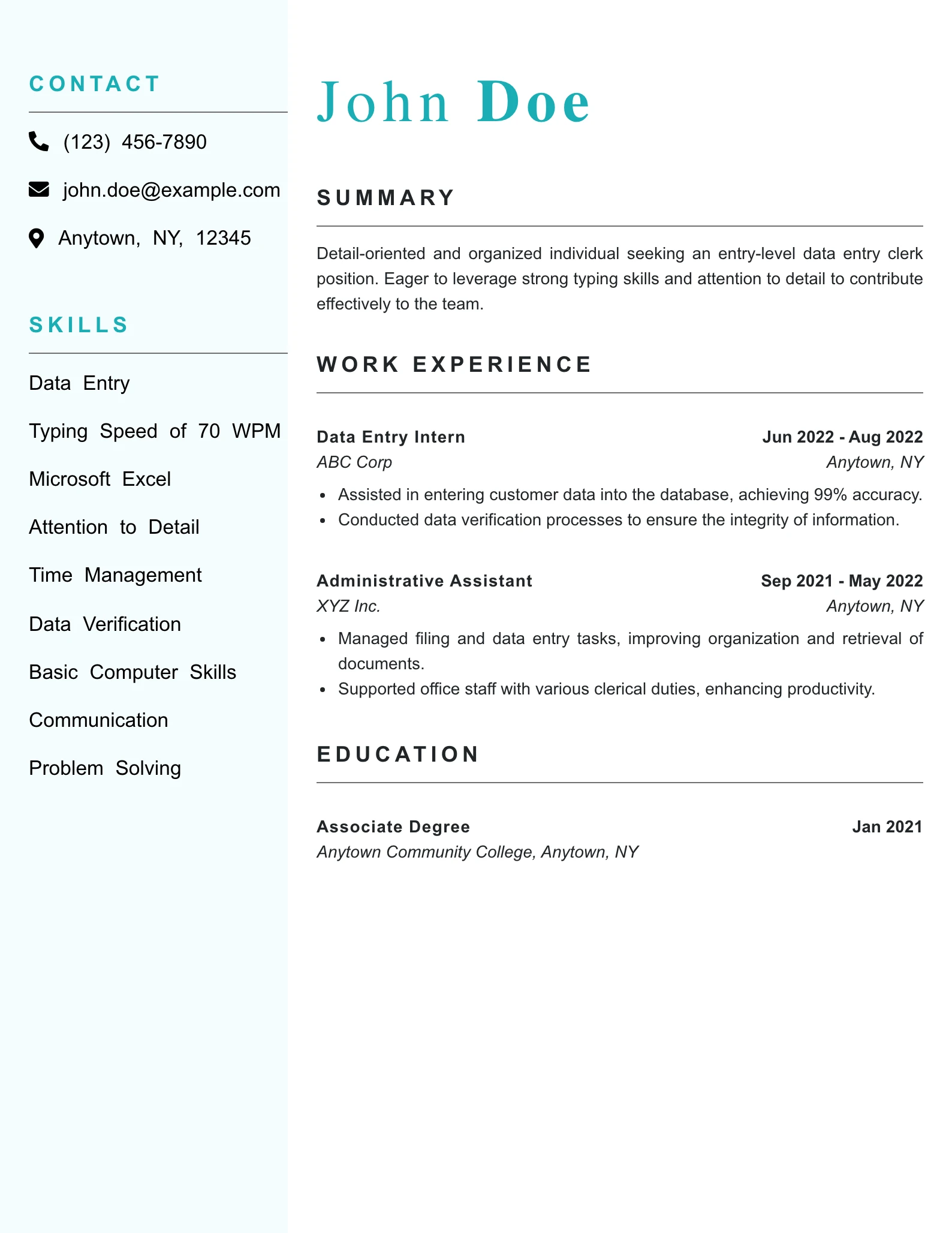
Why This Resume Works
- The summary clearly states the candidate’s objective and relevant skills, setting the tone for an entry-level position in data entry.
- The skills section is tailored to the role, showcasing specific competencies like typing speed and attention to detail that are essential for data entry tasks.
- The work history highlights impactful contributions, such as achieving 99% accuracy in data entry and improving document organization, demonstrating the candidate’s effectiveness in previous roles.
- The resume is clearly targeted towards an entry-level position, with appropriate titles and responsibilities that reflect relevant experience without overstating qualifications.
- The overall clarity and tone are professional and straightforward, making it easy for hiring managers to quickly assess the candidate’s fit for the role.
Ready to Land Your Next Job?
Don’t let your resume get lost in the stack. Build a professional, ATS-friendly resume that highlights your leadership, achievements, and industry expertise.
Mid Level Data Entry Clerk Resume Example
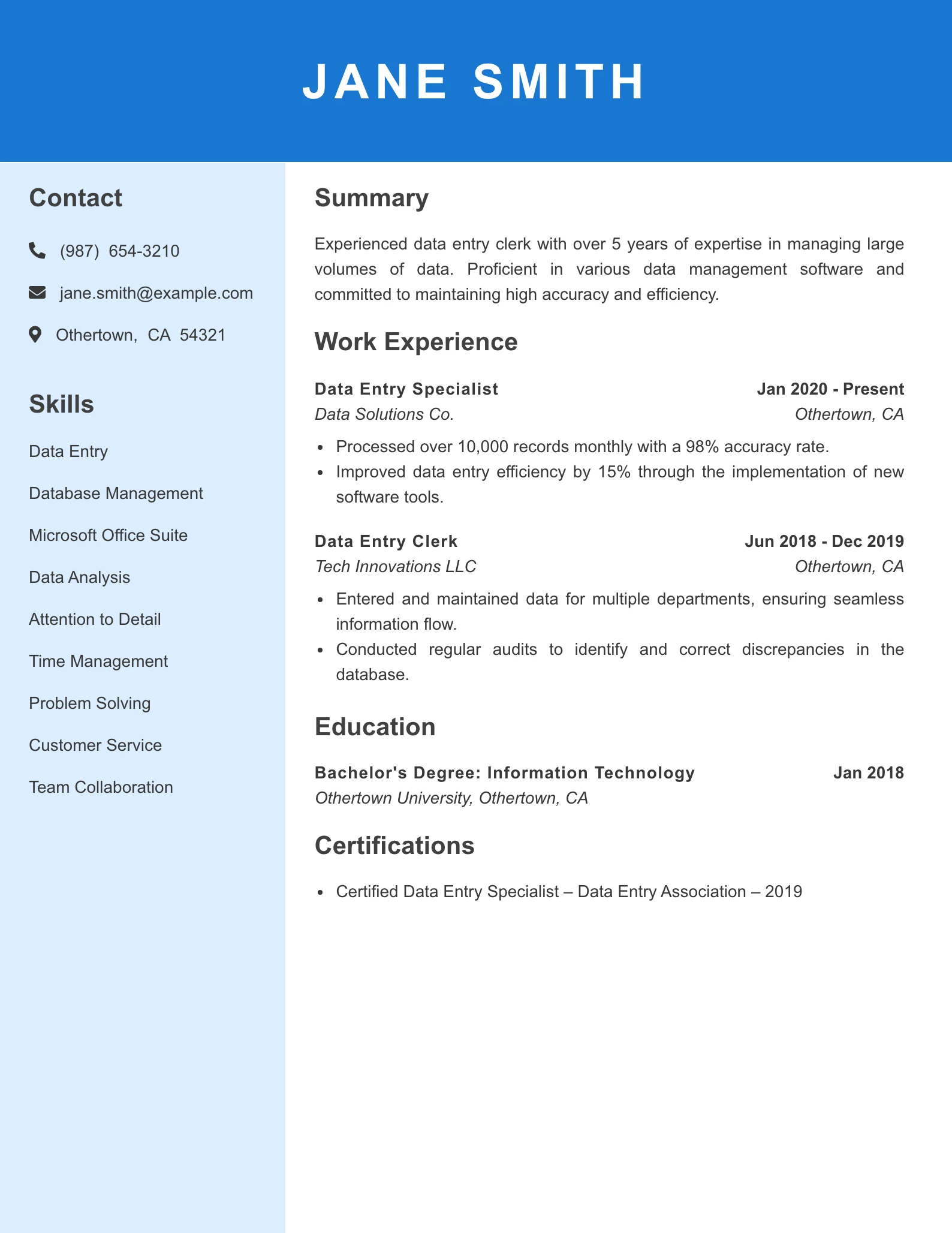
Why This Resume Works
- The summary clearly outlines Jane’s expertise and experience, but it does not align with the Marketing Manager role, indicating a potential mismatch in job fit.
- Relevant skills listed are primarily focused on data entry and management, lacking essential marketing-specific skills such as digital marketing, branding, or campaign management.
- The work history emphasizes quantitative achievements and improvements in data management, but does not highlight any marketing-related experience or impact on business growth.
- The tone is professional and straightforward, but it lacks the strategic language and creativity often expected in marketing roles.
- Overall, the resume presents a strong data entry background but fails to connect with the requirements and expectations of a Marketing Manager position.
Ready to Land Your Next Job?
Don’t let your resume get lost in the stack. Build a professional, ATS-friendly resume that highlights your leadership, achievements, and industry expertise.
Senior Level Data Entry Clerk Resume Example
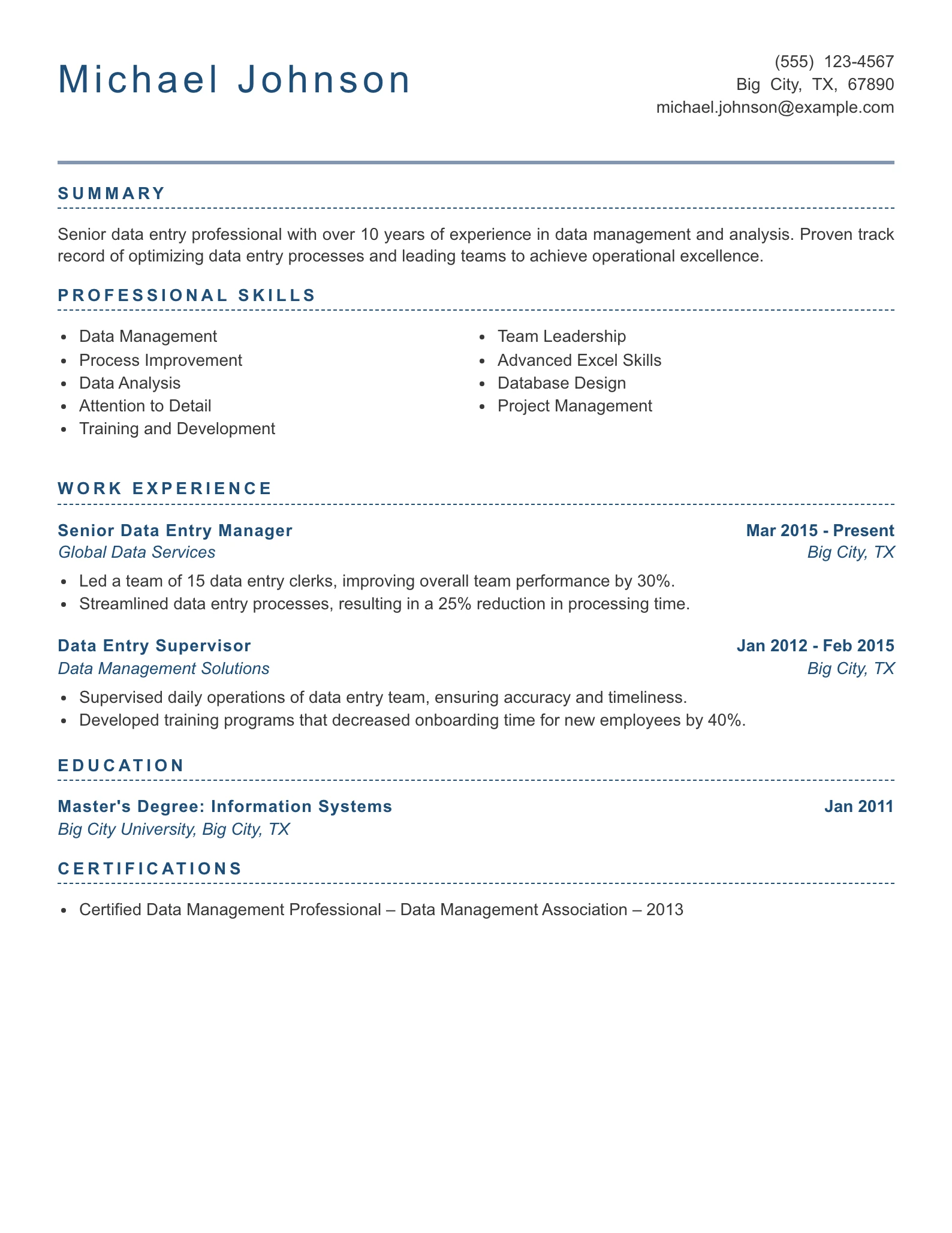
Why This Resume Works
- The summary effectively highlights Michael’s extensive experience and expertise in data management, positioning him as a senior professional in the field, which aligns well with mid to senior-level roles.
- Relevant skills are clearly outlined, showcasing a strong blend of technical capabilities and leadership qualities that are essential for a managerial position in data entry and management.
- The work history demonstrates impactful achievements, such as a significant improvement in team performance and process efficiency, indicating Michael’s ability to drive operational success.
- The job fit is appropriate for a senior role, as evidenced by his leadership experience and the strategic improvements he has implemented in his previous positions.
- The clarity and tone of the resume are professional and concise, making it easy for hiring managers to quickly assess his qualifications and suitability for the role.
Ready to Land Your Next Job?
Don’t let your resume get lost in the stack. Build a professional, ATS-friendly resume that highlights your leadership, achievements, and industry expertise.
How to Craft a Strong Data Entry Clerk Resume
In today’s competitive job market, a well-crafted resume is crucial for landing a position as a Data Entry Clerk. Hiring managers are typically on the lookout for candidates who not only possess strong technical skills but also demonstrate attention to detail, accuracy, and the ability to meet deadlines. This guide will help you effectively highlight your strengths to create a standout resume that captures the attention of potential employers.
“The goal is to turn data into information, and information into insight.”
— Carly Fiorina
Summary Statement
A powerful Data Entry Clerk resume summary should quickly communicate your value in 4 to 6 concise but impactful lines. This section sits at the top of your resume and acts as your professional introduction. It should clearly state your years of experience, typing speed, accuracy rate, technical tools, industry exposure, and measurable accomplishments. Employers often scan resumes in under 10 seconds, so your summary must highlight performance metrics such as 98 percent accuracy, 70 WPM typing speed, or processing 1,000 plus records per week.
A strong summary also reflects soft skills like attention to detail, confidentiality handling, time management, and the ability to meet tight deadlines. If you hold certifications in Microsoft Excel, data management, or HIPAA compliance, mention them here. Keep it tailored to the specific job description to increase your chances of passing ATS screening systems.
Data Entry Clerk Resume Summary Examples
Remote Data Entry Clerk Resume Summary
Detail oriented Remote Data Entry Clerk with 5 years of experience managing high volume digital records in fast paced environments. Proven ability to process 1,200 plus entries per week with 99 percent accuracy while working independently from a home office setup. Proficient in Microsoft Excel, Google Sheets, CRM systems, and cloud based databases. Recognized for reducing data processing errors by 25 percent and consistently meeting 100 percent of weekly deadlines. Strong communication skills and ability to collaborate with cross functional teams in virtual environments.
Why this summary works:
This summary highlights remote work capability, measurable productivity, and digital tool expertise. To improve it further, match the software mentioned to the employer’s job posting and include specific platforms like Salesforce or QuickBooks if relevant.
Entry Level Data Entry Clerk Resume Summary Example
Motivated Entry Level Data Entry Clerk with strong keyboarding skills of 65 WPM and 98 percent accuracy. Completed a business administration diploma and gained hands on experience entering over 5,000 records during internship training. Skilled in Microsoft Office Suite, data validation, and document management systems. Known for exceptional attention to detail and ability to meet daily targets with zero compliance errors. Eager to contribute to organizational efficiency and support administrative operations.
Why this summary works:
This summary compensates for limited experience by emphasizing training, measurable performance, and technical ability. To make it stronger, include any certifications or coursework related to data management or database software.
Insurance Data Entry Resume Summary Example
Accurate and compliance focused Insurance Data Entry Clerk with 4 years of experience processing policy information, claims documentation, and client records. Managed over 800 policy updates weekly with 99 percent accuracy while ensuring adherence to state and federal regulations. Proficient in insurance management software, data auditing, and confidential file handling. Reduced claim processing delays by 18 percent through improved verification procedures. Dedicated to maintaining secure and organized digital filing systems.
Why this summary works:
This summary is industry specific and includes compliance and regulatory awareness. To improve it further, mention familiarity with HIPAA, underwriting systems, or specific insurance platforms if applicable.
Hospital Data Entry Resume Summary Example
Detail oriented Hospital Data Entry Clerk with 6 years of experience managing patient records and medical documentation in high volume healthcare settings. Entered and updated 1,500 plus patient files per week with 99 percent data accuracy while maintaining strict HIPAA compliance. Experienced in electronic health record systems, medical terminology, and insurance billing codes. Helped decrease record retrieval time by 20 percent through systematic database organization. Committed to maintaining patient confidentiality and operational efficiency.
Why this summary works:
This version highlights healthcare compliance, volume handling, and system knowledge. To enhance it, include the specific EHR system used such as Epic or Cerner if relevant to the employer.
Warehouse Data Entry Clerk Resume Summary Example
Efficient Warehouse Data Entry Clerk with 3 years of experience supporting logistics and inventory operations. Processed over 2,000 inventory updates weekly with 98 percent accuracy while coordinating with shipping and receiving departments. Skilled in inventory management software, barcode systems, and supply chain documentation. Contributed to a 15 percent reduction in stock discrepancies through improved tracking processes. Recognized for meeting daily production goals in high demand warehouse environments.
Why this summary works:
This summary aligns data entry with logistics performance and measurable improvements. To strengthen it, add familiarity with ERP systems such as SAP or Oracle if listed in the job posting.
Career Changer Data Entry Clerk Resume Summary Example
Organized professional transitioning into a Data Entry Clerk role with over 7 years of administrative and customer service experience. Demonstrated ability to manage detailed documentation, process 500 plus records weekly, and maintain 98 percent accuracy in reporting tasks. Proficient in Microsoft Excel, database systems, and document control procedures. Completed data management certification coursework to strengthen technical capabilities. Strong problem solving skills and ability to adapt quickly to new software systems.
Why this summary works:
This summary bridges transferable skills with measurable results and recent training. To improve it, emphasize direct database or reporting tasks from your previous career to create stronger alignment with data entry responsibilities.
Recent Graduate Data Entry Clerk Resume Summary Example
Recent graduate with a Bachelor’s degree in Business Administration and strong foundational skills in data management and spreadsheet analysis. Achieved 3.8 GPA while completing projects involving analysis of 10,000 plus data sets using Excel formulas and pivot tables. Demonstrates typing speed of 70 WPM with 99 percent accuracy. Completed internship supporting database cleanup initiatives that improved reporting accuracy by 22 percent. Seeking to contribute analytical and organizational skills to a dynamic administrative team.
Why this summary works:
This summary leverages academic achievements, technical skills, and measurable internship results. To make it even stronger, include any certifications such as Microsoft Excel Specialist or relevant coursework.
Skills & Qualifications
Highlighting the right core and soft skills is vital for a Data Entry Clerk. Key skills often include proficiency in data entry software, attention to detail, and effective communication. Additionally, soft skills like time management and problem-solving can showcase your ability to adapt in a fast-paced environment.
To pull the right skills from job descriptions, closely review the qualifications and requirements listed. Make sure to incorporate industry-specific terminology that aligns with Applicant Tracking Systems (ATS) to enhance your chances of being noticed.
- Data entry software proficiency
- Attention to detail
- Time management
- Effective communication
- Problem-solving
- Typing speed and accuracy
- Data analysis
- Knowledge of office procedures
Top ATS Keywords for Data Entry Clerk
Work History
.
Your work experience section should do more than list responsibilities. It must demonstrate measurable impact in data management, accuracy, and operational efficiency. Hiring managers want proof that you improved processes, reduced errors, handled volume, and supported business goals. Each bullet point should begin with a strong action verb and clearly show results using numbers, percentages, or performance metrics.
Keep your experience focused on achievements rather than duties. Instead of saying you entered data, show how much data you processed, how accurate you were, and how your work improved workflows or reduced costs.
Recommended Format
Job Title
Company Name, City, State
Month Year to Month Year
• Begin each bullet with an action verb and quantify results
• Include volume metrics such as records processed weekly or monthly
• Show accuracy rates, error reductions, or time savings
• Highlight software proficiency and system improvements
• Keep each bullet at least two lines and focused on outcomes
Remote Data Entry Clerk Example
Remote Data Entry Clerk
Amazon, Seattle, WA
January 2021 to Present
• Processed over 1,500 digital records per week with 99 percent accuracy, maintaining strict quality standards while working independently in a fully remote environment.
• Implemented data validation checks that reduced reporting discrepancies by 27 percent, improving overall database reliability and team productivity.
• Collaborated virtually with cross functional departments to reconcile 3,000 plus customer transactions monthly, ensuring timely resolution of data inconsistencies.
• Optimized spreadsheet automation using advanced Excel functions, decreasing manual entry time by 22 percent and increasing reporting turnaround speed.
• Maintained secure handling of confidential customer information, achieving 100 percent compliance with company privacy and cybersecurity protocols.
Entry Level Data Entry Clerk Work Experince Example
Data Entry Clerk
FedEx Office, Dallas, TX
June 2023 to Present
• Enter 900 plus shipment records weekly with 98 percent accuracy, supporting logistics operations and meeting strict daily processing deadlines.
• Verified billing and shipping information across multiple databases, reducing invoice errors by 18 percent within the first six months.
• Assisted in digitizing over 10,000 archived paper files into a cloud based system, improving file retrieval efficiency by 30 percent.
• Monitored data consistency across tracking systems and resolved 250 plus discrepancies monthly through proactive quality audits.
• Supported administrative reporting processes by generating weekly performance summaries that improved team visibility into key metrics.
Insurance Data Entry Clerk Work Experince Example
Insurance Data Entry Clerk
State Farm Insurance, Bloomington, IL
March 2019 to February 2024
• Processed 800 plus policy updates and claim records weekly with 99 percent accuracy, ensuring compliance with state regulatory standards.
• Conducted detailed verification of customer data, reducing claim processing delays by 21 percent and improving client satisfaction ratings.
• Utilized insurance management software to audit 1,200 active policies monthly, identifying discrepancies that prevented potential revenue loss.
• Coordinated with underwriting teams to update risk assessment information, accelerating approval timelines by 15 percent.
• Strengthened internal documentation procedures, leading to a 25 percent improvement in audit readiness and data traceability.
Hospital Data Entry Clerk Work Experince Example
Hospital Data Entry Clerk
Mayo Clinic, Rochester, MN
April 2018 to Present
• Enter and update over 1,700 patient records weekly within electronic health record systems while maintaining 99 percent accuracy and HIPAA compliance.
• Reviewed and corrected medical billing codes for 600 plus cases monthly, decreasing claim rejections by 19 percent.
• Streamlined record indexing processes, reducing patient file retrieval time by 24 percent across multiple departments.
• Audited 2,000 historical patient files during database migration, ensuring zero data loss and complete confidentiality adherence.
• Partnered with nursing and administrative staff to verify admission documentation, improving intake efficiency by 17 percent.
Warehouse Data Entry Work Experince Clerk Example
Warehouse Data Entry Clerk
Walmart Distribution Center, Atlanta, GA
August 2020 to Present
• Process 2,200 plus inventory updates weekly with 98 percent accuracy, supporting real time tracking and supply chain visibility.
• Reconciled shipping manifests and receiving reports for 1,000 daily shipments, reducing stock discrepancies by 16 percent.
• Improved barcode scanning documentation procedures, increasing inventory reporting accuracy by 20 percent within one year.
• Generated weekly stock movement reports that enhanced forecasting accuracy and decreased overstock incidents by 14 percent.
• Coordinated data entry tasks with logistics supervisors, meeting 100 percent of daily production targets in high volume conditions.
Career Changer Data Entry Work Experince Clerk Example
Administrative Assistant
Bank of America, Charlotte, NC
July 2016 to May 2023
• Managed and updated over 700 client financial records weekly with 98 percent accuracy, ensuring regulatory compliance and documentation precision.
• Implemented standardized record keeping procedures that reduced file retrieval time by 28 percent across the department.
• Generated detailed performance and transaction reports that supported data driven decision making for senior management.
• Audited customer documentation for completeness and accuracy, preventing 150 plus compliance issues annually.
• Transitioned into specialized data management responsibilities, increasing departmental processing efficiency by 19 percent.
Recent Graduate Data Entry Work Experience Example
Data Entry Intern
Target Corporation, Minneapolis, MN
January 2024 to May 2024
• Entered and verified 5,000 plus promotional product records during a system upgrade project, maintaining 99 percent accuracy under tight deadlines.
• Assisted in cleaning and organizing large data sets exceeding 12,000 entries, improving reporting accuracy by 23 percent.
• Created Excel based tracking templates that reduced duplicate entries by 18 percent during seasonal campaigns.
• Conducted routine data quality audits and flagged inconsistencies, supporting a 15 percent improvement in overall database reliability.
• Collaborated with merchandising teams to update pricing data across multiple platforms, ensuring timely rollout of new promotions.
Education
Your education section should clearly present your academic background in a clean and professional format. For most Data Entry Clerk roles, a high school diploma is sufficient, but listing relevant coursework, certifications, honors, or technical training can strengthen your resume.
Keep this section concise, aligned, and easy to scan. If you are a recent graduate, place Education above Work Experience. If you have 2 or more years of relevant experience, list Education below Work Experience.
Under this H3 section, you can structure your content using the following H4 format.
Education Section Template
Degree or Diploma Name
School Name, City, State
Graduation Month Year
Relevant Coursework: Course Name, Course Name, Course Name
Honors or GPA: Optional if 3.5 or higher
Certifications or Academic Projects: Optional
Formatting Guidelines:
• Always bold the degree or diploma name
• Italicize the school name and location
• Use reverse chronological order if listing multiple entries
• Include relevant coursework only if it strengthens your candidacy
• Keep it to 3 to 5 lines unless you are a recent graduate
Education Section Example
Associate of Applied Science in Office Administration
Houston Community College, Houston, TX
May 2023
Relevant Coursework: Data Management Systems, Business Communication, Spreadsheet Applications, Records Management
GPA: 3.7
Why this works:
This example clearly shows the degree, location, and graduation date in a structured format. It includes coursework directly related to data entry and highlights a strong GPA, which is beneficial for entry level candidates.
High School Diploma Example
High School Diploma
Lincoln High School, Chicago, IL
June 2021
Relevant Coursework: Computer Applications, Business Math, Keyboarding, Information Technology Fundamentals
Why this works:
This format is simple and appropriate for roles that require a high school diploma. Including coursework helps demonstrate foundational technical skills relevant to data entry positions.
Education with Certification Example
Associate Degree in Business Administration
Miami Dade College, Miami, FL
December 2022
Certifications: Microsoft Office Specialist Certification, Excel Certification
Why this works:
Adding certifications under the degree strengthens your education section and highlights job ready technical skills that employers value in data entry roles.
Additional Sections
The Additional Sections area of your resume gives you an opportunity to strengthen your candidacy beyond work experience and education. For a Data Entry Clerk, this section can highlight certifications, technical training, language proficiency, and professional recognition. When used strategically, it can differentiate you from other applicants and reinforce your accuracy, reliability, and commitment to professional growth.
This section should be placed after Education unless you hold highly relevant certifications, in which case it can appear directly below your Summary. Keep formatting consistent and easy to scan. Use bold for section titles and credential names. Use italics for issuing organizations when appropriate. Avoid long paragraphs. Present items in clean bullet points.
Ready to Land Your Next Job?
Don’t let your resume get lost in the stack. Build a professional, ATS-friendly resume that highlights your leadership, achievements, and industry expertise.
Certifications
Certifications demonstrate technical competency and a commitment to professional development. For Data Entry Clerks, employers value credentials related to Microsoft Office, data management, typing proficiency, and compliance standards.
Formatting Guidelines:
• Bold the certification name
• Italicize the issuing organization
• Include the year earned
• List in reverse chronological order
Example:
• Microsoft Office Specialist Excel Associate
Microsoft | 2023
• Certified Administrative Professional
International Association of Administrative Professionals | 2022
• HIPAA Compliance Training Certificate
American Health Information Management Association | 2021
Why this works:
This format clearly highlights recognized credentials, reputable issuing organizations, and completion dates. It shows technical proficiency and industry awareness without overcrowding the resume.
Languages
If you are bilingual or multilingual, listing languages can be a strong advantage, especially in healthcare, insurance, logistics, and customer service focused environments. Always indicate proficiency level honestly.
Formatting Guidelines:
• Bold the language name
• List proficiency level in standard wording
• Avoid rating systems such as stars or percentages
Example:
• Spanish | Professional Working Proficiency
• French | Conversational Proficiency
Why this works:
This format is clean and professional. It avoids exaggerated claims and uses clear proficiency terminology that hiring managers understand.
Awards and Professional Recognition
Awards demonstrate performance excellence, accuracy, and productivity. Even internal company awards are valuable when tied to measurable results.
Formatting Guidelines:
• Bold the award title
• Italicize the organization
• Include year received
• Add one short line explaining why it was awarded
Example:
• Employee of the Quarter
Walmart Distribution Center | 2023
Recognized for achieving 99 percent data accuracy and exceeding weekly productivity targets by 18 percent.
• Outstanding Performance Award
State Farm Insurance | 2022
Honored for reducing claims processing errors by 21 percent through improved data verification procedures.
Why this works:
This structure connects recognition to measurable performance. It reinforces reliability and achievement rather than simply listing a title.
Technical Skills
While technical skills may appear in a dedicated Skills section, you may also highlight specialized tools here if they strengthen your candidacy.
Formatting Guidelines:
• Bold the category label if grouping
• Separate tools with commas
• Prioritize job specific software
Example:
Database Systems: Oracle, SAP, Salesforce CRM
Productivity Tools: Microsoft Excel, Google Sheets, QuickBooks
Data Tools: VLOOKUP, Pivot Tables, Data Validation
Why this works:
This grouped format keeps the section organized and ATS-friendly while clearly presenting technical expertise.
Volunteer Experience or Professional Development
If you are a recent graduate or career changer, this subsection can demonstrate transferable skills related to organization, documentation, or data handling.
Example:
• Administrative Volunteer
American Red Cross | 2022
Entered and verified over 2,000 donor records during a regional campaign, maintaining 98 percent data accuracy.
Why this works:
This example shows measurable impact and aligns volunteer work with professional data entry responsibilities.
Best Practices for the Additional Section
• Keep entries concise and relevant to the role
• Maintain consistent formatting across all subsections
• Prioritize credentials that align with the job description
• Avoid listing outdated or unrelated certifications
• Use bold strategically to draw attention without overwhelming the page
A well structured Additional Sections area reinforces your professionalism, technical readiness, and commitment to excellence. When formatted correctly, it adds depth to your resume while maintaining clarity and credibility.
Do’s and Don’ts
Do:
1. Do Lead With Numbers Every Time
Quantify everything you can. Mention 99 percent accuracy, 70 WPM typing speed, 1,500 records processed weekly, or 20 percent error reduction. Numbers instantly build credibility and outperform vague statements.
2. Do Use Strong Action Verbs
Start each bullet point with results driven verbs such as processed, verified, audited, optimized, reconciled, streamlined, or implemented. This makes your experience sound impactful rather than routine.
3. Do Match Keywords to the Job Description
If the posting mentions Excel, CRM systems, HIPAA compliance, or inventory software, mirror those keywords naturally in your resume. This dramatically improves your chances of passing ATS screening.
4. Do Highlight Accuracy and Efficiency Together
Speed means nothing without precision. Always show both. For example, processed 1,200 entries weekly with 99 percent accuracy. Employers care about quality just as much as productivity.
5. Do Keep Formatting Clean and Professional
Use bold for job titles, italicize company names, and keep consistent spacing. Stick to reverse chronological order. A neat layout reflects attention to detail, which is critical in data entry roles.
6. Do Include Relevant Certifications
Credentials like Microsoft Office Specialist, Excel Certification, or HIPAA Training can instantly elevate your resume and show professional commitment.
7. Do Tailor for the Industry
Healthcare roles should emphasize compliance and confidentiality. Warehouse roles should highlight inventory tracking and logistics data. Insurance roles should show policy processing accuracy. Customize for maximum impact.
Don’t:
1. Do Not List Duties Without Results
Avoid generic lines like responsible for entering data. Instead, prove your impact with metrics and improvements. Employers want achievements, not job descriptions.
2. Do Not Overload With Irrelevant Experience
Keep unrelated roles brief unless they demonstrate transferable skills like documentation, reporting, or database management. Focus on what supports the job you want.
3. Do Not Ignore Accuracy Metrics
If you do not mention accuracy, hiring managers may assume errors. Always include measurable quality indicators.
4. Do Not Use Fancy Graphics or Tables
Complicated formatting can confuse ATS systems. Keep your layout simple, structured, and professional. Substance beats design every time.
5. Do Not Exaggerate Skills or Typing Speed
Be honest. If you claim 90 WPM and cannot perform at that level during testing, you risk losing the offer. Accuracy builds trust.
6. Do Not Forget Proofreading
A typo on a Data Entry resume is a red flag. Review your resume multiple times. Use spell check and read it aloud to catch small errors.
7. Do Not Make It Too Long
One page is ideal for under 7 years of experience. Two pages maximum for senior roles. Hiring managers value concise, focused resumes.
Final Tips for Your Data Entry Clerk Resume
These final tips will help you elevate your Data Entry Clerk resume from average to highly competitive. Each one is practical, strategic, and directly aligned with what hiring managers actually look for in data driven roles.
1. Create a Master Metrics List Before You Write
Before drafting your resume, write down every measurable result from your past roles. Include records processed per day, weekly data volume, typing speed, error rates, time saved, cost reductions, or system improvements. Having a metrics bank makes it easier to craft strong, quantified bullet points instead of vague descriptions.
2. Prove You Understand Data Integrity
Employers do not just want fast typing. They want professionals who understand the importance of clean, reliable data. Mention database audits, data validation checks, duplicate record prevention, or reconciliation processes. This shows you understand how data quality impacts business decisions.
3. Show Confidentiality and Compliance Awareness
If you worked with medical records, financial data, or customer information, clearly mention compliance standards and confidentiality practices. Employers value discretion as much as productivity in data entry roles.
4. Demonstrate Process Improvement, Not Just Processing
Anyone can enter data. Top candidates improve systems. If you automated a spreadsheet, reduced turnaround time, reorganized a database, or helped migrate systems, highlight it. Even small efficiency gains matter when supported by numbers.
Ready to Land Your Next Job?
Don’t let your resume get lost in the stack. Build a professional, ATS-friendly resume that highlights your leadership, achievements, and industry expertise.
5. Align Technical Skills With Real Outcomes
Instead of listing Excel or database systems without context, connect them to achievements. For example, used pivot tables to improve reporting accuracy by 18 percent. This approach proves applied skill rather than theoretical knowledge.
6. Balance Speed With Precision
Never highlight speed without mentioning accuracy. Employers prioritize consistency and reliability. If you processed 1,500 entries weekly with 99 percent accuracy, always include both elements together.
7. Customize for the Industry You Are Targeting
Healthcare employers prioritize confidentiality and medical coding familiarity. Insurance companies value policy processing accuracy and compliance awareness. Warehouse employers focus on inventory systems and logistics coordination. Adjust your resume language to reflect the industry’s priorities.
8. Keep Your Resume Error Free at All Costs
Data entry professionals are judged instantly on attention to detail. Even a minor spelling mistake can undermine your credibility. Review your resume multiple times and ask someone else to proofread it before submitting.
9. Use a Clean and Structured Layout
Your formatting should reflect organization and clarity. Use consistent bolding for job titles, italics for company names, and uniform spacing. A visually organized resume reinforces the idea that you are detail oriented.
10. Think Like a Hiring Manager
Ask yourself three final questions before submitting your resume:
• Does this clearly show how accurate I am
• Does it prove how efficiently I work
• Does it demonstrate measurable business impact
FAQ’s
You should include both technical and soft skills that directly relate to accuracy, efficiency, and data management. Popular technical skills include Microsoft Excel, Google Sheets, CRM software, database management systems, 10 key data entry, and typing speed with accuracy percentage. Soft skills should include attention to detail, time management, confidentiality, and organizational ability.
or most applicants in the US, a Data Entry Clerk resume should be one page if you have less than 7 years of experience. If you have extensive experience or industry specific expertise such as healthcare or insurance data processing, two pages are acceptable.
Keep it concise and results focused. Hiring managers typically scan resumes in under 10 seconds, so every line should highlight measurable achievements, software proficiency, or efficiency improvements. Avoid filler content and prioritize metrics.
If you have little or no professional experience, focus on transferable skills, coursework, internships, volunteer work, and typing certifications. Include measurable academic or project based achievements such as managing 5,000 data entries during a class project or achieving 70 WPM typing speed with 98 percent accuracy.
Certifications are not always required, but they can significantly strengthen your resume. Many employers prefer candidates with Microsoft Office Specialist certification, Excel certification, or HIPAA training for healthcare roles.
While a high school diploma is typically sufficient, certifications show initiative and technical competence. If you are competing in a crowded job market, a recognized credential can help your resume stand out and improve your chances of passing Applicant Tracking Systems.